DVPP + AIPP 加速数据预处理
摘要 本文介绍了基于华为昇腾Atlas800T A2服务的YOLOv8目标检测推理任务优化方案,重点阐述了如何通过DVPP和AIPP模块协同加速数据预处理流程。方案将原8步CPU预处理操作合理分配到三个环节:DVPP负责大尺寸图像缩放(12000→4096)和内存连续性处理;AIPP完成色彩空间转换(BGR→RGB)、维度转换(BHWC→BCHW)、数据类型转换(uint8→fp16/32)和归一
·
DVPP + AIPP 加速数据预处理
背景:基于华为昇腾Atlas800T A2服务实现目标检测推理任务,要求使用ACL加载OM实现,数据预处理使用DVPP模块以加速预处理时间。
yolov8 原生推理接口主要包含以下预处理操作
- resize(1200012000 -> 40964096) #实际业务场景需要添加一层resize操作
- BGR→RGB 通道转换
- BHWC→BCHW 维度转换
- 转为连续内存数组
- 转换为 PyTorch Tensor
- 移动到指定设备(CPU/CUDA)
- uint8→fp16/32 类型转换
- 像素值归一化 (0-255 → 0.0-1.0)
下面给出完整的预处理方案,将 8 个步骤合理分配到 DVPP、AIPP 和 OM 推理三个环节
预处理步骤分工对照
| # | 原始步骤 (CPU/OpenCV) | 迁移至 | 说明 |
|---|---|---|---|
| 1 | Resize 12000→4096 | DVPP | 硬件缩放,零 CPU 开销 |
| 2 | BGR→RGB | AIPP | CSC 色域转换覆盖 |
| 3 | BHWC→BCHW | AIPP | input_format 自动完成 |
| 4 | 连续内存 | DVPP | 输出本身连续 |
| 5 | → PyTorch Tensor | 消除 | OM 推理不需要 |
| 6 | 移动到设备 | 消除 | 全程 Device 内存 |
| 7 | uint8→fp16/32 | AIPP | 隐式类型提升 |
| 8 | /255 归一化 | AIPP | var_reci_chn=1/255 |
- AIPP 配置文件
aipp.cfg
aipp_op {
    aipp_mode : static
    related_input_rank : 0
    # ---- 输入描述(对接 DVPP Resize 的输出)----
    input_format : YUV420SP_U8        # DVPP 解码/缩放 的标准输出格式
    src_image_size_w : 4096
    src_image_size_h : 4096

    # ---- ② BGR→RGB:YUV→RGB CSC 直接输出 RGB 通道序 ----
    csc_switch : true
    rbuv_swap_switch : false          # 输出 RGB;若模型需要 BGR 则设 true
    # BT.601 标准转换矩阵
    matrix_r0c0 : 298
    matrix_r0c1 : 0
    matrix_r0c2 : 409
    matrix_r1c0 : 298
    matrix_r1c1 : -100
    matrix_r1c2 : -208
    matrix_r2c0 : 298
    matrix_r2c1 : 516
    matrix_r2c2 : 0
    input_bias_0 : 16
    input_bias_1 : 128
    input_bias_2 : 128
    # ---- ⑧ 归一化:(x - 0) × (1/255) → [0.0, 1.0] ----
    min_chn_0 : 0
    min_chn_1 : 0
    min_chn_2 : 0
    var_reci_chn_0 : 0.00392157      # 1/255
    var_reci_chn_1 : 0.00392157
    var_reci_chn_2 : 0.00392157
}
AIPP 内部流水线顺序:输入 → CSC(②) → 归一化(⑧) → 类型转换(⑦) → 输出(NCHW=③),全在 AI Core 上零拷贝执行。
- ATC 模型转换
atc --model=model.onnx
--framework=5
--output=model_aipp
--soc_version=Ascend310P3
--input_shape="input:1,3,4096,4096"
--insert_op_conf=aipp.cfg
--input_format=NCHW
- 推理代码
import acl
import numpy as np
import time

# ============ 常量 ============
DEVICE_ID = 0
MODEL_PATH = "model_aipp.om"
IMG_PATH   = "test_resized.png"       # JPEG 编码文件
RESIZE_W, RESIZE_H = 4096, 4096
ACL_MEM_MALLOC_NORMAL_ONLY = 2
ACL_MEMCPY_HOST_TO_DEVICE = 1
ACL_MEMCPY_DEVICE_TO_HOST = 2

# ============ ACL 初始化 ============
acl.init()
acl.rt.set_device(DEVICE_ID)
context, _ = acl.rt.create_context(DEVICE_ID)
stream, _  = acl.rt.create_stream()

# ============ 加载 OM 模型 ============
model_id, _ = acl.mdl.load_from_file(MODEL_PATH)
model_desc  = acl.mdl.create_desc()
acl.mdl.get_desc(model_desc, model_id)

# ----------- 准备输出 buffer -----------
output_dataset = acl.mdl.create_dataset()
for i in range(acl.mdl.get_num_outputs(model_desc)):
  out_size = acl.mdl.get_output_size_by_index(model_desc, i)
  out_buf, _ = acl.rt.malloc(out_size, ACL_MEM_MALLOC_NORMAL_ONLY)
  out_data = acl.create_data_buffer(out_buf, out_size)
  acl.mdl.add_dataset_buffer(output_dataset, out_data)

# ============ DVPP 初始化 ============
dvpp_channel_desc = acl.media.dvpp_create_channel_desc()
acl.media.dvpp_create_channel(dvpp_channel_desc)

# ============ ① DVPP Decode:JPEG → YUV420SP ============
# 读取 JPEG 到 Device
with open(IMG_PATH, "rb") as f:
  jpeg_data = f.read()
jpeg_size = len(jpeg_data)

# 阶段1: 读取文件到设备
copy_start = time.time()
jpeg_dev, _ = acl.media.dvpp_malloc(jpeg_size)
acl.rt.memcpy(jpeg_dev, jpeg_size,
            acl.util.bytes_to_ptr(jpeg_data), jpeg_size,
            ACL_MEMCPY_HOST_TO_DEVICE)
copy_end = time.time()
copy_time = copy_end - copy_start
print(f"[阶段1] 读取文件到设备: {copy_time:.4f} 秒")

# 获取 JPEG 图片信息
W_orig, H_orig = 12000, 12000   # 已知尺寸,也可 dvpp_jpeg_get_image_info 查询
# 解码输出 buffer(YUV420SP = W*H*3/2,宽 128 对齐,高 16 对齐)
W_aligned = ((W_orig + 127) // 128) * 128
H_aligned = ((H_orig + 15) // 16) * 16
decode_size = W_aligned * H_aligned * 3 // 2
decode_dev, _ = acl.media.dvpp_malloc(decode_size)

# 配置解码输出图片描述
decode_pic = acl.media.dvpp_create_pic_desc()
acl.media.dvpp_set_pic_desc_data(decode_pic, decode_dev)
acl.media.dvpp_set_pic_desc_size(decode_pic, decode_size)
acl.media.dvpp_set_pic_desc_format(decode_pic, 1)             # 1 = YUV420SP_NV12
acl.media.dvpp_set_pic_desc_width(decode_pic, W_orig)
acl.media.dvpp_set_pic_desc_height(decode_pic, H_orig)
acl.media.dvpp_set_pic_desc_width_stride(decode_pic, W_aligned)
acl.media.dvpp_set_pic_desc_height_stride(decode_pic, H_aligned)

acl.media.dvpp_jpeg_decode_async(dvpp_channel_desc,
                                jpeg_dev, jpeg_size,
                                decode_pic, stream)
acl.rt.synchronize_stream(stream)

# ============ ① DVPP Resize:12000×12000 → 4096×4096 ============
RW_aligned = ((RESIZE_W + 15) // 16) * 16   # 4096 已对齐
RH_aligned = ((RESIZE_H + 1) // 2) * 2      # 4096 已对齐
resize_size = RW_aligned * RH_aligned * 3 // 2
resize_dev, _ = acl.media.dvpp_malloc(resize_size)

resize_input = decode_pic   # 复用解码输出描述

resize_output = acl.media.dvpp_create_pic_desc()
acl.media.dvpp_set_pic_desc_data(resize_output, resize_dev)
acl.media.dvpp_set_pic_desc_size(resize_output, resize_size)
acl.media.dvpp_set_pic_desc_format(resize_output, 1)
acl.media.dvpp_set_pic_desc_width(resize_output, RESIZE_W)
acl.media.dvpp_set_pic_desc_height(resize_output, RESIZE_H)
acl.media.dvpp_set_pic_desc_width_stride(resize_output, RW_aligned)
acl.media.dvpp_set_pic_desc_height_stride(resize_output, RH_aligned)

# 阶段2: DVPP resize操作
resize_cfg = acl.media.dvpp_create_resize_config()
resize_start = time.time()
acl.media.dvpp_vpc_resize_async(dvpp_channel_desc,
                               resize_input, resize_output,
                               resize_cfg, stream)
acl.rt.synchronize_stream(stream)
resize_end = time.time()
resize_time = resize_end - resize_start
print(f"[阶段2] DVPP resize: {resize_time:.4f} 秒 (从 {W_orig}×{H_orig} resize 到 {RESIZE_W}×{RESIZE_H})")

# ============ OM 推理(AIPP 自动执行 ②③⑦⑧) ============
input_dataset = acl.mdl.create_dataset()
in_data = acl.create_data_buffer(resize_dev, resize_size)
acl.mdl.add_dataset_buffer(input_dataset, in_data)

# 阶段3: OM推理
inference_start = time.time()
acl.mdl.execute(model_id, input_dataset, output_dataset)
inference_end = time.time()
inference_time = inference_end - inference_start
print(f"[阶段3] OM 推理: {inference_time:.4f} 秒 (输入大小: {RESIZE_W}×{RESIZE_H})")

# ============ 获取推理结果 ============
out_buf_ptr = acl.get_data_buffer_addr(
  acl.mdl.get_dataset_buffer(output_dataset, 0))
out_size = acl.get_data_buffer_size_v2(
  acl.mdl.get_dataset_buffer(output_dataset, 0))
out_host, _ = acl.rt.malloc_host(out_size)
acl.rt.memcpy(out_host, out_size, out_buf_ptr, out_size,
            ACL_MEMCPY_DEVICE_TO_HOST)
result = np.frombuffer(acl.util.ptr_to_bytes(out_host, out_size),
                     dtype=np.float32)
print("Inference result shape:", result.shape)

# 打印总耗时统计
print("\n" + "="*50)
print("各阶段耗时统计:")
print("="*50)
print(f"[阶段1] 读取文件到设备:   {copy_time:.4f} 秒")
print(f"[阶段2] DVPP resize:      {resize_time:.4f} 秒")
print(f"[阶段3] OM 推理:          {inference_time:.4f} 秒")
total_time = copy_time + resize_time + inference_time
print(f"总耗时:                  {total_time:.4f} 秒")
print("="*50)

# ============ 资源释放 ============
acl.media.dvpp_free(jpeg_dev)
acl.media.dvpp_free(decode_dev)
acl.media.dvpp_free(resize_dev)
acl.media.dvpp_destroy_pic_desc(decode_pic)
acl.media.dvpp_destroy_pic_desc(resize_output)
acl.media.dvpp_destroy_resize_config(resize_cfg)
acl.media.dvpp_destroy_channel(dvpp_channel_desc)
acl.media.dvpp_destroy_channel_desc(dvpp_channel_desc)
acl.mdl.unload(model_id)
acl.rt.destroy_stream(stream)
acl.rt.destroy_context(context)
acl.rt.reset_device(DEVICE_ID)
acl.finalize()
端到端数据总览
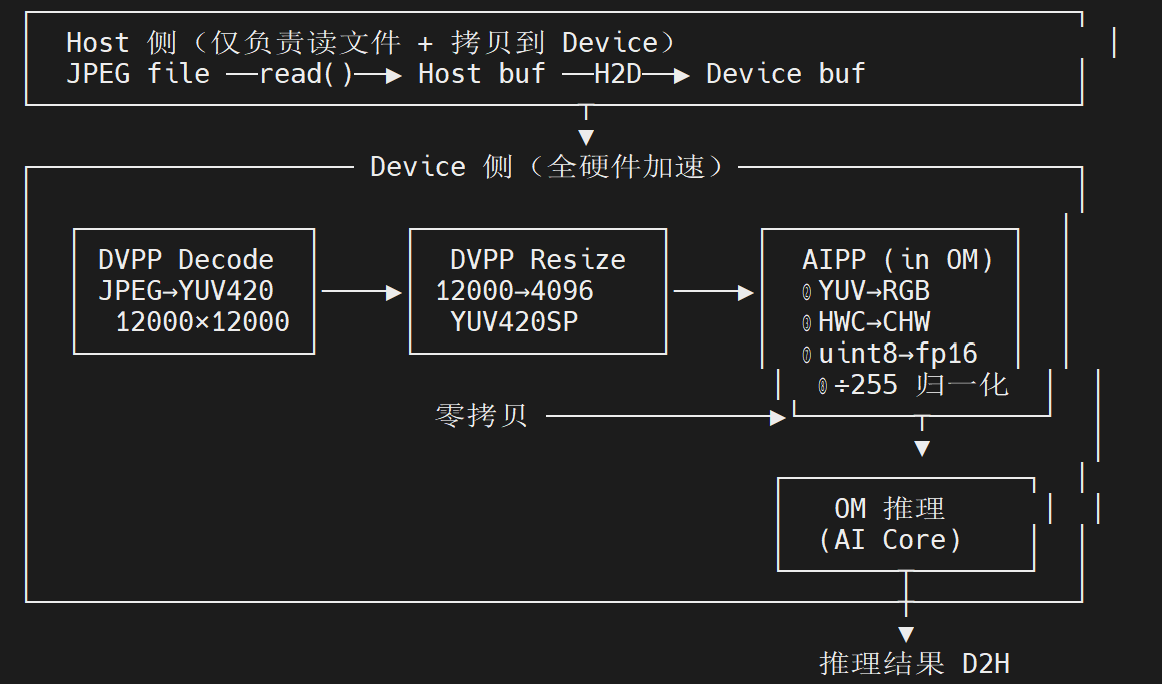
测试
300I Duo卡: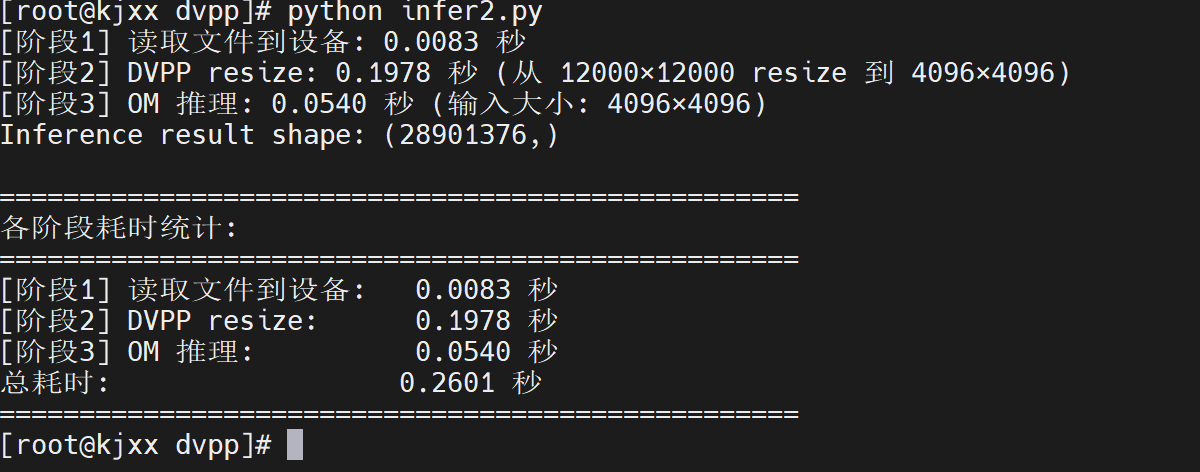
910B4卡: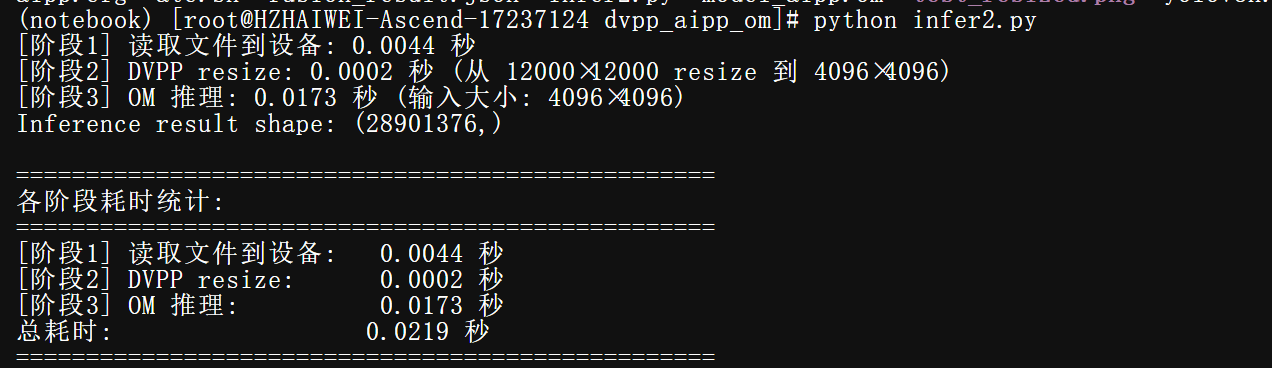

昇腾计算产业是基于昇腾系列(HUAWEI Ascend)处理器和基础软件构建的全栈 AI计算基础设施、行业应用及服务,https://devpress.csdn.net/organization/setting/general/146749包括昇腾系列处理器、系列硬件、CANN、AI计算框架、应用使能、开发工具链、管理运维工具、行业应用及服务等全产业链
更多推荐

 6
6 0
0- 0


 已为社区贡献4条内容

所有评论(0)