VeRL 强化学习场景下NPU环境profiling使用指南
本文介绍了在NPU环境下使用Profiling工具进行强化学习模型性能优化的方法。主要内容包括:1)Profiling配置的三部分结构(全局控制、角色控制和具体采集行为);2)实践案例展示E2E和离散两种采集模式;3)MindStudio Profiler Analyze工具的使用,特别是性能对比功能;4)精细化采集策略,通过schedule类参数控制采集行为。文章提供了详细的配置示例和可视化结果
作者:昇腾实战派
【强化学习】知识地图:https://blog.csdn.net/friezanmmm/article/details/156806899
背景概述
在大模型训练和推理过程中,性能优化是提升效率的关键环节。Profiling工具能够帮助我们深入理解模型在NPU上的执行细节,识别性能热点,从而进行针对性优化。
本篇文档基于verl v0.6版本,指导了在NPU环境下,如何高效使用profiling配置采集数据,及profiling的数据解析与可视化。
一、Profile配置解析
veRL 的profile配置大体分为三个部分:1. 全局采集控制;2.基于角色控制;3.具体采集行为。划分为三部分的原因是强化学习训练流程包含了:推理,训练,生成 等多个阶段,不同的阶段既有统一的配置和又有各角色单独的配置。
1.1、全局采集控制
global_profiler 配置项对所有阶段生效,主要参数包括:
- tool: 采集工具选择,支持nsys、npu、torch、torch_memory等
- steps: 指定采集的步数列表,如[2,4]表示采集第2步和第4步,设置为null则不采集
- save_path: 采集数据保存路径,默认为"outputs/profile"
配置示例:
global_profiler.tool=npu # 使用npu作为profiling采集工具
1.2、角色Profile控制
每个角色独立控制采集参数:
- enable: 是否启用该角色的性能分析
- all_ranks: 是否从所有rank收集数据
- ranks: 指定采集数据的rank列表
- tool_config: 性能分析工具的具体配置
配置示例:
actor_rollout_ref.actor.profiler.enable=True # 开启actor阶段的profiling采集
1.3、具体采集行为配置
通过profiler.tool_config.npu参数控制详细采集行为:
采集级别(level):
- level_none: 禁用所有基于级别的数据采集
- level0: 采集高级应用数据、底层NPU数据和算子执行详情(推荐默认配置)
- level1: 在level0基础上增加CANN层AscendCL数据和AI Core性能指标
- level2: 在level1基础上增加CANN层Runtime数据和AI CPU指标
采集内容(contents):
- npu: 设备端性能数据
- cpu: 主机端性能数据
- memory: 内存分析
- shapes: 张量形状记录
- module: 框架层Python调用栈信息(性能开销较低)
- stack: 算子调用栈信息
其他参数:
- analysis: 启用自动数据解析(数据量大时耗时增加)
- discrete: 离散模式开关(False为e2e模式,True为离散模式)
配置示例:
actor_rollout_ref.actor.profiler.tool_config.npu.level='level1' # 开启level1采集
二、Profiling实践案例
上一章节讲述了所有配置参数的含义,通过这些参数的组合搭配,可以构建强化学习训练各阶段的profiling采集流程。本章节提出几个基础的配置来举例。
2.1、E2E模式采集
E2E模式将所有阶段数据采集到同一文件夹下:
python3 -m verl.trainer.main_ppo \
  global_profiler.tool=npu \
  global_profiler.steps=[2] \ # 只采集step 2的数据
  global_profiler.save_path="outputs/profile" \
  actor_rollout_ref.actor.profiler.enable=True \
  actor_rollout_ref.actor.profiler.ranks=[0] \ # 只采集rank:0 卡的数据
  actor_rollout_ref.actor.profiler.tool_config.npu.level="level1" \
  actor_rollout_ref.actor.profiler.tool_config.npu.discrete=False \ # 设置为end-to-end模式,将所有阶段的数据都采集到一个文件夹下
  actor_rollout_ref.actor.profiler.tool_config.npu.contents=['npu'] \
  actor_rollout_ref.actor.profiler.tool_config.npu.analysis=True
2.2、discrete模式采集
discrete模式可精确控制采集范围,减少数据量:
python3 -m verl.trainer.main_ppo \
  global_profiler.tool=npu \
  global_profiler.steps=[2] \
  global_profiler.save_path="outputs/profile" \
  actor_rollout_ref.actor.profiler.enable=True \ #只开启训练阶段数据采集
  actor_rollout_ref.rollout.profiler.enable=False \
  actor_rollout_ref.actor.profiler.ranks=[0] \
  actor_rollout_ref.ref.profiler.enable=False \
  actor_rollout_ref.ref.profiler.ranks=[0] \
  actor_rollout_ref.actor.profiler.tool_config.npu.level="level0" \
  actor_rollout_ref.actor.profiler.tool_config.npu.discrete=True \ #设置为分离模式
  actor_rollout_ref.actor.profiler.tool_config.npu.contents=['npu'] \
  actor_rollout_ref.actor.profiler.tool_config.npu.analysis=True
使用分离模式可以更好的控制数据的采集范围,有效减少数据量,建议使用该模式。(ps若在长序列场景,完整采集推理的数据可能会有近上百G的数据量,采集之前需要评估是否需要缩小采集范围,下文会讲述如何精细化控制采集方式)
2.3、数据目录对比
e2e模式与分离模式下采集的数据目录对比:
左图为e2e模式目录结构,右图为分离模式
三、Profile数据解析工具
前两个章节讲述了如何采集profiling数据,本章节介绍一款profiling解析工具,使用工具可以更高效分析数据。
MindStudio Profiler Analyze(msprof-analyze,MindStudio性能分析工具)是MindStudio全流程工具链推出的性能分析工具,基于采集的性能数据进行分析,识别AI作业中的性能瓶颈。官网地址:https://gitcode.com/Ascend/msprof-analyze
基础的安装使用指导可见官网README,此处讲述一个实用的功能点msprof-analyze compare 性能对比工具。
msprof-analyze compare命令支持性能数据对比分析:
msprof-analyze compare -d <profiling_path> -bp <benchmark_profiling_path> --output_path=<output_path>
参数说明:
- -d: 待比对性能数据路径(支持ascend_pt/ascend_ms目录、ASCEND_PROFILER_OUTPUT目录等)
- -bp: 基准性能数据路径(支持GPU基准或NPU不同版本基准)
- -o: 比对结果输出路径(默认当前目录)
结果展示: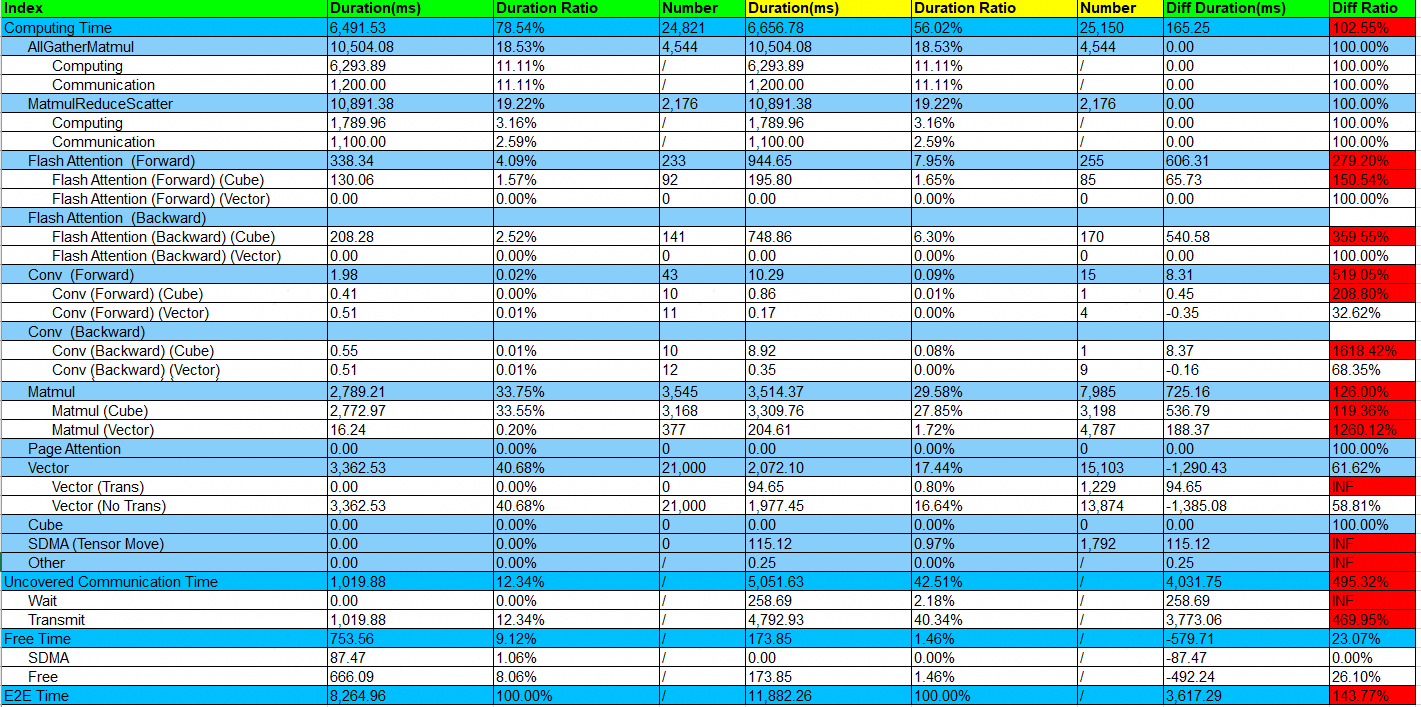
上图为官网中的样例示图,可以看到对各阶段包括计算,通信,free等耗时都统计出来了,对此可以大致分析性能的瓶颈,从而采用对应的性能优化手段。
四、精细化采集策略
上文我们提到若在长序列场景,完整采集推理的数据可能会有近上百G的数据量,这为后续解析、读取增加了工作了,而且这些数据都是Decoder 模型的前向计算,底层执行的算子是一样的。我们需要有一种方式来解决这种重复计算的流程。
在torch_npu.profiler.profile进行数据采集中,有个 schedule 类的作用为:用于在采集进程中设置在不同step时的采集行为,他有以下几个参数:
- wait: 每次重复执行采集跳过的step轮数
- active: 采集的step轮数
- warmup: 预热的step轮数(建议设置1轮)
- repeat: 重复执行wait+warmup+active的次数
- skip_first: 采集前跳过的step轮数(动态Shape场景建议跳过前10轮)
由此可以设计我们需要的profiling采集方案,以下以vllm进行举例:
在vllm-ascend/vllm_ascend/worker/worker_v1.py 文件中,新增以下代码:
class NPUWorker(WorkerBase):

        def __init__(self, *args, **kwargs):
            # ... existing code ...

+           # Initialize profiler
+           import torch_npu
+           experimental_config = torch_npu.profiler._ExperimentalConfig(
+               profiler_level=torch_npu.profiler.ProfilerLevel.Level1,
+               export_type=torch_npu.profiler.ExportType.Db,  # 可选择torch_npu.profiler.ExportType.Text格式
+           )
+           self.profiler_npu = torch_npu.profiler.profile(
+               activities=[torch_npu.profiler.ProfilerActivity.CPU, torch_npu.profiler.ProfilerActivity.NPU],
+               with_modules=False,  # 采集调用栈
+               profile_memory=False,  # 采集内存
+               experimental_config=experimental_config,
+               # 跳过第一步,warmup一步,采集3步,重复1次。如果想采集第30~60个decode step,可以设置为schedule=torch_npu.profiler.schedule(wait=29, warmup=1, active=30, repeat=1)
+               schedule=torch_npu.profiler.schedule(wait=1, warmup=1, active=3, repeat=1),
+               on_trace_ready=torch_npu.profiler.tensorboard_trace_handler("./outputs/vllm_profile", analyse_flag=True)  # 采集数据保存路径,是否在线解析
+           )
+           self.profiler_npu.start()

            # ... existing code ...

        def execute_model(self, scheduler_output=None, intermediate_tensors=None, **kwargs):
            # ... existing code ...
            output = self.model_runner.execute_model(scheduler_output,
                                                intermediate_tensors)

+           self.profiler_npu.step()  # 驱动 schedule,对部分decode step进行采集

            # ... existing code ...
💡注意:
- 当使用集群分析工具或MindStudio Insight查看时,建议配置repeat = 1(表示执行1次,仅生成一份性能数据)
- 使用代码插桩采集时,请在启动脚本中禁用profiling,以避免 Profiler 冲突。
- 本章节涉及直接修改源码。建议修改前备份文件,调试完成后恢复。
五、可视化分析工具
昇腾提供了可视化调优工具 MindStudio Insight,提供时间线视图、内存、算子耗时、通信瓶颈分析等功能,帮助开发者快速定位模型性能瓶颈。
另外在Linux环境下,MindStudio Insight工具提供了 JupyterLab插件 形态,提供更直观和交互式强的操作界面。JupyterLab插件优势如下:
- 无缝集成:支持在Jupyter环境中直接运行MindStudio Insight工具,无需切换平台,无需拷贝服务器上的数据,实现数据即采即用。
- 快速启动:通过JupyterLab的命令行或图形界面,可快速启动MindStudio Insight工具。
- 运行流畅:在Linux环境下,通过JupyterLab环境启动MindStudio Insight,相较于整包通信,有效解决了运行卡顿问题,操作体验显著提升。
- 远程访问:支持远程启动MindStudio Insight,可通过本地浏览器远程连接服务直接进行可视化分析,缓解了大模型训练或推理数据上传和下载的困难。

昇腾计算产业是基于昇腾系列(HUAWEI Ascend)处理器和基础软件构建的全栈 AI计算基础设施、行业应用及服务,https://devpress.csdn.net/organization/setting/general/146749包括昇腾系列处理器、系列硬件、CANN、AI计算框架、应用使能、开发工具链、管理运维工具、行业应用及服务等全产业链
更多推荐

 13
13 0
0- 0


 已为社区贡献2条内容

所有评论(0)