国产芯片助力大模型推理!LMDeploy+昇腾 它来了!
近日,LMDeploy 基于其强大的 PytorchEngine,增加了对华为昇腾设备的支持。这样一来,在华为昇腾上使用 LDMeploy 的方法与在英伟达 GPU 上使用 PytorchEngine 后端的方法几乎相同。因此,我们将在本期内容中为大家带来在华为昇腾设备上使用 LMDeploy 的方法。
安装
我们强烈建议用户构建一个 Docker 镜像以简化环境设置。
克隆 lmdeploy 的源代码,Dockerfile 位于 docker 目录中。
git clone https://github.com/InternLM/lmdeploy.git
cd lmdeploy
环境准备
Docker 版本应不低于 18.03。并且需按照官方指南[1]安装 Ascend Docker Runtime。
Drivers,Firmware 和 CANN
目标机器需安装华为驱动程序和固件版本 23.0.3,请参考CANN 驱动程序和固件安装[2]和下载资源[3]。
另外,docker/Dockerfile_aarch64_ascend 没有提供 CANN 安装包,用户需要自己从昇腾资源下载中心[4]下载 CANN (8.0.RC3.alpha001)软件包。并将 Ascend-cann-kernels-910b*.run 和 Ascend-cann-toolkit*-aarch64.run 放在 lmdeploy 源码根目录下。
构建镜像
请在 lmdeploy源 代码根目录下执行以下镜像构建命令,CANN 相关的安装包也放在此目录下。
DOCKER_BUILDKIT=1 docker build -t lmdeploy-aarch64-ascend:latest \
-f docker/Dockerfile_aarch64_ascend .
如果以下命令执行没有任何错误,这表明环境设置成功。
docker run -e ASCEND_VISIBLE_DEVICES=0 --rm --name lmdeploy -t lmdeploy-aarch64-ascend:latest lmdeploy check_env
关于在昇腾设备上运行docker run命令的详情,请参考这篇文档[5]。
离线批处理
LLM 推理
将device_type="ascend"加入PytorchEngineConfig的参数中。
from lmdeploy import pipeline
from lmdeploy import PytorchEngineConfig
if __name__ == "__main__":
pipe = pipeline("internlm/internlm2_5-7b-chat",
backend_config = PytorchEngineConfig(tp=1, device_type="ascend"))
question = ["Shanghai is", "Please introduce China", "How are you?"]
response = pipe(question)
print(response)
VLM 推理
将device_type="ascend"加入PytorchEngineConfig的参数中。
from lmdeploy import pipeline, PytorchEngineConfig
from lmdeploy.vl import load_image
if __name__ == "__main__":
pipe = pipeline('OpenGVLab/InternVL2-2B',
backend_config=PytorchEngineConfig(tp=1, device_type='ascend'))
image = load_image('https://raw.githubusercontent.com/open-mmlab/mmdeploy/main/tests/data/tiger.jpeg')
response = pipe(('describe this image', image))
print(response)
在线服务
LLM 模型服务
将--device ascend加入到服务启动命令中。
lmdeploy serve api_server --backend pytorch --device ascend internlm/internlm2_5-7b-chat
VLM 模型服务
将--device ascend加入到服务启动命令中。
lmdeploy serve api_server --backend pytorch --device ascend OpenGVLab/InternVL2-2B
使用命令行与LLM模型对话
将--device ascend加入到服务启动命令中。
lmdeploy chat internlm/internlm2_5-7b-chat --backend pytorch --device ascend
也可以运行以下命令使启动容器后开启lmdeploy聊天
docker exec -it lmdeploy_ascend_demo \
bash -i -c "lmdeploy chat --backend pytorch --device ascend internlm/internlm2_5-7b-chat"
参考资料
[1]官方指南: https://www.hiascend.com/document/detail/zh/mindx-dl/60rc2/clusterscheduling/clusterschedulingig/clusterschedulingig/dlug_installation_012.html
[2]CANN 驱动程序和固件安装: https://www.hiascend.com/document/detail/zh/CANNCommunityEdition/80RC1alpha003/softwareinst/instg/instg_0019.html
[3]下载资源: https://www.hiascend.com/hardware/firmware-drivers/community?product=4&model=26&cann=8.0.RC3.alpha001&driver=1.0.0.2.alpha
[4]昇腾资源下载中心: https://www.hiascend.com/developer/download/community/result?module=cann&cann=8.0.RC3.alpha001
[5]文档: https://www.hiascend.com/document/detail/zh/mindx-dl/60rc1/clusterscheduling/dockerruntimeug/dlruntime_ug_013.html
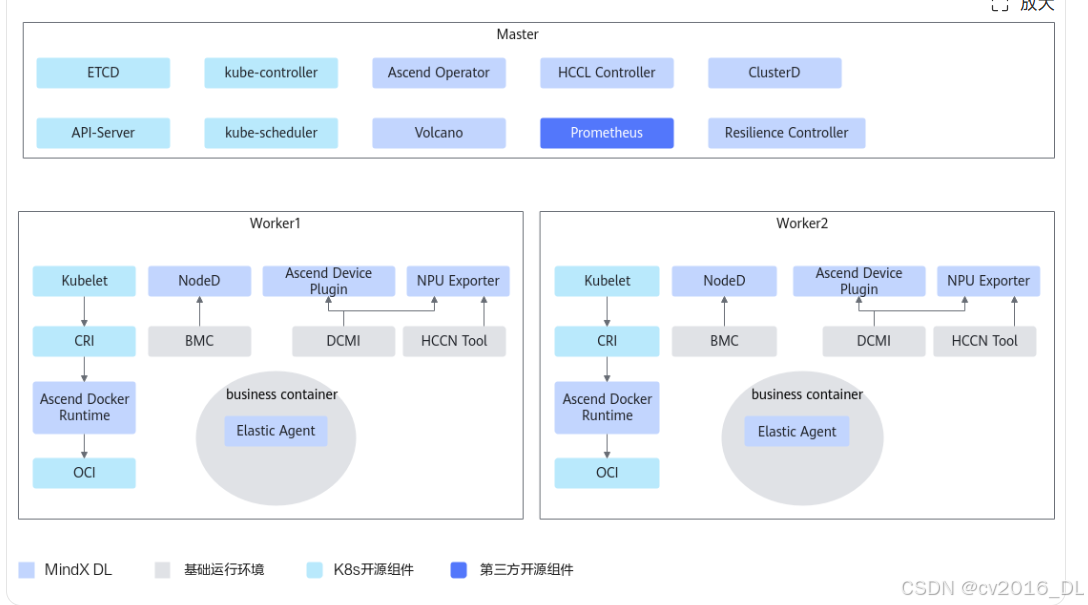

昇腾计算产业是基于昇腾系列(HUAWEI Ascend)处理器和基础软件构建的全栈 AI计算基础设施、行业应用及服务,https://devpress.csdn.net/organization/setting/general/146749包括昇腾系列处理器、系列硬件、CANN、AI计算框架、应用使能、开发工具链、管理运维工具、行业应用及服务等全产业链
更多推荐

 11
11 0
0- 0


 已为社区贡献2条内容

所有评论(0)