在windows系统上安装mindspore GPU版本
·
在windows(win10/win11)系统上安装mindspore GPU版本
由于win系统只能安装mindspore cpu版本,训练模型速度很慢,要使用gpu版本可以使用docker安装一个ubuntu系统,在ubuntu系统中安装mindspore。
如果没有安装docker可以参考:https://www.runoob.com/docker/windows-docker-install.html
1.在docker中安装ubuntu
如果没有安装docker需要先安装docker
docker pull ubuntu:18.04
2.启动ubuntu(需要加上参数–gpus才可以使用主机的gpu)
docker run -itd -p 8888:8888 --gpus all --name mindspore -e NVIDIA_DRIVER_CAPABILITIES = compute , utility -e NVIDIA_VISIBLE_DEVICES=all ubuntu:18.04
3.进入容器
docker exec -it 容器ID /bin/bash
4.更新安装软件
apt-get update
apt install sudo
apt install wget
5.设置用户名密码,使用root权限
sudo passwd root
Su root
6.查看显卡驱动
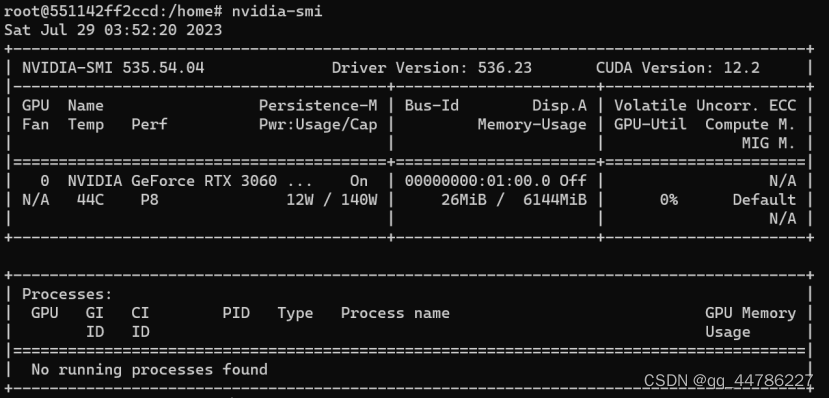
7.使用官方脚本自动安装mindspore
#没有安装这个后面运行脚本会出错
sudo apt-get install software-properties-common
下载脚本
wget https://gitee.com/mindspore/mindspore/raw/r2.0/scripts/install/ubuntu-gpu-pip.sh
#执行脚本 安装MindSpore 2.0.0,Python 3.7和CUDA 11.1。
MINDSPORE_VERSION=2.0.0 bash -i ./ubuntu-gpu-pip.sh
8.安装docker中的jupyter notebook
pip install jupyter notebook
9.配置jupyter远程访问
jupyter notebook --generate-config
vim /root/.jupyter/jupyter_notebook_config.py
在文件中增加以下配置:
c.NotebookApp.password=''
c.NotebookApp.ip='*'
c.NotebookApp.allow_remote_access = True
c.NotebookApp.open_browser = False
c.NotebookApp.token = ''
c.NotebookApp.port = 8888  #8888为容器端口
10.启动jupyter
jupyter notebook --notebook-dir=./mindsporetest/ --no-browser --allow-root
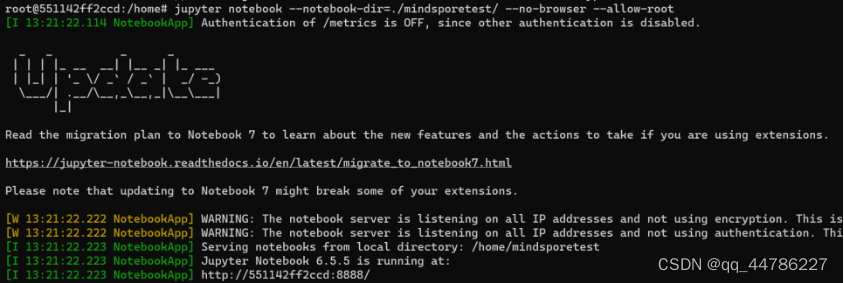
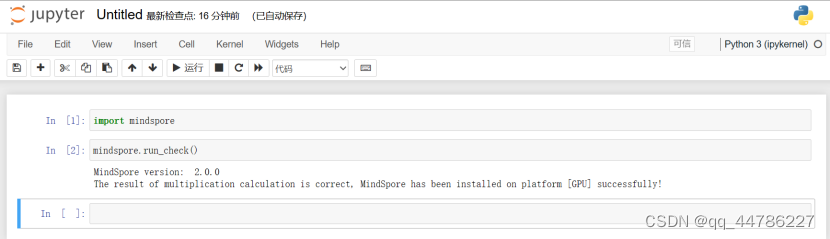
11.主机访问容器中的jupyter
在浏览器输入网址:http://127.0.0.1:8888/
参考资料:
[1]https://blog.csdn.net/hhq163/article/details/123431061
[2]docker中安装jupyter,并远程打开jupyter_docker

昇腾计算产业是基于昇腾系列(HUAWEI Ascend)处理器和基础软件构建的全栈 AI计算基础设施、行业应用及服务,https://devpress.csdn.net/organization/setting/general/146749包括昇腾系列处理器、系列硬件、CANN、AI计算框架、应用使能、开发工具链、管理运维工具、行业应用及服务等全产业链
更多推荐

 2
2 0
0- 0


 已为社区贡献2条内容

所有评论(0)