GRIN-MOE模型适配昇腾NPU(一):模型结构适配、权重转换
- GRIN-MOE相关链接
1.1 HuggingFace GRIN-MOE链接
https://huggingface.co/microsoft/GRIN-MoE
1.2 GitHub GRIN-MOE链接
https://github.com/microsoft/GRIN-MoE/
1.3 Ascend MindSpeed-LLM链接
https://gitee.com/ascend/MindSpeed-LLM
- 环境准备
2.1 创建并切换conda环境
conda create -n mytest python=3.9
conda activate mytest
2.2 创建个人目录
(mytest) [root@localhost aarch64-linux]# cd /home/
(mytest) [root@localhost home]# mkdir mytest
2.3 创建安装包目录,并上传安装包
(mytest) [root@localhost home]# cd mytest/
(mytest) [root@localhost mytest]# mkdir download
所需安装包:
Ascend-cann-kernels-910b_8.0.0_linux-aarch64.run
Ascend-cann-nnal_8.0.0_linux-aarch64.run
Ascend-cann-toolkit_8.0.0_linux-aarch64.run

torch-2.1.0-cp39-cp39-manylinux_2_17_aarch64.manylinux2014_aarch64.whl
torch_npu-2.1.0.post10.dev20241212-cp39-cp39-manylinux_2_17_aarch64.manylinux2014_aarch64.whl

apex-0.1.dev20241107+ascend-cp39-cp39-linux_aarch64.whl
2.4 安装所需包
2.4.1 安装所需版本的 CANN包
添加可执行权限:
(mytest) [root@localhost download]# chmod 777 *.run
安装并指定路径:
(mytest) [root@localhost download]# ./Ascend-cann-toolkit_8.0.0_linux-aarch64.run --full --install-path=/usr/local/Ascend/
(mytest) [root@localhost download]# ./Ascend-cann-kernels-910b_8.0.0_linux-aarch64.run --devel --install-path=/usr/local/Ascend/
(mytest) [root@localhost download]# ./Ascend-cann-nnal_8.0.0_linux-aarch64.run --install-path=/usr/local/Ascend/
配置环境变量
# source ascend-toolkit 环境变量
source /usr/local/Ascend/ascend-toolkit/set_env.sh
# source atb库 环境变量
source /usr/local/Ascend/nnal/atb/set_env.sh
常见问题:
Failed to initialize NumPy: No module named 'numpy' (Triggered internally at /pytorch/torch/csrc/utils/tensor_numpy.cpp:84.)
device: torch.device = torch.device(torch._C._get_default_device()),  # torch.device('cpu'),

解决方法:
(mytest) [root@localhost download]# conda install numpy
2.4.2 安装所需版本的 torch 和 torch_npu
(mytest) [root@localhost download]# pip install torch-2.1.0-cp39-cp39-manylinux_2_17_aarch64.manylinux2014_aarch64.whl
(mytest) [root@localhost download]# pip install torch_npu-2.1.0.post10.dev20241212-cp39-cp39-manylinux_2_17_aarch64.manylinux2014_aarch64.whl
2.4.3 安装apex for Ascend
(mytest) [root@localhost download]# pip install apex-0.1.dev20241107+ascend-cp39-cp39-linux_aarch64.whl
2.4.4 安装对应版本的torchvision
(mytest) [root@localhost download]# pip install torchvision==0.16.0
2.4.5 MindSpeed-LLM仓库拉取
(mytest) [root@localhost download]# cd ..
(mytest) [root@localhost mytest]# git clone https://gitee.com/ascend/MindSpeed-LLM.git
(mytest) [root@localhost mytest]# git clone https://github.com/NVIDIA/Megatron-LM.git
(mytest) [root@localhost mytest]# cd Megatron-LM
(mytest) [root@localhost Megatron-LM]# git checkout core_r0.7.0
(mytest) [root@localhost Megatron-LM]# cp -r megatron ../MindSpeed-LLM/
(mytest) [root@localhost Megatron-LM]# cd ..
(mytest) [root@localhost mytest]# cd MindSpeed-LLM
(mytest) [root@localhost MindSpeed-LLM]# mkdir logs
(mytest) [root@localhost MindSpeed-LLM]# mkdir model_from_hf
(mytest) [root@localhost MindSpeed-LLM]# mkdir dataset
(mytest) [root@localhost MindSpeed-LLM]# mkdir ckpt
2.4.6 安装MindSpeed加速库
(mytest) [root@localhost MindSpeed-LLM]# git clone https://gitee.com/ascend/MindSpeed.git
(mytest) [root@localhost MindSpeed-LLM]# cd MindSpeed
# checkout commit from MindSpeed core_r0.7.0 in 2024.12.13
(mytest) [root@localhost MindSpeed]# git checkout 4045864e6df
(mytest) [root@localhost MindSpeed]# pip install -r requirements.txt
(mytest) [root@localhost MindSpeed]# pip3 install -e .
(mytest) [root@localhost MindSpeed]# cd ..
# 安装其余依赖库
(mytest) [root@localhost MindSpeed-LLM]# pip install -r requirements.txt
- 模型结构适配
3.1 GRIN-MOE模型结构
通过下面一段代码将GRIN-MOE模型结构打印出来
from transformers import AutoConfig, AutoModel, AutoTokenizer, AutoModelForCausalLM
from accelerate import init_empty_weights
import torch

model_dir = "/home/hf_weights/GRIN-MoE/"
hf_config = AutoConfig.from_pretrained(model_dir, trust_remote_code=True)
with init_empty_weights():
	hf_model = AutoModelForCausalLM.from_config(hf_config, torch_dtype=torch.float16, trust_remote_code=True)
	print(hf_model)
注:model_dir = "/home/hf_weights/GRIN-MoE/"为从huggingface上下载的模型配置文件和权重的保存路径
执行上述python脚本会如下报错:
缺少flash_attn,解决办法如下:
修改modeling_grinmoe_hf.py文件
修改后再执行python脚本即可打印出模型结构: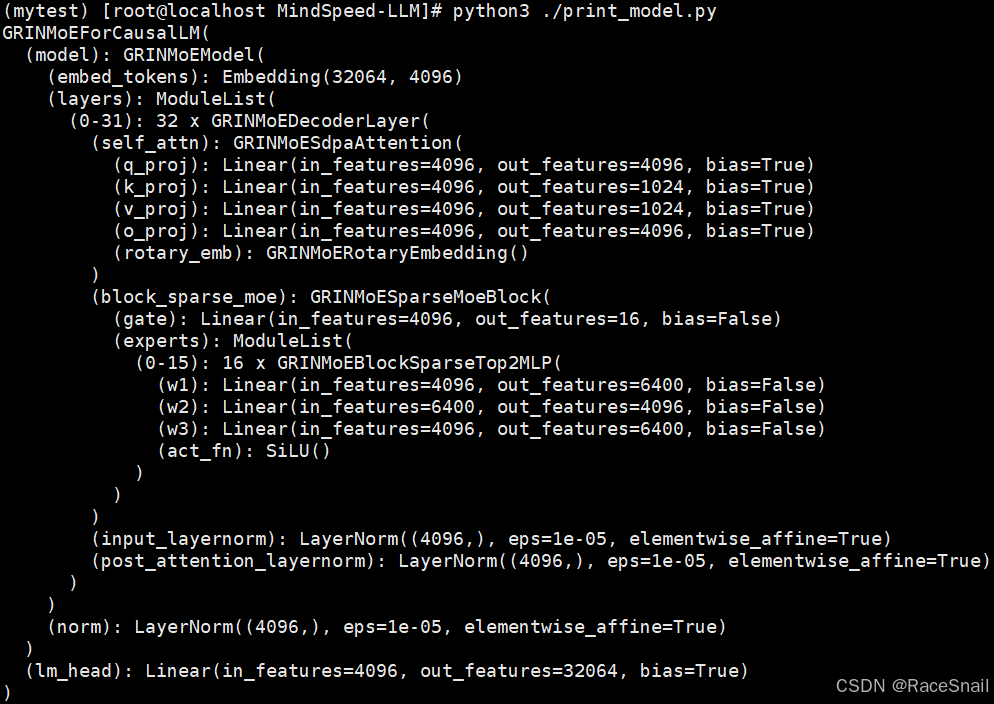
3.2 与Mixtral-8x7B模型结构对比
同样方式打印出Mixtral-8x7B模型结构如下: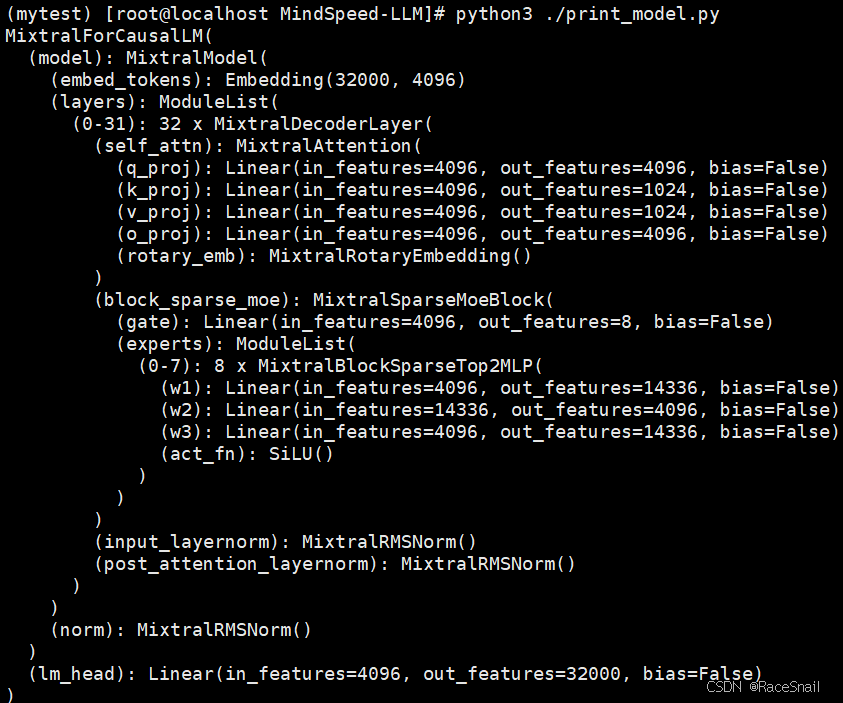
可以看出GRIN-MOE和Mixtral-8x7B模型结构基本相同,区别只是在attention部分一个带bias一个不到bias,因此后续流程可以参考MindSpeed-LLM里Mixtral-8x7B的实现。
此外,还可以参考Phi-3.5-MoE模型的实现。
- 权重转换
4.1 权重转换代码路径
权重转换相关代码在/home/mytest/MindSpeed-LLM/mindspeed_llm/tasks/checkpoint/路径下: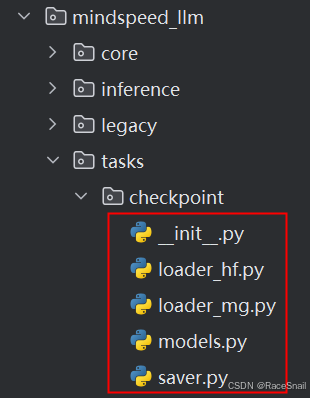
4.2 model_cfg.json文件
/home/mytest/MindSpeed-LLM/configs/checkpoint/model_cfg.json文件中的base配置如下:
1. config_set_value里是一些固定配置;
2. config_hf_key_mapping里是需要从HF配置文件读取的参数;
3. model_hf_key_mapping是HF模型参数对应的路径,而megatron模型的参数路径在models.py文件中如下面截图,这些key-value值会通过__register_functions函数映射成一个方法,用来set或get对应路径的模型参数。
4.3 GRIN模型权重配置
model_cfg.json里添加GRIN模型权重相关的配置:
"grin-moe": {
      "__base__": "base",
      "config_set_value": {
        "normalization": "LayerNorm",
		"moe_flag": true,
        "add_output_layer_bias": true
      },
      "model_hf_key_mapping": {
        "layers_mlp_router": "model.layers[layer_idx].block_sparse_moe.gate",
        "layers_mlp_experts_gate_proj": "model.layers[layer_idx].block_sparse_moe.experts[expert_idx].w1",
        "layers_mlp_experts_up_proj": "model.layers[layer_idx].block_sparse_moe.experts[expert_idx].w3",
        "layers_mlp_experts_linear_fc2": "model.layers[layer_idx].block_sparse_moe.experts[expert_idx].w2"
	  }
    },
注:从打印出的模型结构可以看到GRIN-MOE的layernorm用的是LayerNorm而不是RMSNorm,
其它配置可参考Mixtral-8x7B和Phi-3.5-MoE。
4.4 权重转换
权重转换脚本代码如下:
source /usr/local/Ascend/ascend-toolkit/set_env.sh

# 设置需要的并行配置
python convert_ckpt.py \
    --model-type GPT \
    --load-model-type hf \
    --save-model-type mg \
	--params-dtype bf16 \
    --target-tensor-parallel-size 1 \
    --target-pipeline-parallel-size 1 \
    --target-expert-parallel-size 1 \
    --load-dir /home/hf_weights/GRIN-MoE/ \
    --save-dir /home/mytest/MindSpeed-LLM/model_weights/GRIN-mcore/ \
    --tokenizer-model /home/hf_weights/GRIN-MoE/tokenizer.json \
    --use-mcore-models \
    --model-type-hf grin-moe \
注:--load-dir为要加载的huggingface权重路径;
--save-dir为转换后的权重保存路径
报错原因:–model-type-hf不支持设置grin-moe
解决方法:修改convert_ckpt.py文件,–model-type-hf支持设置grin-moe
重新执行权重转换脚本,结果显示成功: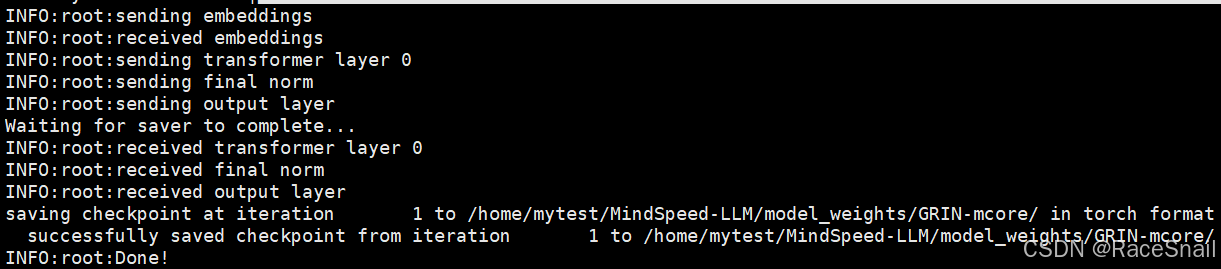

昇腾计算产业是基于昇腾系列(HUAWEI Ascend)处理器和基础软件构建的全栈 AI计算基础设施、行业应用及服务,https://devpress.csdn.net/organization/setting/general/146749包括昇腾系列处理器、系列硬件、CANN、AI计算框架、应用使能、开发工具链、管理运维工具、行业应用及服务等全产业链
更多推荐

 0
0 0
0- 0


 已为社区贡献8条内容

所有评论(0)