易用昇腾(二):四机32卡基于MindSpeed-RL进行Qwen32B GRPO训练
使用昇腾平台结合MindSpeed-RL进行大模型的强化学习训练,是提升模型能力的重要途径。此前分享了单机八卡使用MindSpeed-RL进行Qwen-7B模型GRPO训练的踩坑记录。本节聚焦于四机32卡环境下,基于MindSpeed-RL进行Qwen-32B GRPO训练的过程,重点分享在实际复现过程中遇到的问题、原因分析以及解决方法,希望能为广大开发者提供参考。Qwen - 32B 使用 GRPO 强化学习的详细教程已发布在gitee上 。在按照教程进行四机 32 卡的实际训练过程中,我们同样遇到了一些问题,以下是详细记录。
一、前期准备:环境与配置验证
1. 环境搭建
- 权重转换:按照MindSpeed-RL官方文档的指引进行Qwen-32B 权重转换操作。在转换过程中,需关注参数设置,如张量并行(TP)和流水线并行(PP)的配置,根据四机32卡的实际硬件布局进行设置,充分发挥硬件性能。需要从HuggingFace权重转换为megatron权重,可参考**权重转换部分**
source /usr/local/Ascend/ascend-toolkit/set_env.sh

# 设置需要的权重转换参数

# actor使用TP8PP2,将脚本里改成TP8PP2配置
# reference使用TP8PP1,将脚本里改成TP8PP1配置
bash examples/ckpt/ckpt_convert_qwen25_hf2mcore.sh

# 训练完后如需要转回HF格式
bash examples/ckpt/ckpt_convert_qwen25_mcore2hf.sh
- 数据集准备:根据官方文档要求,准备训练所需的数据集。本篇工作使用Qwen25-32B模型复现DeepSeek-R1-Zero在Math领域的工作。R1-Zero复现需要在数据处理时加上prompt模板激发
<think>...</think><answer>...$\boxed{}</answer>
<|im_start|>system\nYou are a helpful assistant.<|im_end|>\n<|im_start|>user\nA conversation between User and Assistant. The user asks a question, and the Assistant solves it. The assistant first thinks about the reasoning process in the mind and then provides the user with the answer. The reasoning process and answer are enclosed within <think> </think> and <answer> </answer> tags, respectively, i.e., <think> reasoning process here </think><answer> answer here </answer>Put your final answer within \\boxed{}.\n{你真正的问题}<|im_end|>\n<|im_start|>assistant\n{模型真正的回答}
以上为默认的qwen_r1模板,根据模型和数据的不同,用户可以在configs/model/templates.json添加自己的自定义模板。对于32B模型应使用更高难度的数据集,所以按照官方建议使用DeepScale 40K数据集来训练。
- 依赖安装:MindSpeed - RL 训练依赖众多软件包和库,需按照官方文档列出的依赖清单,逐一安装并确保版本正确。官方建议版本如下:
| 依赖软件 | 版本 |
|---|---|
| 昇腾NPU驱动 | 25.0.RC1(此版本限制不严格,24.1.0.3同样兼容) |
| 昇腾NPU固件 | 25.0.RC1(此版本限制不严格,24.1.0.3同样兼容) |
| Toolkit(开发套件) | 8.1.RC1 |
| Kernel(算子包) | 8.1.RC1 |
| NNAL(Ascend Transformer Boost加速库) | 8.1.RC1 |
| Python | 3.10 |
| torch | 2.5.1 |
| torch_npu | 2.5.1 |
| apex | 0.1 |
| ray | 2.42.1 |
| vllm | 0.7.3 |
2. 配置文件检查
- 模型配置文件:模型结构的配置文件位于configs/model下,训练配置文件位于configs/目录下,我们以qwen2.5-32b为例[r1_zero_qwen25_32b.yaml],该配置用到了32卡,为了进一步加速可以不断增加推理DP的数量。以下为参数配置:
defaults:
  - model:
      - qwen25-32b                        <-- 网络结构需要定义在model目录的yaml文件下

megatron_training:
  global_batch_size: 128                  <-- 每个迭代的总样本数
  ...
  dataset_additional_keys: ['labels',]    <-- 使用打分器时需要的额外字段

actor_config:
  model: qwen25-32b
  micro_batch_size: 1          <-- 训练的mbs
  ...
  lr: 1e-6
  lr_decay_style: constant     <-- 学习率衰减方式
  weight_decay: 0.0            <-- 正则化强度系数
  lr_warmup_fraction: 0.0      <-- 控制学习率预热
  ...
  no_load_optim: false         <-- 续训加载优化器状态
  no_load_rng: false           <-- 续训加载数据随机数生成器
  no_save_optim: false         <-- 保存权重时同时保存优化器状态
  no_save_rng: false           <-- 保存权重时同时保存数据随机数生成器

ref_config:
  model: qwen25-32b
  ...

rl_config:
  blocking: false              <-- 开启异步流水
  ...
  adv_estimator: group_norm    <-- 优势计算方法
  mini_batch_size: 2048        <-- 训练更新梯度的bs, 一般为gbs*n_samples_per_prompt
  ...
  max_prompt_length: 1024      <-- 最大的prompt长度
  clip_ratio: 0.2              <-- 策略裁剪比例
  shuffle_minibatch: false     <-- minibatch里的数据是否打乱
  n_samples_per_prompt: 16     <-- GRPO中一个group内生成的response条数
  colocate_actor_ref: false
  colocate_all_models: false
  rule_reward: true                              <-- 开启规则奖励
  verifier_function: ["acc", "strict_format"]    <-- 规则奖励模型方法
  verifier_weight: [1.0, 1.0]                    <-- 规则奖励模型权重
  use_tensorboard: true                          <-- 开启tensorboard日志功能
  num_cpus_for_placement_group: 8                <-- 给每个worker的ray placement分配cpu核数
  actor_resource:                                <-- actor worker资源分配
    num_npus: 16
  reference_resource:                            <-- ref worker资源分配
    num_npus: 16

generate_config:
  trust_remote_code: true            <-- tokenizer相关配置

  infer_tensor_parallel_size: 4      <-- 推理时的并行配置
  infer_pipeline_parallel_size: 1
  infer_expert_parallel_size: 1

  max_num_seqs: 128                  <-- vllm 推理并发最大样本限制
  max_num_batched_tokens: 128000     <-- vllm 推理并发最大token限制
  max_model_len: 4096
  dtype: "bfloat16"
  gpu_memory_utilization: 0.9
  offload_train_optimizer: true      <-- 卸载训练节点优化器
  offload_train_grad: true           <-- 卸载训练节点梯度
  offload_train_param: true          <-- 卸载模型权重

  sampling_config:                   <-- vllm 采样配置
    max_tokens: 3072                 <-- 单条response最大生成token数量
    logprobs: 1                      <-- 是否生成logprobs
    top_p: 0.9
    top_k: 50
    min_p: 0.01
    temperature: 0.9
    detokenize: false
  ...
- 网络配置文件:针对四机 32 卡的分布式训练,网络配置文件负责管理机器之间的通信。后文会根据踩坑记录给出网络配置排查的相关流程。
- 训练配置文件:训练配置文件在
rl_config文件中。文件中的参数设置如下:
blocking:是否开启异步,默认为 False;
n_samples_per_prompt:每条prompt的重用次数,一条 prompt 输入能输出 n 条 responese;
max_prompt_length:GRPO 训练中最大 prompt 长度,默认为512;
clip_ratio:Actor 模型训练计算损失函数时的 clip 比例,默认为0.2 一般取值范围 [0.1,0.3] 最大取值范围[0,1] 该数值越大允许策略更新的幅度越大,反之不然;
shuffle_mini_batch:Actor 训练时是否对 minibatch 进行 shuffle,默认为 False;
actor_resource :分配给 Actor 模型的显卡数量;
reference_resource :分配给 Reference 模型的显卡数量;
reward_resource :分配给 Reward 模型的显卡数量;
显卡资源配置格式为 :
actor_resource:
    num_npus: 4
二、踩坑记录
- 多机多卡通讯BUG:HCCL无法初始化
报错代码如下:
RuntimeError: create_config:build/CMakeFiles/torch_npu.dir/compiler_depend.ts:102 HCCL function error: hcclCommInitRootInfoConfig(numRanks, &rootInfo, rank, config, &(comm->hcclComm_)), error code is 4
[ERROR] 2025-04-18-16:04:50 (PID:2353565, Device:0, RankID:0) ERR02200 DIST call hccl api failed.
(1)尝试一(失败):分析问题可能原因是CANN的版本不对,使用机器时已经预先安装了CANN 8.0.*版本,按照官网后续建议重装了CANN 8.1.RC1,但旧版本未卸载干净。参考链接:grpo 7b报错 · Issue #IBZFSH · Ascend/MindSpeed-RL - Gitee.com。
解决结果:卸载后还是相同报错。
(2)尝试二(失败):分析问题可能原因是训练代码中的MASTER_PORT,与yaml文件中指定的端口不一致,导致HCCL通信超时。按照下面的代码进行测试:
export MASTER_ADDR=127.0.0.1
export MASTER_PORT=29688
export HCCL_WHITELIST_DISABLE=1

NPUS=($(seq 0 7))
export RANK_SIZE=${#NPUS[@]}
rank=0
for i in ${NPUS[@]}
do
    export DEVICE_ID=${i}
    export RANK_ID=${rank}
    echo run process ${rank}
    please input your shell script here > output_npu_${i}.log 2>&1 &
    let rank++
done
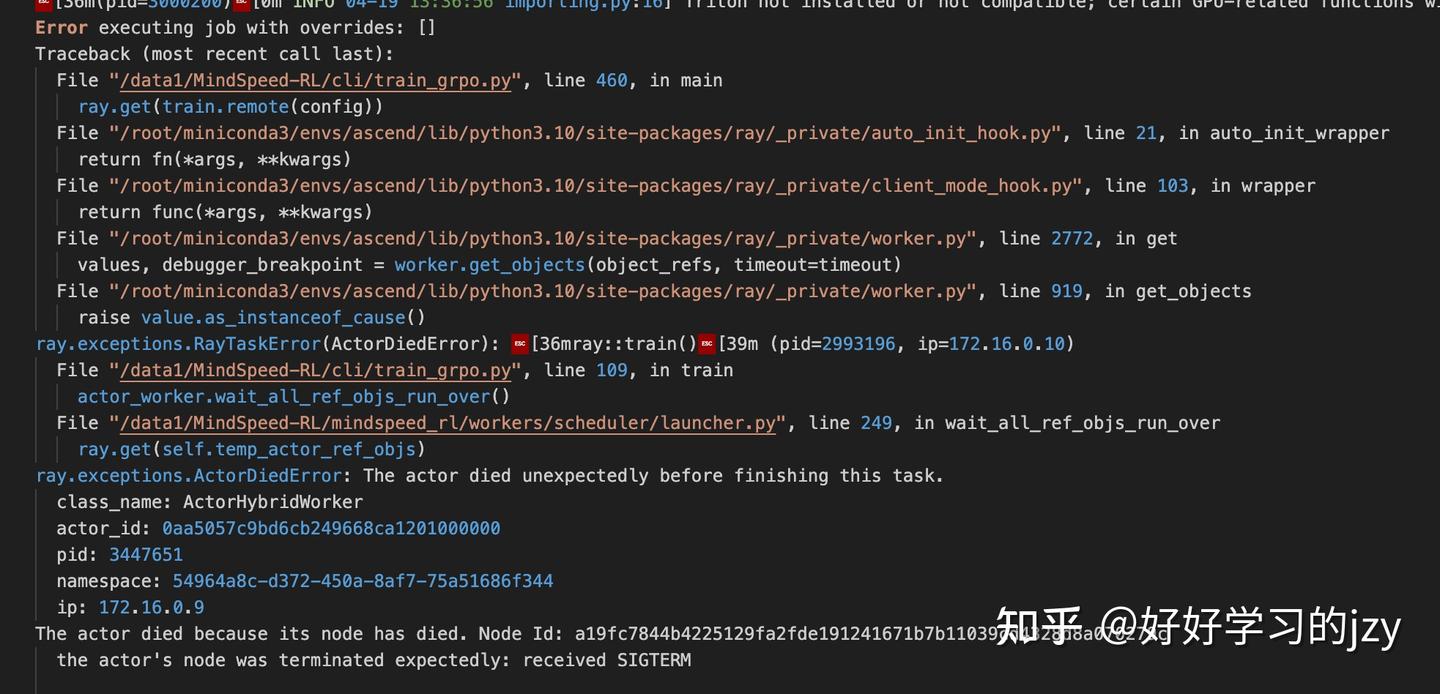
仍然报错未解决
(3)尝试三(定位问题):按照下面最简单的代码,分别在不同机器上测试HCCL是否可用。
# test_allreduce.py测试脚本
import torch
import torch_npu
import os

device = int(os.getenv('LOCAL_RANK'))
print(device)
torch.npu.set_device(device)

# Call the hccl init process
torch.distributed.init_process_group(backend='hccl', init_method='env://')

a = torch.tensor(1).npu()
torch.distributed.all_reduce(a)
print('Hccl: ', a, device)
然后多机执行测试脚本(先保证单机可通,多机版本一致)
torchrun --master_addr=localhost --master_port=20022 --nnodes=1 --node_rank=0 --nproc_per_node=8 test_allreduce.py
解决结果是测试脚本都不通,初步定位是网段配置,而非固件/包版本等问题。进一步对每台机器采用如下脚本测试:
1.(可选,已设置可跳过)为每张卡设置可连通的不同IP,可以先看 cat /etc/hccn.conf ,若不同机器的device ip不同,可跳过本步
# 0机上可以这样设置
hccn_tool -i 0 -ip -s address 10.10.1.11 netmask 255.255.255.128
hccn_tool -i 1 -ip -s address 10.10.1.12 netmask 255.255.255.128
hccn_tool -i 2 -ip -s address 10.10.1.13 netmask 255.255.255.128
hccn_tool -i 3 -ip -s address 10.10.1.14 netmask 255.255.255.128
hccn_tool -i 4 -ip -s address 10.10.1.15 netmask 255.255.255.128
hccn_tool -i 5 -ip -s address 10.10.1.16 netmask 255.255.255.128
hccn_tool -i 6 -ip -s address 10.10.1.17 netmask 255.255.255.128
hccn_tool -i 7 -ip -s address 10.10.1.18 netmask 255.255.255.128


# 1机上可以这样设置
hccn_tool -i 0 -ip -s address 10.10.1.21  netmask 255.255.255.128
hccn_tool -i 1 -ip -s address 10.10.1.22  netmask 255.255.255.128
hccn_tool -i 2 -ip -s address 10.10.1.23  netmask 255.255.255.128
hccn_tool -i 3 -ip -s address 10.10.1.24  netmask 255.255.255.128
hccn_tool -i 4 -ip -s address 10.10.1.25  netmask 255.255.255.128
hccn_tool -i 5 -ip -s address 10.10.1.26  netmask 255.255.255.128
hccn_tool -i 6 -ip -s address 10.10.1.27  netmask 255.255.255.128
hccn_tool -i 7 -ip -s address 10.10.1.28  netmask 255.255.255.128

...以此类推,ip不冲突可以相互访问就行

2.# 连通检查
hccn_tool -i 0 -netdetect -s address 10.10.1.21(替换为实际IP)
hccn_tool -i 0 -net_health –g
确认网口通信状态正常

# 执行下面指令检查光口状态,显示up为OK
for i in {0..7}; do hccn_tool -i $i -link -g ; done

# 执行下面指令检查光口TLS状态,不同服务器上显示均为一致为OK(如都关闭)
for i in {0..7}; do hccn_tool -i $i -tls -g ; done

# 执行下面指令检查交换机状态,显示一堆交换机状态为OK
for i in {0..7}; do hccn_tool -i $i -lldp  -g ; done

3.编写多机多卡脚本
# 额外的环境变量
export HCCL_IF_IP=${本机IP}

# 在所有启动脚本统一主节点的 MASTER_PORT, MASTER_ADDR

# 设置相应的rank和world_size

# 当前不支持init_process_group在多P场景下不传参,需要设置rank, world_size
dist.init_process_group(backend='hccl',rank=rank, world_size=world_size)

# 正确set_device
torch.npu.set_device(rank%ngpu_per) # ngpu_per 每个机器的卡数,默认8
定位出问题是其中一台机器网段配置有误:

4台机器中一台HCCL不通
解决方式:服务器供应商重新配置,可参考以下配置指南:准备多机多卡训练-多卡分布式训练-模型训练-模型迁移与训练-PyTorch 网络模型迁移和训练-模型开发(PyTorch)-CANN商用版7.0.0开发文档-昇腾社区
解决结果:部分解决,报错码由4变为9
HCCL function error: hcclCommInitRootInfoConfig(numRanks, &rootInfo, rank, config, &(comm->hcclComm_)), error code is 9
完整子节点报错:
[rank20]: Traceback (most recent call last):
[rank20]:   File "/data1/test_allreduce.py", line 13, in <module>
[rank20]:     torch.distributed.all_reduce(a)
[rank20]:   File "/root/miniconda3/envs/ascend/lib/python3.10/site-packages/torch/distributed/c10d_logger.py", line 83, in wrapper
[rank20]:     return func(*args, **kwargs)
[rank20]:   File "/root/miniconda3/envs/ascend/lib/python3.10/site-packages/torch/distributed/distributed_c10d.py", line 2501, in all_reduce
[rank20]:     work = group.allreduce([tensor], opts)
[rank20]: RuntimeError: create_config:build/CMakeFiles/torch_npu.dir/compiler_depend.ts:102 HCCL function error: hcclCommInitRootInfoConfig(numRanks, &rootInfo, rank, config, &(comm->hcclComm_)), error code is 9
[rank20]: [ERROR] 2025-04-24-14:27:35 (PID:540014, Device:4, RankID:20) ERR02200 DIST call hccl api failed.
[rank20]: EI0006: [PID: 540014] 2025-04-24-14:27:35.897.143 Getting socket times out. Reason: 1. The remote does not initiate a connect request. some NPUs in the cluster are abnormal.    2. The remote does not initiate a connect request because the collective communication operator is started too late or is not started by some NPU in the cluster.    3. The communication link is disconnected. (For example, the IP addresses are not on the same network segment or the TLS configurations are inconsistent.)
[rank20]:         Solution: 1. Check the rank service processes with other errors or no errors in the cluster.2. If this error is reported for all NPUs, check whether the time difference between the earliest and latest errors is greater than the connect timeout interval (120s by default). If so, adjust the timeout interval by using the HCCL_CONNECT_TIMEOUT environment variable.3. Check the connectivity of the communication link between nodes. (For example, run the 'hccn_tool -i $devid -tls -g' command to check the TLS status of each NPU).
(3)尝试四(成功解决):解决报错码由4变为9
原因分析:HCCL默认网口与实际网口不一致,导致建立链接超时。需要设置环境变量指定HCCL通信使用的网口。
解决方式:在KaTeX parse error: Undefined control sequence: \* at position 41: …查看Host侧日志plog\_\̲*̲.log,HOME为Host侧用户根目录。如果运行失败,通过日志分析并定位问题。Host侧日志路径:KaTeX parse error: Undefined control sequence: \* at position 36: …plog/plog-pid\_\̲*̲.log,HOME为Host侧用户根目录。Device侧日志路径:$HOME/ascend/log/run/device-id/device-pid_*.log。参考:https://www.hiascend.com/doc_center/source/zh/canncommercial/70RC1/modeldev/tfmigr2/tfmigr2_000033.html。
修改下图中最后三行并取消注释:
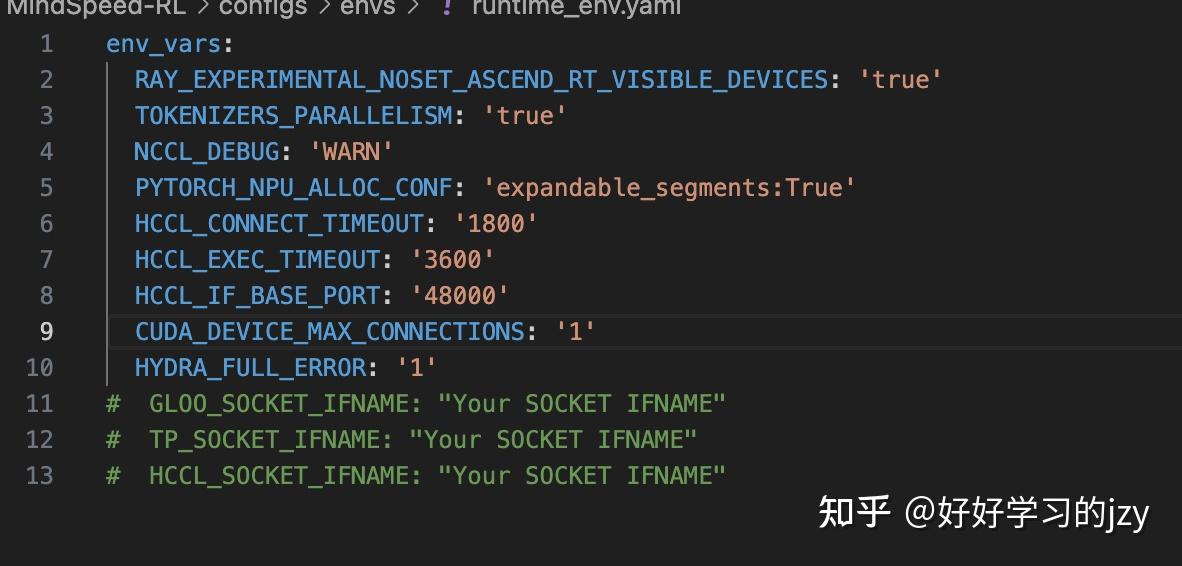
最后三行
查看Plog网卡端口发现是eno0和bond2,使用export HCCL_SOCKET_IFNAME=eno0
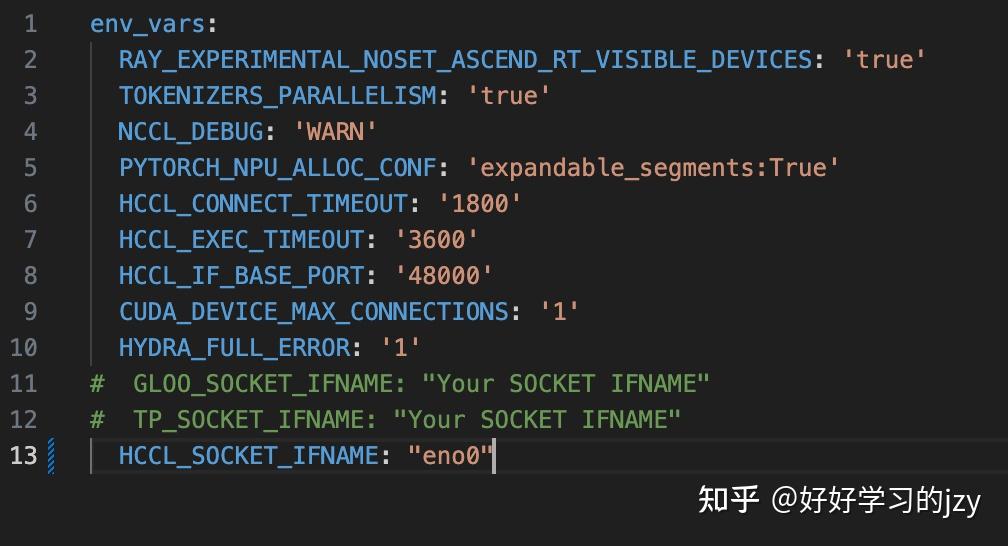
最后三行都修改为同样的网卡端口
如果只修改一行,还是会报错:
RuntimeError: Gloo connectFullMesh failed with [/pytorch/third_party/gloo/gloo/transport/tcp/pair.cc:144] no error
2. 训练速度优化
按照上述踩坑过程配置完成后,一个完整的RL训练过程在4机32卡要12天左右,可以按照以下训练配置方式进行优化rl_config文件:
上述参数可以适当减小:
global batch size: 128
max _prompt length: 1024
max tokens:3072
n samples per prompt: 16
actor多分配一点,下列参数可以考虑调整为28+4
actor resource:num_npus: 16
reference resource:num npus:16
mbs可以放大一点:
actor config:
model: qwen25 32b
micro batch size:1
上述踩坑记录感谢孙浥尘和努尔夏提同学的大力支持。希望可以帮助后续使用的开发者更容易得上手MindSpeed-RL及相应模型的强化学习!

昇腾计算产业是基于昇腾系列(HUAWEI Ascend)处理器和基础软件构建的全栈 AI计算基础设施、行业应用及服务,https://devpress.csdn.net/organization/setting/general/146749包括昇腾系列处理器、系列硬件、CANN、AI计算框架、应用使能、开发工具链、管理运维工具、行业应用及服务等全产业链
更多推荐

 12
12 0
0- 0


 已为社区贡献4条内容

所有评论(0)