【triton教程】Triton-Ascend环境安装指南
作者:昇腾实战派
系列文章: Triton Ascend知识地图
背景概述
Triton-Ascend 是适配华为 Ascend 昇腾芯片的 Triton 优化版本,提供高效的核函数自动调优、算子编译及部署能力。本文将详细介绍在昇腾环境中安装Triton-Ascend的完整流程,涵盖环境准备、依赖安装和验证测试等关键步骤。
官方安装指南参考:https://triton-ascend-test.readthedocs.io/zh-cn/latest/installation_guide.html
一、环境依赖
硬件环境:Atlas 800I A2服务器
软件环境:
| 软件 | 版本 |
|---|---|
| CANN | 8.3.RC1 |
| triton-ascend | 最新稳定版本或日构建版本 |
| python | 3.9-3.11 |
| torch | 2.6.0或2.7.1 |
| torch_npu | 2.6.0或2.7.1,与torch版本匹配 |
二、环境搭建
2.1 容器创建
从昇腾镜像仓库cann (hiascend.com)下载8.3.rc1版本CANN镜像:
docker pull swr.cn-south-1.myhuaweicloud.com/ascendhub/cann:8.3.rc1-910b-ubuntu22.04-py3.11
查看 image-id:
docker image
创建容器,其中dir是用于存放个人文件的路径,image-id是cann的镜像id。
docker run -it --shm-size=500g --privileged -uroot --net=host --name triton-test \
  --device=/dev/davinci0 \
  --device=/dev/davinci_manager \
  --device=/dev/devmm_svm \
  --device=/dev/hisi_hdc \
  -v /dev/shm:/dev/shm \
  -v /usr/local/bin/npu-smi:/usr/local/bin/npu-smi \
  -v /usr/local/Ascend/driver/lib64/common:/usr/local/Ascend/driver/lib64/common \
  -v /usr/local/Ascend/driver/lib64/driver:/usr/local/Ascend/driver/lib64/driver \
  -v /usr/local/Ascend/driver/version.info:/usr/local/Ascend/driver/version.info \
  -v /etc/ascend_install.info:/etc/ascend_install.info \
  -v /home/<dir>:/home \
  <image-id>
  /bin/bash
2.2 毕昇编译器
毕昇编译器是CANN的toolkit包自带的,可通过which命令查看环境变量中是否有对应文件。
which bishengir-compile

2.3 torch和torch_npu安装
triton-ascend支持的torch_npu版本为2.6.0或2.7.1。
安装python依赖:
pip install attrs decorator psutil requires cloudpickle ml-dtypes scipy tornado numpy PyYaml pybind11
安装pytorch2.7.1和相同版本的torch_npu(2.6.0版本安装方式参考链接:安装PyTorch-昇腾社区 (hiascend.com)):
# 安装torch
pip install torch==2.7.1

# 下载torch_npu插件包
wget https://gitcode.com/Ascend/pytorch/releases/download/v7.2.0-pytorch2.7.1/torch_npu-2.7.1-cp311-cp311-manylinux_2_28_aarch64.whl

# 安装torch_npu
pip3 install torch_npu-2.7.1-cp311-cp311-manylinux_2_28_aarch64.whl
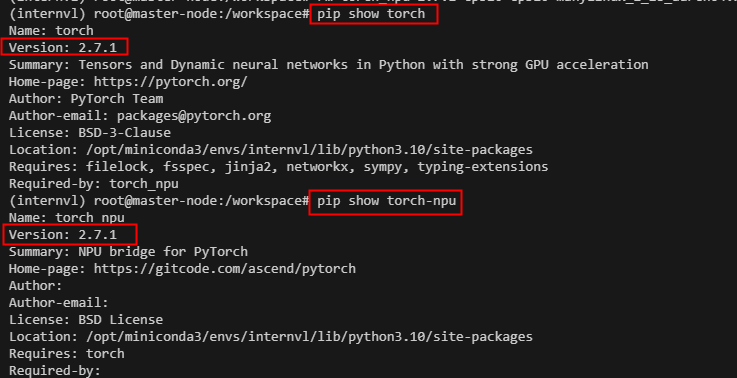
安装完成后验证:

2.4 triton-ascend安装
可以使用pip安装triton-ascend的最新稳定版本。
pip install triton-ascend
也可以使用pip安装每日更新的triton-ascend nightly包。
pip install -i https://test.pypi.org/simple/ "triton-ascend<3.2.0rc" --pre --no-cache-dir
如果遇到ssl相关报错,在安装命令后面追加--trusted-host test.pypi.org --trusted-host test-files.pythonhosted.org。
3. 环境验证
完成安装后,运行triton示例,确保环境配置正确。
# 设置CANN环境变量(以root用户默认安装路径`/usr/local/Ascend`为例)
source /usr/local/Ascend/ascend-toolkit/set_env.sh

# 运行vector-add示例
python3 ./triton-ascend/ascend/examples/tutorials/01-vector-add.py
输出中包含The maximum difference between torch and triton is 0.0即说明环境配置正确。

昇腾计算产业是基于昇腾系列(HUAWEI Ascend)处理器和基础软件构建的全栈 AI计算基础设施、行业应用及服务,https://devpress.csdn.net/organization/setting/general/146749包括昇腾系列处理器、系列硬件、CANN、AI计算框架、应用使能、开发工具链、管理运维工具、行业应用及服务等全产业链
更多推荐

 6
6 0
0- 0


 已为社区贡献2条内容

所有评论(0)