Ascend昇腾npu设备上安装cann和torch,昇腾npu驱动、CANN 和 torch/torch_npu 三者之间的对应关系
在昇腾设备上跑深度学习,就一定需要安装npu驱动、CANN,如果是跑pytorch框架的,就还要安装torch和torch_npu。
但是三者之间的版本是有对应关系的,装的时候查阅了很多网站博客,弄清楚版本对应也挺麻烦的,汇总在这里。
其实就和nvida显卡驱动、cuda和torch的关系是一样的:
1. 在有nvidia显卡的设备上首先要安装驱动;
2. 安装驱动后通过nvidia-smi可以看到驱动版本,和支持到的最高的cuda版本,再安装cuda;
3. 装了对应cuda版本后,也要安装该cuda版本所支持的torch版本。
1️⃣快速上手:直接拉官方容器使用
如果在服务器上启容器用,懒得装的话可以直接到昇腾社区拉官方镜像使用:
https://www.hiascend.com/developer/ascendhub
triton-inference-server-ge-backend直接集成号了python、CANN、torch和torch_npu,只要找到对应宿主机驱动版本的镜像拉取即可。
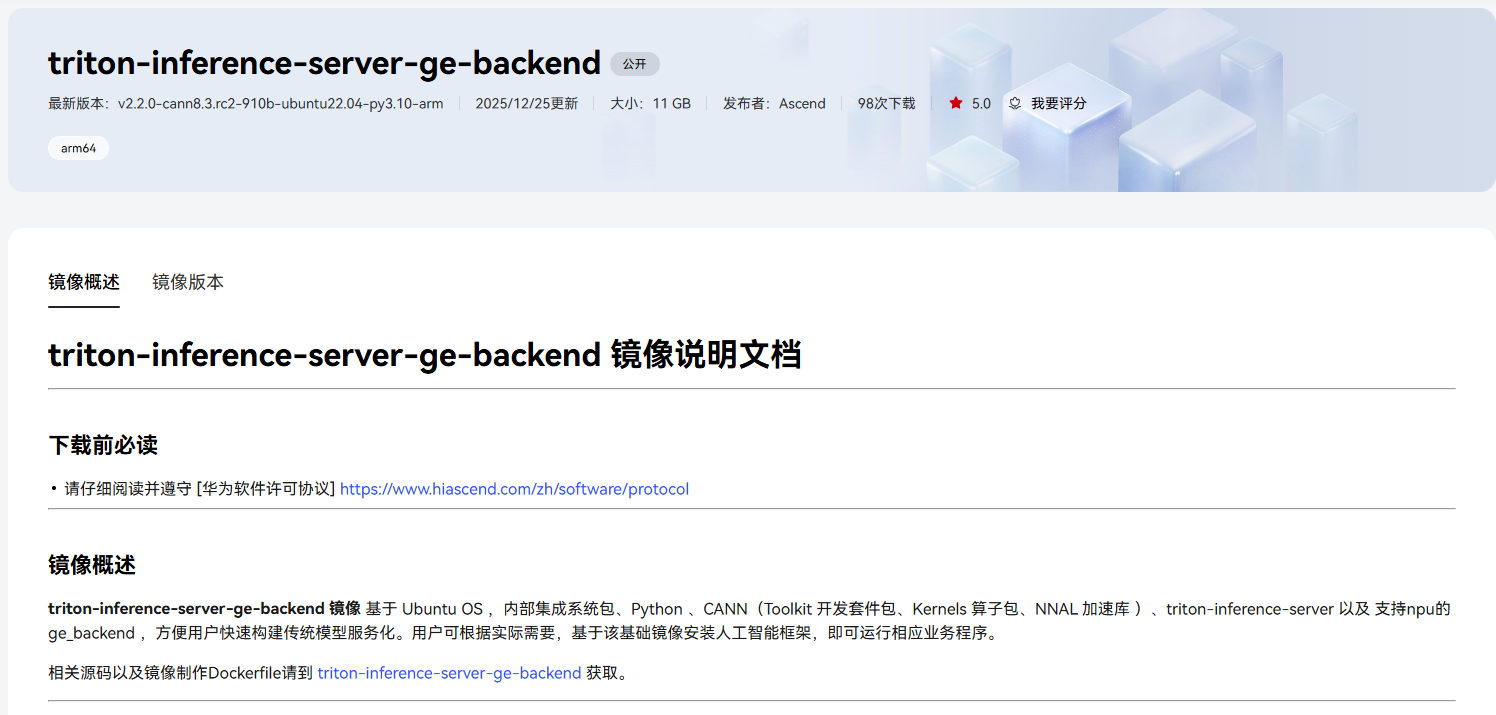
上面那个一般都要二十多g,如果想要简洁一些的可以选择 cann 镜像,只预装了cann-toolkit和python,一般有十多g。
2️⃣下面是容器里自己配环境的过程
一、安装昇腾npu驱动和固件
如果你在服务器上使用,多半是已经安装过的,只要npu-smi info指令能用就说明是已经安装好了。
然后根据该命令查看已安装驱动的版本:

若没有安装:https://www.hiascend.com/document/detail/zh/canncommercial/80RC2/softwareinst/instg/instg_0003.html?Mode=PmIns&OS=Ubuntu&Software=cannToolKit
如果宿主机使用npu-smi info没问题,但是在容器中不能正常使用,可能是启容器时没有挂载相关路径,可以查看我的另一篇文章:
https://blog.csdn.net/m0_52182894/article/details/156392724?fromshare=blogdetail&sharetype=blogdetail&sharerId=156392724&sharerefer=PC&sharesource=m0_52182894&sharefrom=from_link
二、安装CANN
官方提供的有两种安装方式,离线安装和在线安装,如果有conda可以直接在线安装更方便,想安装特定版本就离线安装。
离线安装
参考的官方教程:https://www.hiascend.com/document/detail/zh/canncommercial/700/envdeployment/instg/instg_0038.html
1.安装依赖
官方教程:https://www.hiascend.com/document/detail/zh/canncommercial/700/envdeployment/instg/instg_0028.html
根据官方文档的要求,如果离线安装则需要先安装依赖。
若下列依赖没装直接运行指令安装:
apt-get update
apt-get install -y gcc g++ make cmake zlib1g zlib1g-dev openssl libsqlite3-dev libssl-dev libffi-dev unzip pciutils net-tools libblas-dev gfortran libblas3
如果没有装pip
apt-get update
apt-get install -y python3.10-venv python3-pip
apt install python-is-python3					# 将python命令映射到python3上的小工具
2.版本选择
先通过昇腾社区查阅配套表,来找到适合自己驱动版本的CANN
访问昇腾社区 资源下载中心 > 社区版
- https://www.hiascend.com/developer/download/community/result?cann=8.3.RC1&product=2&model=17下载CANN
选择 CANN 版本
- 先选择你的硬件信息;
- 在页面上找到你正在使用或打算使用的 CANN 版本(可以先尝试推荐的)。
- 点击
查看文档。
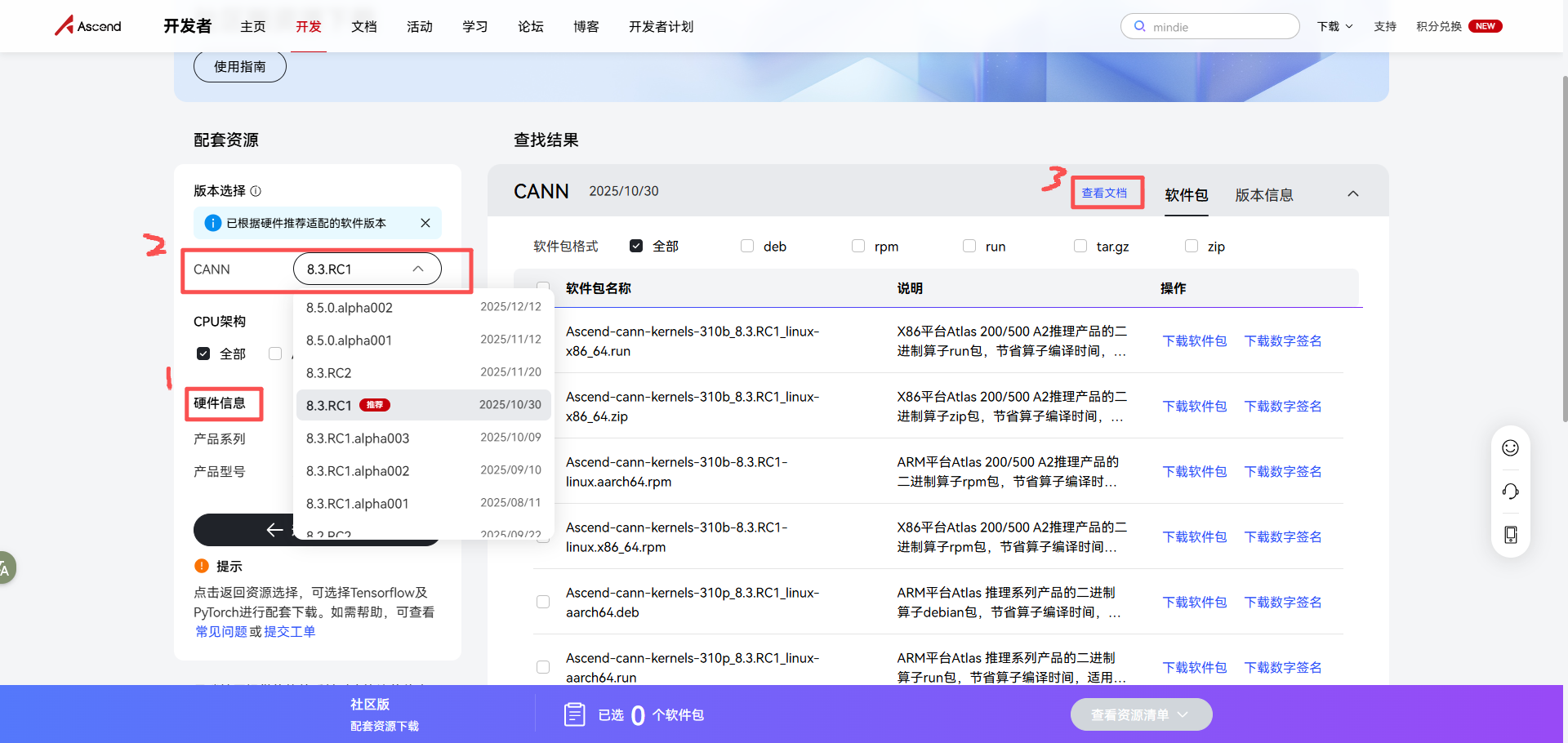
点开版本说明查看是否有对应的驱动版本。

版本说明中的表格会明确列出:CANN 版本 -> 配套Ascend HDK版本。
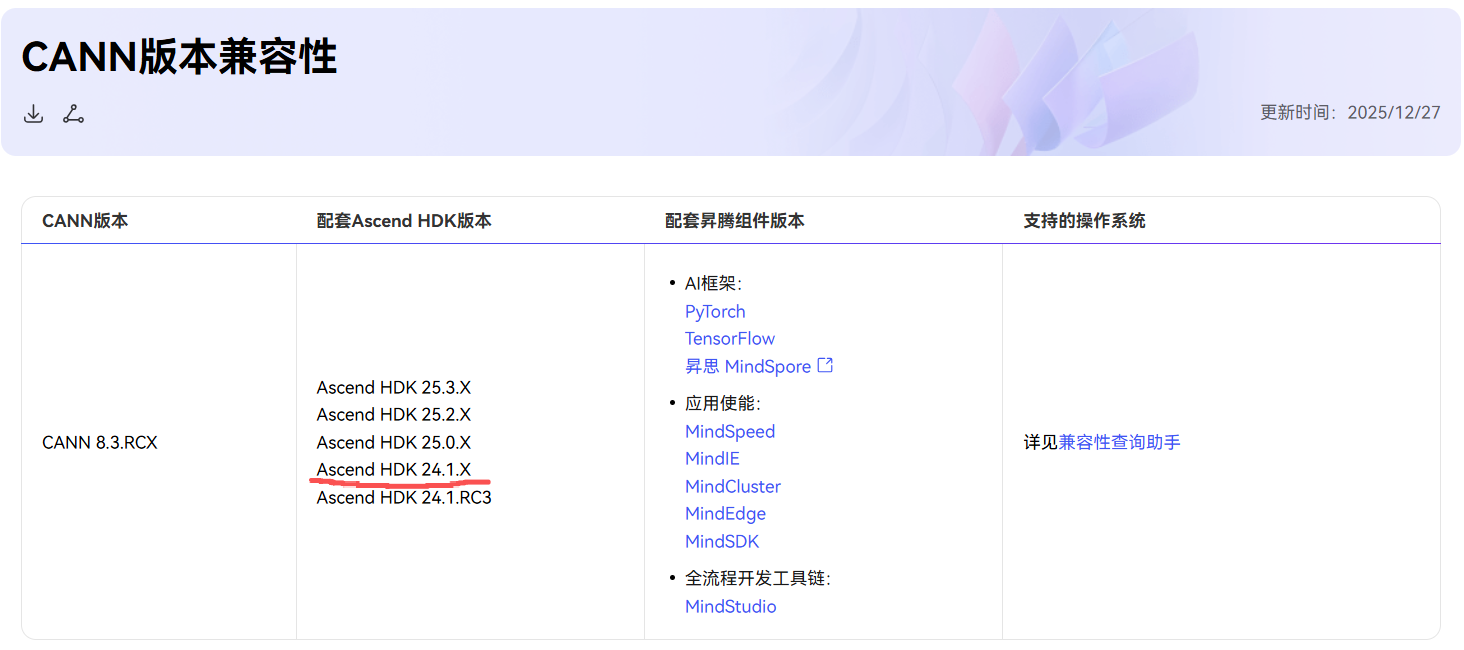
我的驱动版本是24.1.0.1,可以看到这个版本的CANN支持Ascend HDK 24.1.X

3.下载并安装
确定好自己要安装的cann版本后,退回到下载页面,选择自己对应的选择CPU架构和软件包格式就可以下载安装了。
- 注意:安装cann-kernel和kernel-toolkit时,要先安装toolkit再安装kernel,要么可能会安装失败。
- 具体安装步骤可参考https://www.hiascend.com/document/detail/zh/canncommercial/700/envdeployment/instg/instg_0038.html
deb格式
# 安装,要先安装toolkit再安装kernel
dpkg -i Ascend-cann-toolkit_8.3.RC1_linux-aarch64.deb
dpkg -i Ascend-cann-kernels-310p_8.3.RC1_linux-aarch64.deb
run格式
# 给运行权限
chmod +x Ascend-cann-toolkit_8.3.RC1_linux-aarch64.run
chmod +x Ascend-cann-kernels-310p_8.3.RC1_linux-aarch64.run
# 安装 Toolkit (默认路径 /usr/local/Ascend)
./Ascend-cann-toolkit_8.3.RC1_linux-aarch64.run --install
# 安装 Kernels
./Ascend-cann-kernels-310p_8.3.RC1_linux-aarch64.run --install
4.环境变量设置
安装完后切记要完成环境变量设置
CANN软件提供进程级环境变量设置脚本,供用户在进程中引用,以自动完成环境变量设置。用户进程结束后自动失效。示例如下(以root用户默认安装路径为例):
source /usr/local/Ascend/ascend-toolkit/set_env.sh
上面的命令只对当前终端生效,也可以将这行命令写入到你 Shell 的启动配置文件中。这样每次你打开一个新的终端窗口时,系统会自动帮你执行这行命令:
# 执行写入命令:
echo "source /usr/local/Ascend/ascend-toolkit/set_env.sh" >> ~/.bashrc
# 让配置立即生效(或者你可以直接关闭终端重新打开):
source ~/.bashrc
在线安装
如果嫌离线安装麻烦,官方也提供了在线安转的方式,直接使用conda安装即可:
官方教程:https://www.hiascend.com/document/detail/zh/canncommercial/83RC1/softwareinst/instg/instg_quick.html?Mode=PmIns&InstallType=netconda&OS=openEuler&Software=cannToolKit
安装指令:
# 安装Toolkit开发套件包
conda config --add channels https://repo.huaweicloud.com/ascend/repos/conda/
conda install ascend::cann-toolkit

# 配置环境变量
source /home/miniconda3/Ascend/ascend-toolkit/set_env.sh

# 安装Kernels算子包
conda install ascend::cann-kernels-310b
三、安装pytorch
先确保安装了使用torch_npu会用到的库
pip install "numpy<2.0.0"				# 个人习惯,装太新的总是会有些其他库有冲突
pip install numpy decorator sympy cffi pyyaml pathlib2 psutil protobuf requests absl-py scipy attrs cloudpickle ml-dtypes tornado pyyaml -i https://mirrors.aliyun.com/pypi/simple
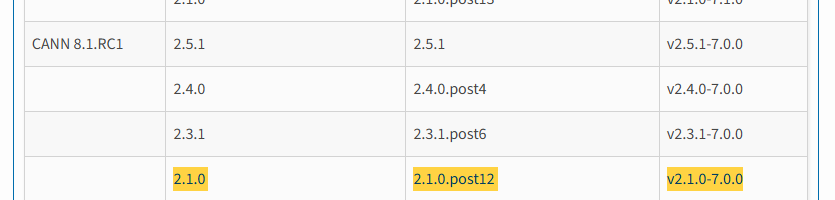
安装好cann后,可以在pypi的官方文档中找到torch的版本对应关系:
https://pypi.org/project/torch-npu/#ascend-auxiliary-software
如图
安装torch和torch_npu:
官方教程:
torch:https://www.hiascend.com/document/detail/zh/Pytorch/60RC1/configandinstg/instg/insg_0006.html
torch_npu:https://www.hiascend.com/document/detail/zh/Pytorch/60RC1/configandinstg/instg/insg_0007.html
可以直接在线安装:
pip3 install torch==2.1.0
pip3 install torch-npu==2.1.0.post12
也可以先离线下载轮子再安装(注意要下载cpu版本的torch!):
torch轮子下载网址:https://download.pytorch.org/whl/torch/
torch_npu轮子下载网址:https://pypi.org/project/torch-npu/#history
pip install torch-2.6.0-cp310-cp310-manylinux_2_17_aarch64.manylinux2014_aarch64.whl
pip install torch_npu-2.6.0-cp310-cp310-manylinux_2_17_aarch64.manylinux2014_aarch64.whl
四、环境验证
可直接粘贴到终端进行验证
python - <<'PY'
import torch
import torch_npu

print("torch:", torch.__version__)
print("torch_npu:", torch_npu.__version__)
print("NPU available:", torch.npu.is_available())
print("NPU device count:", torch.npu.device_count())
if torch.npu.device_count() > 0:
    print("Current device:", torch.npu.current_device())
    print("Device name:", torch.npu.get_device_name(0))
PY
让npu进行一次计算来测试环境,如果输出SUCCESS: Environment is ready!就说明都OK了
# test_npu.py
# Author:vanity
import torch
import torch_npu
import sys
import os

# 设置启动方式为 spawn,解决了 SystemError 和驱动上下文混乱的问题
try:
    torch.multiprocessing.set_start_method('spawn', force=True)
except RuntimeError:
    pass

# 所测试的卡号
TARGET_DEVICE_ID = 0

def run_test():
    try:
        print(f"-" * 30)
        print(f"Torch Version: {torch.__version__}")
        print(f"PID: {os.getpid()}")

        if not torch.npu.is_available():
            print("ERROR: NPU is not available.")
            sys.exit(1)

        torch.npu.set_device(TARGET_DEVICE_ID)
        current_device = torch.npu.current_device()
        print(f"Selected Device ID: {current_device}")

        print(f"-" * 30)
        print(f"Running calculation...")

        x = torch.randn(2, 2).npu()
        y = torch.randn(2, 2).npu()
        z = x + y

        # 显式同步,捕捉计算错误
        torch.npu.synchronize()

        print(f"Calculation Result:\n{z.cpu()}")
        print(f"-" * 30)
        print("SUCCESS: Environment is ready!")

    except Exception as e:
        print(f"ERROR: An exception occurred:\n{e}")

if __name__ == "__main__":
    run_test()
over

昇腾计算产业是基于昇腾系列(HUAWEI Ascend)处理器和基础软件构建的全栈 AI计算基础设施、行业应用及服务,https://devpress.csdn.net/organization/setting/general/146749包括昇腾系列处理器、系列硬件、CANN、AI计算框架、应用使能、开发工具链、管理运维工具、行业应用及服务等全产业链
更多推荐

 15
15 0
0- 0


 已为社区贡献2条内容

所有评论(0)