AscendC算子代码阅读指南
分析华为昇腾AscendC算子
吐槽
相比cuda,网上关于AscendC的资料,数量少且质量不高。我来写一个。看完本篇,希望读者可以看懂昇腾平台上的算子代码。
Reference
[1] Ascend C保姆级教程:我的第一份Ascend C代码
[2] Ascend C 多核并行/流水计算/dobule buffer技术
[3] 一文看懂昇腾达芬奇架构计算单元
[4] Ascend C算子开发接口
[5] asc-devkit文档
前置知识
华为昇腾npu,达芬奇架构。每张卡上有若干个AI Core。
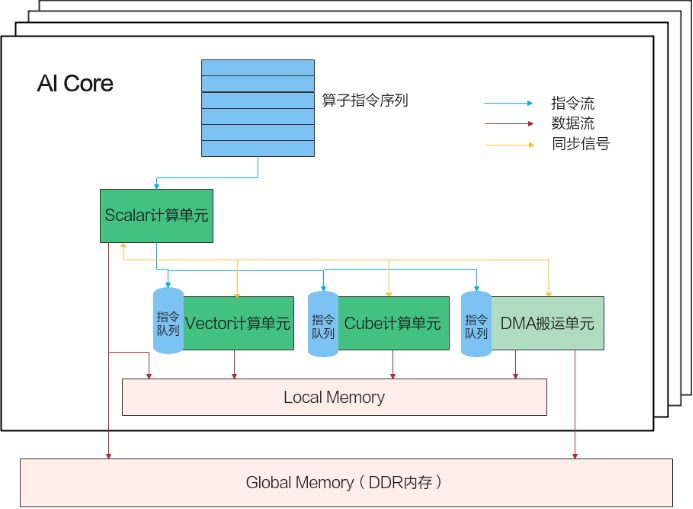
pic source:昇腾Ascend C编程入门教程(纯干货)
每个Ai Core中,有1个Cube计算单元,负责矩阵计算,2个Vector计算单元,负责向量计算。MTE(Memory Transfer Engine)负责数据搬运。需要指出的是,AscendC编写的代码,被编译成二进制后,由Scalar单元负责指令执行和分发。在我理解,Scalar就是一个cpu的能力。for循环需要Scala计算单元执行,向量运算由Vector负责。理解算子代码,要点:指令的分发是串行的。不同的计算单元并行执行各自的指令。Vector计算单元,Cube计算单元,MTE搬运单元由各自的指令队列。每个单元串行执行指令。 在没有数据依赖的情况下,MTE在搬运数据的同时,Vector可以执行向量运算。在存在数据依赖的情况下,比如MTE搬入数据完成后,Vector负责计算,两个之前需要信号同步:SetFlag/WaitFlag。double buffer就是从UB申请了两块空间。
template <HardEvent event>
__aicore__ inline void SetFlag(int32_t eventID)
template <HardEvent event>
__aicore__ inline void WaitFlag(int32_t eventID)
SetFlag<HardEvent::V_S>(0), 这条指令发送到Vector计算单元,由其设置对应的信号。
WaitFlag<HardEvent::V_S>(0), 这条指令由Scalar计算单元执行,等待Vector计算单元设置对应的时间,然后程序才会向下执行。
针对Atlas 推理系列产品AI Core,eventID的数据范围为:0-7。
HardEvent的定义:
enum class HardEvent : uint8_t {
    // 名称(源流水_目标流水),例如MTE2_V,代表PIPE_MTE2为源流水,PIPE_V为目标流水。标识从PIPE_MTE2到PIPE_V的同步,PIPE_V等待PIPE_MTE2。
    MTE2_MTE1
    MTE1_MTE2
    MTE1_M
    M_MTE1
    MTE2_V
    V_MTE2
    MTE3_V
    V_MTE3
    M_V
    V_M
    V_V
    MTE3_MTE1
    MTE1_MTE3
    MTE1_V
    MTE2_M
    M_MTE2
    V_MTE1
    M_FIX // 当前版本暂不支持
    FIX_M // 当前版本暂不支持
    MTE3_MTE2
    MTE2_MTE3
    S_V
    V_S
    S_MTE2
    MTE2_S
    S_MTE3
    MTE3_S
    MTE2_FIX // 当前版本暂不支持
    FIX_MTE2 // 当前版本暂不支持
    FIX_S // 当前版本暂不支持
    M_S
    FIX_MTE3 // 当前版本暂不支持
}
不同的型号,AI Core的数量不同。根据下图提供的线索,找到配置文件。
pic source:叭一叭AscendC算子支持芯片的运算单元数和AscendC提供的API
https://gitcode.com/cann/runtime/tree/master/src/platform/platform_config
| 910B1 | 910B2 | 910B3 | 910B4 | |
|---|---|---|---|---|
| ai_core_cnt | 24 | 24 | 20 | 20 |
| cube_core_cnt | 24 | 24 | 20 | 20 |
| vector_core_cnt | 48 | 48 | 40 | 40 |
在torch_npu中,torch.randn((2, 2), device=torch.device(‘npu’)),其数据存储在GM(Global Memory)。
AIV中,MTE2负责将数据从GM搬运到UB。MTE3负载将数据从UB搬运到GM。Vector提供的函数接口(Add, Sub, Mul),输入和输出需要存储在UB上。LocalTensor的数据存储在UB上。
每个AiCore上有2个Vector计算单元,2块UB。每块UB的大小:ub_size = 196608 bytes = 192 KB × 1024 bytes/KB。
template <typename T>
__aicore__ inline void Add(const LocalTensor<T>& dstLocal, const LocalTensor<T>& src0Local, const LocalTensor<T>& src1Local, const int32_t& calCount)

template <typename T>
__aicore__ inline void Mul(const LocalTensor<T>& dstLocal, const LocalTensor<T>& src0Local, const LocalTensor<T>& src1Local, const int32_t& calCount)
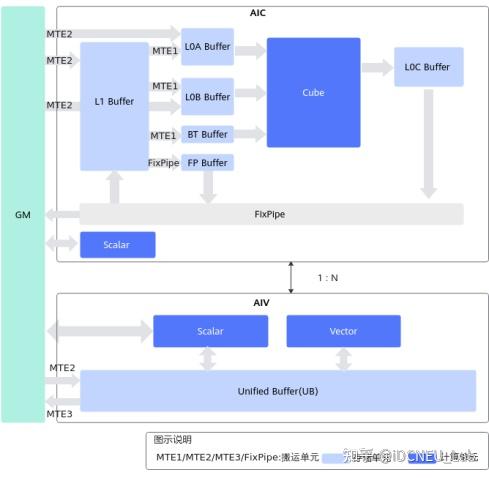
pic source:昇腾处理器的硬件架构与关键技术
算子源码分析
官方给出的算子样例add_custom.cpp。
BUFFER_NUM = 2,inQueueX有两块buffer。
#include "kernel_operator.h"

constexpr int32_t TOTAL_LENGTH = 8 * 2048;                            // total length of data
constexpr int32_t USE_CORE_NUM = 8;                                   // num of core used
constexpr int32_t BLOCK_LENGTH = TOTAL_LENGTH / USE_CORE_NUM;         // length computed of each core
constexpr int32_t TILE_NUM = 8;                                       // split data into 8 tiles for each core
constexpr int32_t BUFFER_NUM = 2;                                     // tensor num for each queue
constexpr int32_t TILE_LENGTH = BLOCK_LENGTH / TILE_NUM / BUFFER_NUM; // separate to 2 parts, due to double buffer

class KernelAdd {
public:
    __aicore__ inline KernelAdd() {}
    __aicore__ inline void Init(GM_ADDR x, GM_ADDR y, GM_ADDR z)
    {
        xGm.SetGlobalBuffer((__gm__ half *)x + BLOCK_LENGTH * AscendC::GetBlockIdx(), BLOCK_LENGTH);
        yGm.SetGlobalBuffer((__gm__ half *)y + BLOCK_LENGTH * AscendC::GetBlockIdx(), BLOCK_LENGTH);
        zGm.SetGlobalBuffer((__gm__ half *)z + BLOCK_LENGTH * AscendC::GetBlockIdx(), BLOCK_LENGTH);
        pipe.InitBuffer(inQueueX, BUFFER_NUM, TILE_LENGTH * sizeof(half));
        pipe.InitBuffer(inQueueY, BUFFER_NUM, TILE_LENGTH * sizeof(half));
        pipe.InitBuffer(outQueueZ, BUFFER_NUM, TILE_LENGTH * sizeof(half));
    }
    __aicore__ inline void Process()
    {
        int32_t loopCount = TILE_NUM * BUFFER_NUM;
        for (int32_t i = 0; i < loopCount; i++) {
            CopyIn(i);
            Compute(i);
            CopyOut(i);
        }
    }

private:
    __aicore__ inline void CopyIn(int32_t progress)
    {
        AscendC::LocalTensor<half> xLocal = inQueueX.AllocTensor<half>();
        AscendC::LocalTensor<half> yLocal = inQueueY.AllocTensor<half>();
        AscendC::DataCopy(xLocal, xGm[progress * TILE_LENGTH], TILE_LENGTH);
        AscendC::DataCopy(yLocal, yGm[progress * TILE_LENGTH], TILE_LENGTH);
        inQueueX.EnQue(xLocal);
        inQueueY.EnQue(yLocal);
    }
    __aicore__ inline void Compute(int32_t progress)
    {
        AscendC::LocalTensor<half> xLocal = inQueueX.DeQue<half>();
        AscendC::LocalTensor<half> yLocal = inQueueY.DeQue<half>();
        AscendC::LocalTensor<half> zLocal = outQueueZ.AllocTensor<half>();
        AscendC::Add(zLocal, xLocal, yLocal, TILE_LENGTH);
        outQueueZ.EnQue<half>(zLocal);
        inQueueX.FreeTensor(xLocal);
        inQueueY.FreeTensor(yLocal);
    }
    __aicore__ inline void CopyOut(int32_t progress)
    {
        AscendC::LocalTensor<half> zLocal = outQueueZ.DeQue<half>();
        AscendC::DataCopy(zGm[progress * TILE_LENGTH], zLocal, TILE_LENGTH);
        outQueueZ.FreeTensor(zLocal);
    }

private:
    AscendC::TPipe pipe;
    AscendC::TQue<AscendC::QuePosition::VECIN, BUFFER_NUM> inQueueX, inQueueY;
    AscendC::TQue<AscendC::QuePosition::VECOUT, BUFFER_NUM> outQueueZ;
    AscendC::GlobalTensor<half> xGm;
    AscendC::GlobalTensor<half> yGm;
    AscendC::GlobalTensor<half> zGm;
};

extern "C" __global__ __aicore__ void add_custom(GM_ADDR x, GM_ADDR y, GM_ADDR z)
{
    if (g_coreType == AIC) {
        return;
    }
    KernelAdd op;
    op.Init(x, y, z);
    op.Process();
}

#ifndef ASCENDC_CPU_DEBUG
void add_custom_do(uint32_t blockDim, void *stream, uint8_t *x, uint8_t *y, uint8_t *z)
{
    add_custom<<<blockDim, nullptr, stream>>>(x, y, z);
}
#endif
从官网抄下一些文字解释。参考文档:Ascend C算子开发接口。
TPipe用于管理内存和同步。
TQueBind简介,文档链接。TQueBind绑定源逻辑位置和目的逻辑位置,根据源位置和目的位置,来确定内存分配的位置 、插入对应的同步事件,帮助开发者解决内存分配和管理、同步等问题。Tque是TQueBind的简化模式。通常情况下开发者使用TQue进行编程,TQueBind对外提供一些特殊数据通路的内存管理和同步控制,涉及这些通路时可以直接使用TQueBind。
| 数据通路 | TQueBind定义 | TQue定义 |
|---|---|---|
| GM->VECIN | TQueBind<TPosition::GM, TPosition::VECIN, 1> | TQue<TPosition::VECIN, 1> |
| VECOUT->GM | TQueBind<TPosition::VECOUT, TPosition::GM, 1> | TQue<TPosition::VECOUT, 1> |
我在autodl租用了一台昇腾910B,在/usr/local/Ascend/ascend-toolkit/8.1.RC1可以看到一些cann的头文件。这部分代码已经开源,在asc-devkit
TQue类的定义:
/*
/usr/local/Ascend/ascend-toolkit/8.1.RC1/aarch64-linux/include/ascendc/include/basic_api/impl/kernel_event.h
*/
__aicore__ constexpr TPosition GetBufferLogicPos(TPosition pos, bool isSrc)
{
    } else if (pos == TPosition::VECIN) {
        return isSrc ? TPosition::GM : TPosition::VECIN;
    } else if (pos == TPosition::VECOUT) {
        return isSrc ? TPosition::VECOUT : TPosition::GM;
    }
}

/*
ascendc/include/basic_api/interface/kernel_tpipe.h
*/
template <TPosition pos, int32_t depth, auto mask = 0>
class TQue : public TQueBind<GetBufferLogicPos(pos, true), GetBufferLogicPos(pos, false), depth, mask>
blockDim是逻辑核的概念,取值范围为[1,65535]。为了充分利用硬件资源,一般设置为物理核的核数或其倍数。对于耦合架构和分离架构,blockDim在运行时的意义和设置规则有一些区别,具体说明如下:
- 耦合架构:由于其Vector、Cube单元是集成在一起的,blockDim用于设置启动多个AICore核实例执行,不区分Vector、Cube。
- 分离架构
- 针对仅包含Vector计算的算子,blockDim用于设置启动多少个Vector(AIV)实例执行。
- 针对仅包含Cube计算的算子,blockDim用于设置启动多少个Cube(AIC)实例执行。
- 针对Vector/Cube融合计算的算子,启动时,按照AIV和AIC组合启动,blockDim用于设置启动多少个组合执行,比如某款AI处理器上有40个Vector核和20个Cube核,一个组合是2个Vector核和1个Cube核。如果设置为20,此时会启动20个组合,即40个Vector核和20个Cube核。
int32_t main(int32_t argc, char *argv[])
{
    uint32_t blockDim = 8;
    size_t inputByteSize = 8 * 2048 * sizeof(uint16_t);
    size_t outputByteSize = 8 * 2048 * sizeof(uint16_t);

    CHECK_ACL(aclInit(nullptr));
    int32_t deviceId = 0;
    CHECK_ACL(aclrtSetDevice(deviceId));
    aclrtStream stream = nullptr;
    CHECK_ACL(aclrtCreateStream(&stream));

    uint8_t *xHost, *yHost, *zHost;
    uint8_t *xDevice, *yDevice, *zDevice;

    CHECK_ACL(aclrtMallocHost((void **)(&xHost), inputByteSize));
    CHECK_ACL(aclrtMallocHost((void **)(&yHost), inputByteSize));
    CHECK_ACL(aclrtMallocHost((void **)(&zHost), outputByteSize));
    CHECK_ACL(aclrtMalloc((void **)&xDevice, inputByteSize, ACL_MEM_MALLOC_HUGE_FIRST));
    CHECK_ACL(aclrtMalloc((void **)&yDevice, inputByteSize, ACL_MEM_MALLOC_HUGE_FIRST));
    CHECK_ACL(aclrtMalloc((void **)&zDevice, outputByteSize, ACL_MEM_MALLOC_HUGE_FIRST));

    ReadFile("./input/input_x.bin", inputByteSize, xHost, inputByteSize);
    ReadFile("./input/input_y.bin", inputByteSize, yHost, inputByteSize);

    CHECK_ACL(aclrtMemcpy(xDevice, inputByteSize, xHost, inputByteSize, ACL_MEMCPY_HOST_TO_DEVICE));
    CHECK_ACL(aclrtMemcpy(yDevice, inputByteSize, yHost, inputByteSize, ACL_MEMCPY_HOST_TO_DEVICE));

    add_custom_do(blockDim, stream, xDevice, yDevice, zDevice);
    CHECK_ACL(aclrtSynchronizeStream(stream));

    CHECK_ACL(aclrtMemcpy(zHost, outputByteSize, zDevice, outputByteSize, ACL_MEMCPY_DEVICE_TO_HOST));
    WriteFile("./output/output_z.bin", zHost, outputByteSize);

    CHECK_ACL(aclrtFree(xDevice));
    CHECK_ACL(aclrtFree(yDevice));
    CHECK_ACL(aclrtFree(zDevice));
    CHECK_ACL(aclrtFreeHost(xHost));
    CHECK_ACL(aclrtFreeHost(yHost));
    CHECK_ACL(aclrtFreeHost(zHost));

    CHECK_ACL(aclrtDestroyStream(stream));
    CHECK_ACL(aclrtResetDevice(deviceId));
    CHECK_ACL(aclFinalize());
    return 0;
}
在main函数中,xDevice,yDevice,zDevice分配的内存空间位于GM。blockDim =8,程序使用4个AICore,8个Vector计算单元。
add_custom_do(blockDim, stream, xDevice, yDevice, zDevice); xDevice,yDevice,zDevice地址分别传递给核函数中的x,y,z。
add_custom中,我增加了三行代码。add_custom算子用不到Cube计算单元,增加return的逻辑。
    if (g_coreType == AIC) {
        return;
    }
内部函数的调用关系示意图如下: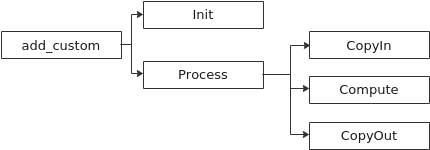
pic source:Ascend C保姆级教程:我的第一份Ascend C代码
初始化函数Init主要完成以下内容:设置输入输出Global Tensor的Global Memory内存地址,通过Pipe内存管理对象为输入输出Queue分配内存。
本样例将数据切分成8块,平均分配到8个核上运行,每个核上处理的数据大小BLOCK_LENGTH为2048。那么我们是如何实现这种切分的呢?
每个核上处理的数据地址需要在起始地址上增加GetBlockIdx()*BLOCK_LENGTH(每个block处理的数据长度)的偏移来获取。这样也就实现了多核并行计算的数据切分。
以输入x为例,x + BLOCK_LENGTH * GetBlockIdx()即为单核处理程序中x在Global Memory上的内存偏移地址,获取偏移地址后,使用GlobalTensor类的SetGlobalBuffer接口设定该核上Global Memory的起始地址以及长度。具体示意图如下。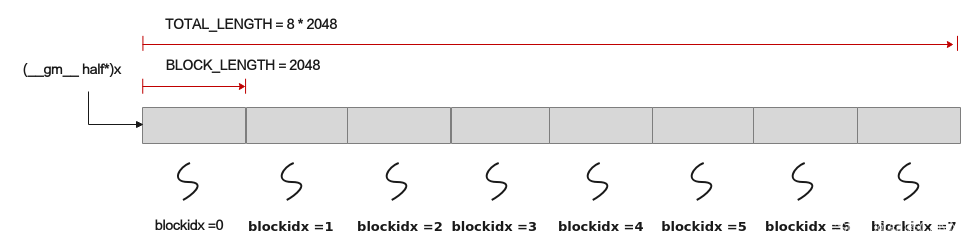
pic source:Ascend C保姆级教程:我的第一份Ascend C代码
Process函数中主要由三个步骤:CopyIn,Compute,CopyOut。
CopyIn负责从GM搬运数据到UB。AscendC::DataCopy使用MTE2提供的数据搬入能力。
Compute负责计算。AscendC::Add由Vector负责计算,计算结果存储到zLocal。
CopyOut负责将计算结果从UB拷贝到GM。AscendC::DataCopy使用MTE3提供的数据搬出能力。
CopyIn中数据搬入的指令下发MTE2。
Compute中AscendC::Add指令下发给Vector单元。
CopyOut中数据搬出的指令下发MTE3。
三个器件需要协作,需要使用同步指令:
- 在CopyIn,MTE2将GM中的数据搬运到xLocal,yLocal,需要调用SetFlag<MTE2_V>,通知Vector可以进行计算。SetFlag<MTE2_V>由inQueueX.EnQue(xLocal)函数触发。
- 在Compute,Vector计算单元需要调用WaitFlag<MTE2_V>,等待数据拷贝完成,然后才能执行AscendC::Add指令。WaitFlag<MTE2_V>由inQueueX.DeQue触发。AscendC::Add计算完成之后,Vector计算单元会执行SetFlag<V_MTE3>,通知MTE3搬出数据。SetFlag<V_MTE3>由outQueueZ.EnQue触发。
- 在CopyOut,outQueueZ.DeQue会触发WaitFlag<V_MTE3>,等待Vector计算完成,然后执行AscendC::DataCopy,将zLocal拷贝到zGM。
DataCopy函数说明文档。在使用DataCopy接口进行数据传输时,必须确保搬运的数据长度和操作数在UB上的起始地址为32字节对齐;在进行向量计算时,操作数的起始地址也需满足32字节对齐的要求。source。非32B对齐场景,需要使用DataCopyPad接口。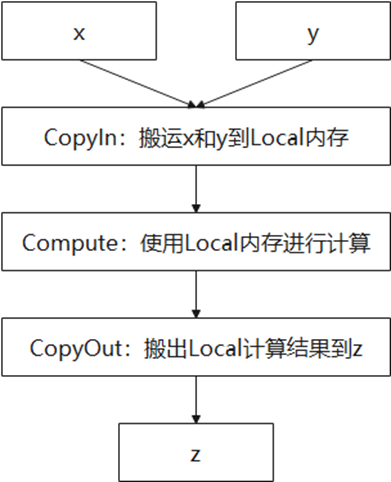
pic source:Ascend C保姆级教程:我的第一份Ascend C代码
double buffer的原理分析
在当前的硬件情况下,计算快于拷贝。double buffer主要是为了提高计算核心的利用率。在计算核心进行计算的同时,MTE可以拷贝另一部分数据。
double buffer机制可以实现下图的结果。
每个并行任务(Stage1、2、3)需要依次完成n个数据切片的处理。Stage1,Stage2,Stage3分别代表:数据搬入,计算,数据搬出。 Progress1、2、3代表处理的数据分片,对于同一片数据,Stage1、Stage2、Stage3之间的处理具有依赖关系,需要串行处理;不同的数据切片,同一时间点,可以有多个任务在并行处理,由此达到任务并行、提升性能的目的。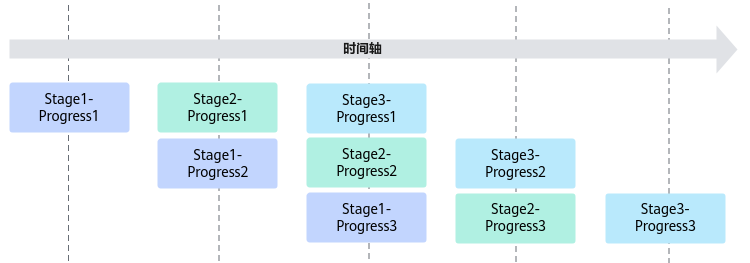
pic source:Ascend C算子性能优化实用技巧01——流水优化
在Init函数中, inQueueX有两块存储空间。inQueueY,outQueueZ同理。
        pipe.InitBuffer(inQueueX, BUFFER_NUM, TILE_LENGTH * sizeof(half));
        pipe.InitBuffer(inQueueY, BUFFER_NUM, TILE_LENGTH * sizeof(half));
        pipe.InitBuffer(outQueueZ, BUFFER_NUM, TILE_LENGTH * sizeof(half));
TQue继承自TQueBind。源码
TQueBind定义的几个函数:
- AllocTensor
- EnQue
- DeQue
- FreeTensor
inQueueX中的两块buffer分别用inBuf0, inBuf1表示。
在Process函数的for循环中,scalar按序下发CopyIn,Compute,CopyOut中包含的指令。
i = 0
CopyIn(0);
Compute(0);
CopyOut(0);
在CopyIn函数中,AscendC::LocalTensor xLocal = inQueueX.AllocTensor(); 使用inBuf0。inQueueX.EnQue(xLocal)中包含SetFlag<MTE2_V>。MTE2触发SetFlag<MTE2_V>,通知Vector计算单元可以计算。
在Compute函数中,AscendC::LocalTensor xLocal = inQueueX.DeQue();包含有WaitFlag<MTE2_V>。Vector计算单元等待数据完成copy,才会执行AscendC::Add指令。
inQueueX.FreeTensor(xLocal); FreeTensor函数中包含SetFlag<V_MTE2>。Vector计算单元完成计算后,触发SetFlag,通知这块内存可以写入新的数据。在i = 2时候,程序向inBuf0拷贝新的数据。
i = 1
CopyIn(1);
Compute(1);
CopyOut(1);
在CopyIn函数中,AscendC::LocalTensor xLocal = inQueueX.AllocTensor(); 使用inBuf1。
在Compute函数中,inQueueX.FreeTensor(xLocal); Vector计算单元完成计算后,触发SetFlag<V_MTE2>,通知这块内存可以写入新的数据。在i = 3时候,程序向inBuf1拷贝新的数据。
i = 2
CopyIn(2);
Compute(2);
CopyOut(2);
在CopyIn函数中,AscendC::LocalTensor xLocal = inQueueX.AllocTensor(); 使用inBuf0。
在Compute函数中,inQueueX.FreeTensor(xLocal); Vector计算单元完成计算后,触发SetFlag<V_MTE2>,通知这块内存可以写入新的数据。在i = 4时候,程序向inBuf0拷贝新的数据。
i = 3
CopyIn(3);
Compute(3);
CopyOut(3);
在CopyIn函数中,AscendC::LocalTensor xLocal = inQueueX.AllocTensor(); 使用inBuf1。
在Compute函数中,inQueueX.FreeTensor(xLocal); Vector计算单元完成计算后,触发SetFlag<V_MTE2>,通知这块内存可以写入新的数据。在i = 5时候,程序向inBuf1拷贝新的数据。
EnQue/DeQue代码实现片段
EnQue代码实现片段
template <TPosition src, TPosition dst, int32_t depth, auto mask>
template <typename T>
__aicore__ inline __sync_alias__ bool TQueBind<src, dst, depth, mask>::EnQue(const LocalTensor<T>& tensor)
{
    auto buf = tensor.GetBufferHandle();
    return EnQue(reinterpret_cast<TBufHandle>(buf));
}

template <TPosition src, TPosition dst, int32_t depth, auto mask>
__aicore__ inline __sync_alias__ bool TQueBind<src, dst, depth, mask>::EnQue(TBufHandle buf)
{
    auto ptr = reinterpret_cast<TBufType*>(buf);
    if constexpr (depth == 1) {
        this->que_ = buf;
    } else {
        this->que_[this->tail] = buf;
    }
    this->usedCount++;

    auto enQueEvtID = GetTPipePtr()->AllocEventID<enQueEvt>();
    SetFlag<enQueEvt>(enQueEvtID);
    ptr->enQueEvtID = enQueEvtID;

    if constexpr (depth != 1) {
        if (++this->tail >= depth) {
            this->tail = 0;
        }
    }
}
EnQue中包含SetFlag(enQueEvtID)。
enQueEvt是根据srcHardType和dstHardType确定的。
当从GM拷贝数据到UB,例如CopyIn中的AscendC::DataCopy(xLocal, xGm[progress * TILE_LENGTH], TILE_LENGTH); 此时src == Hardware::GM,dst == Hardware::UB,那么enQueEvt=HardEvent::MTE2_V。
当从UB拷贝数据到GM,例如CopyOut中的AscendC::DataCopy(zGm[progress * TILE_LENGTH], zLocal, TILE_LENGTH); 此时src == Hardware::UB,dst == Hardware::GM,那么enQueEvt= HardEvent::V_MTE3。
DeQue代码实现片段:
template <TPosition src, TPosition dst, int32_t depth, auto mask>
template <typename T>
__aicore__ inline __sync_alias__ LocalTensor<T> TQueBind<src, dst, depth, mask>::DeQue()
{
    auto buf = DeQue();
    auto ret = Buf2Tensor<T>(buf);
    return ret;
}

template <TPosition src, TPosition dst, int32_t depth, auto mask>
__aicore__ inline __sync_alias__ TBufHandle TQueBind<src, dst, depth, mask>::DeQue()
{
    TBufHandle buf;
    if constexpr (depth == 1) {
        buf = this->que_;
    } else {
        buf = this->que_[this->head];
    }
    if (ptr->enQueEvtID != INVALID_TEVENTID) {
        WaitFlag<enQueEvt>(ptr->enQueEvtID);
        GetTPipePtr()->ReleaseEventID<enQueEvt>(ptr->enQueEvtID);
        ptr->enQueEvtID = INVALID_TEVENTID;
    }
    if constexpr (depth != 1) {
        if (++this->head >= depth) {
            this->head = 0;
        }
    }
}
enQueEvt参考上述说明。DeQue中包含WaitFlag。WaitFlag获取到事件之后,就释放了:
GetTPipePtr()->ReleaseEventID。
FreeTensor/AllocTensor
FreeTensor代码实现片段
template <TPosition src, TPosition dst, int32_t depth, auto mask>
template <typename T>
__aicore__ inline void TQueBind<src, dst, depth, mask>::FreeTensor(LocalTensor<T>& tensor)
{
    FreeBuffer(tensor.GetBufferHandle());
    return;
}

template <TPosition src, TPosition dst, int32_t depth, auto mask>
__aicore__ inline void TQueBind<src, dst, depth, mask>::FreeBuffer(TBufHandle buf)
{
    auto ptr = reinterpret_cast<TBufType*>(buf);
    ptr->freeBufEvtID = GetTPipePtr()->AllocEventID<freeBufEvt>();
    SetFlag<freeBufEvt>(ptr->freeBufEvtID);
    ptr->state = TBufState::FREE;
    this->bufUsedCount--;
}
当src == Hardware::GM,dst == Hardware::UB,那么freeBufEvt = HardEvent::V_MTE2。
当src == Hardware::UB,dst == Hardware::GM,那么freeBufEvt = HardEvent::MTE3_V。
SetFlag通知这块内存可以使用。
以add_custom算子为例
当i = 0时,在Compute函数中,inQueueX.FreeTensor(xLocal),SetFlag<V_MTE2>,通知MTE2拷贝数据。ptr->freeBufEvtID赋值为申请的event id。这个事件在i = 2时候,在CopyIn函数中被消费(inQueueX.AllocTensor<half>).
AllocTensor代码实现片段
template <TPosition src, TPosition dst, int32_t depth, auto mask>
__aicore__ inline TBufHandle TQueBind<src, dst, depth, mask>::AllocBuffer()
{
    do {
        ret = this->bufStart + this->bufCursor;
        if constexpr (config.bufferNumber != 1) {
            this->bufCursor += 1;
            if (this->bufCursor == this->bufNum) {
                this->bufCursor = 0;
            }
        }
        if (ret->state == TBufState::FREE) {
            ret->state = TBufState::OCCUPIED;
            if (ret->freeBufEvtID != INVALID_TEVENTID) {
                WaitFlag<freeBufEvt>(ret->freeBufEvtID);
                GetTPipePtr()->ReleaseEventID<freeBufEvt>(ret->freeBufEvtID);
                ret->freeBufEvtID = INVALID_TEVENTID;
            }
            break;
        }
        ASCENDC_ASSERT((++size <= this->bufNum), {
            KERNEL_LOG(KERNEL_ERROR, "size is %d, which exceed limits %d", size, static_cast<int32_t>(this->bufNum));
        });
    } while (true);
    this->bufUsedCount++;
}
当i = 0时,在CopyIn函数中,inQueueX.AllocTensor<half>,此时ret->freeBufEvtID = INVALID_TEVENTID。Vector计算单元完成AscendC::Add后,执行inQueueX.FreeTensor中封装的SetFlag<V_MTE2>。
当i = 2时,在CopyIn函数中,inQueueX.AllocTensor<half>,此时ret->freeBufEvtID != INVALID_TEVENTID, 下发WaitFlag<freeBufEvt>指令。MTE2需要等待事件。这就需要等待inBuf0中的数据在 i = 0已经被使用,就是完成AscendC::Add计算。
SetFlag/WaitFlag例子
当Scala需要用到Vector计算的数据,就需要使用HardEvent::V_S类型的同步事件。
例子:moe_v2_fullload_dynamic_quant.h
Process函数
template <typename T>
__aicore__ inline void MoeV2FullLoadDynamicQuant<T>::Process()
{
    if (this->blockIdx_ < this->needCoreNum_) {
        CopyIn();
        SortCompute();
        if (this->blockIdx_ == 0) {
            CopyOutIdx();
        }
        if (this->blockIdx_ == this->needCoreNum_ - 1 && this->expertTokensCountOrCumsumFlag > EXERPT_TOKENS_NONE) {
            ComputeExpertTokenCountOrCumsum();
        } else {
            CopyOutEmpty();
        }
        if (smoothType == 2) {
            CopyOutXQuantEH();
        } else {
            CopyOutXQuant1H();
        }
    }
}
SortCompute函数, Cast, Muls, Duplicate, Concat, Sort, Extract均是Vector计算单元提供的能力。PipeBarrier: 阻塞相同流水,具有数据依赖的相同流水之间需要插此同步。
template <typename T>
__aicore__ inline void MoeV2FullLoadDynamicQuant<T>::SortCompute()
{
    LocalTensor<int32_t> inLocal = sortDataCopyInQueue.DeQue<int32_t>();
    LocalTensor<int32_t> expertIdxLocal = inLocal[0];
    LocalTensor<float> expertIdxLocalFp32 = expertIdxLocal.ReinterpretCast<float>();
    Cast(expertIdxLocalFp32, expertIdxLocal, RoundMode::CAST_ROUND, this->totalLength);
    PipeBarrier<PIPE_V>();
    Muls(expertIdxLocalFp32, expertIdxLocalFp32, (float)-1, this->totalLength);
    PipeBarrier<PIPE_V>();
    int64_t duplicateNum = this->totalLength % ONE_REPEAT_SORT_NUM;
    if (duplicateNum > 0) {
        int duplicateIndex = this->totalLength - duplicateNum;
        uint64_t mask0 = UINT64_MAX;
        mask0 = mask0 << duplicateNum;
        mask0 = mask0 & (UINT64_MAX >> ONE_REPEAT_SORT_NUM);
        uint64_t mask[2] = {mask0, 0};
        Duplicate(expertIdxLocalFp32[duplicateIndex], MIN_FP32, mask, 1, DST_BLK_STRIDE, DST_REP_STRIDE);
        PipeBarrier<PIPE_V>();
    }
    LocalTensor<float> concatLocal;
    LocalTensor<float> tempTensor = tempBuffer.Get<float>(GetSortLen<float>(this->sortNum_));
    Concat(concatLocal, expertIdxLocalFp32, tempTensor, this->sortNum_ / ONE_REPEAT_SORT_NUM);
    PipeBarrier<PIPE_V>();
    LocalTensor<uint32_t> rowIdxLocal = inLocal[this->sortNum_].template ReinterpretCast<uint32_t>();
    LocalTensor<float> sortedLocal = sortedBuffer.Get<float>(GetSortLen<float>(this->sortNum_));
    Sort<float, true>(sortedLocal, concatLocal, rowIdxLocal, tempTensor, this->sortNum_ / ONE_REPEAT_SORT_NUM);
    PipeBarrier<PIPE_V>();
    LocalTensor<float> expandedExpertIdxLocal = expandedExpertIdxCopyOutQueue_.AllocTensor<float>();
    expandDstToSrcRowLocal = expandDstToSrcRowQueue_.AllocTensor<uint32_t>();
    LocalTensor<float> expandDstToSrcRowLocalFp32 = expandDstToSrcRowLocal.ReinterpretCast<float>();
    Extract(expandedExpertIdxLocal, expandDstToSrcRowLocal, sortedLocal, this->sortNum_ / ONE_REPEAT_SORT_NUM);
    PipeBarrier<PIPE_V>();
    Cast(
        expandDstToSrcRowLocalFp32, expandDstToSrcRowLocal.ReinterpretCast<int32_t>(), RoundMode::CAST_ROUND,
        this->totalLength);
    PipeBarrier<PIPE_V>();
    Muls(expandedExpertIdxLocal, expandedExpertIdxLocal, (float)-1, this->totalLength);
    PipeBarrier<PIPE_V>();
    LocalTensor<int32_t> expandedExpertIdxLocalInt32;
    expandedExpertIdxLocalInt32 = expandedExpertIdxLocal.ReinterpretCast<int32_t>();
    Cast(expandedExpertIdxLocalInt32, expandedExpertIdxLocal, RoundMode::CAST_ROUND, this->totalLength);
    PipeBarrier<PIPE_V>();
    expandedExpertIdxCopyOutQueue_.EnQue<int32_t>(expandedExpertIdxLocalInt32);

    LocalTensor<uint32_t> expandedRowIdx = expandedRowIdxCopyOutQueue_.AllocTensor<uint32_t>();
    LocalTensor<uint32_t> expandedRowIdxU32 = expandedRowIdx.ReinterpretCast<uint32_t>();
    Muls(expandDstToSrcRowLocalFp32, expandDstToSrcRowLocalFp32, (float)-1, this->totalLength);
    PipeBarrier<PIPE_V>();
    ArithProgression<int32_t>(inLocal[this->sortNum_], 0, 1, this->totalLength);
    PipeBarrier<PIPE_V>();
    if (duplicateNum > 0) {
        int duplicateIndex = this->totalLength - duplicateNum;
        uint64_t mask0 = UINT64_MAX;
        mask0 = mask0 << duplicateNum;
        mask0 = mask0 & (UINT64_MAX >> ONE_REPEAT_SORT_NUM);
        uint64_t mask[2] = {mask0, 0};
        Duplicate(expandDstToSrcRowLocalFp32[duplicateIndex], MIN_FP32, mask, 1, DST_BLK_STRIDE, DST_REP_STRIDE);
        PipeBarrier<PIPE_V>();
    }
    Concat(concatLocal, expandDstToSrcRowLocalFp32, tempTensor, this->sortNum_ / ONE_REPEAT_SORT_NUM);
    PipeBarrier<PIPE_V>();
    Sort<float, true>(sortedLocal, concatLocal, rowIdxLocal, tempTensor, this->sortNum_ / ONE_REPEAT_SORT_NUM);
    PipeBarrier<PIPE_V>();
    Extract(tempTensor, expandedRowIdxU32, sortedLocal, this->sortNum_ / ONE_REPEAT_SORT_NUM);
    PipeBarrier<PIPE_V>();
    expandedRowIdxCopyOutQueue_.EnQue<uint32_t>(expandedRowIdx);
    sortDataCopyInQueue.FreeTensor(inLocal);
}
ComputeExpertTokenCountOrCumsum函数
template <typename T>
__aicore__ inline void MoeV2FullLoadDynamicQuant<T>::ComputeExpertTokenCountOrCumsum()
{
    expandedExpertIdxLocal = expandedExpertIdxCopyOutQueue_.DeQue<int32_t>();
    LocalTensor<int32_t> expertTokensCount = expertTokensCopyOutQueue_.AllocTensor<int32_t>();

    int64_t expertNumAlign = Align(this->expertNum, sizeof(int32_t));
    Duplicate(expertTokensCount, 0, expertNumAlign);
    SetWaitFlag<HardEvent::V_S>(HardEvent::V_S);

    int32_t lastExpertId = expandedExpertIdxLocal.GetValue(0);
    int64_t tokenCount = 0;
    int64_t lastExpertCount = 0;
    for (int64_t i = 0; i < this->totalLength; i++) {
        int32_t curExpertId = expandedExpertIdxLocal.GetValue(i);
        tokenCount++;
        while (lastExpertId < curExpertId) {
            expertTokensCount.SetValue(lastExpertId, tokenCount - 1);
            if (this->expertTokensCountOrCumsumFlag == EXERPT_TOKENS_COUNT) {
                tokenCount = 1;
            }
            lastExpertId++;
        }
    }
    expertTokensCount.SetValue(lastExpertId, tokenCount);
    if (this->expertTokensCountOrCumsumFlag == EXERPT_TOKENS_CUMSUM) {
        lastExpertId++;
        while (lastExpertId < this->expertNum) {
            expertTokensCount.SetValue(lastExpertId, tokenCount);
            lastExpertId++;
        }
    }
    DataCopyExtParams copyParams{
        static_cast<uint16_t>(1), static_cast<uint32_t>(this->expertNum * sizeof(int32_t)), 0, 0, 0};
    if (this->expertTokensCountOrCumsumFlag > 0) {
        DataCopyPad(expertTokensCountOrCumsumGm, expertTokensCount, copyParams);
    }
    expertTokensCopyOutQueue_.FreeTensor(expertTokensCount);
}
SetWaitFlag封装了SetFlag/WaitFlag。
template <HardEvent event>
__aicore__ inline void SetWaitFlag(HardEvent evt)
{
    event_t eventId = static_cast<event_t>(GetTPipePtr()->FetchEventID(evt));
    SetFlag<event>(eventId);
    WaitFlag<event>(eventId);
}
在ComputeExpertTokenCountOrCumsum函数中,Scala计算单元需要等待Vector计算完成,设置相应的同步时间。这是因为for循环中的代码,需要读取expandedExpertIdxLocal中的数值(expandedExpertIdxLocal.GetValue)。
在SortCompute函数中,expandedExpertIdxLocal的结果是由Vector计算单元写入数据的。

昇腾计算产业是基于昇腾系列(HUAWEI Ascend)处理器和基础软件构建的全栈 AI计算基础设施、行业应用及服务,https://devpress.csdn.net/organization/setting/general/146749包括昇腾系列处理器、系列硬件、CANN、AI计算框架、应用使能、开发工具链、管理运维工具、行业应用及服务等全产业链
更多推荐

 15
15 0
0- 0


 已为社区贡献1条内容

所有评论(0)