vLLM本地搭建过程与使用
本文分享了使用vLLM部署大语言模型的经验。vLLM是一个高效的大模型推理框架,但在48G显存的NVIDIA L20显卡上运行大型模型时面临显存不足问题。作者介绍了安装方法(建议使用虚拟环境)、模型下载途径(推荐魔塔社区)以及多个模型的调参过程,包括Qwen、DeepSeek等不同规模模型的运行结果(成功/失败案例)。重点分享了显存优化技巧,如调整--max-num-seqs参数、使用FP8量化等
1. vLLM是什么
官网文档:https://docs.vllm.ai/en/stable/, Easy, fast, and cheap LLM serving for everyone.
相对于Ollama来说,vLLM使用就没有那么easy, 特别硬件资源不足的时候,我手头只有一块nvidia L20, 显存48G,大一点的模型运行起来就超过显存总量,各种参数调整才能搞定。
2. vLLM安装
pip安装是很简单的,但是一定要搞一个虚拟环境,因为尝试不同大模型时,需要的各种库版本是不一样的,要各种大模型版本尝试,最好是创建几个虚拟环境隔离开来,测试运行成功的模型环境就不要改动了。
python3 -m venv vLLm
pip install vllm
pip list
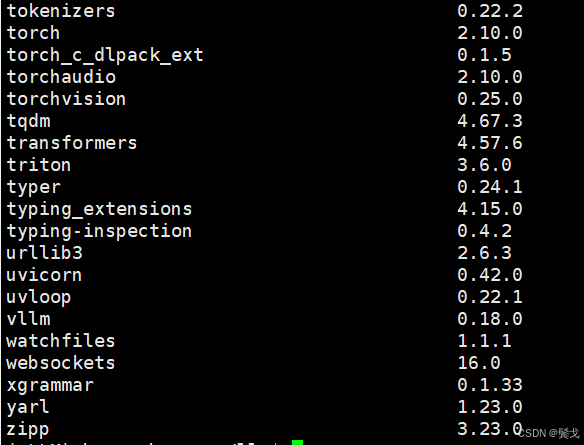
安装起来很简单,只要你GPU硬件比较新,驱动版本比较新,基本不要考虑指定老版本来安装:
$ nvidia-smi
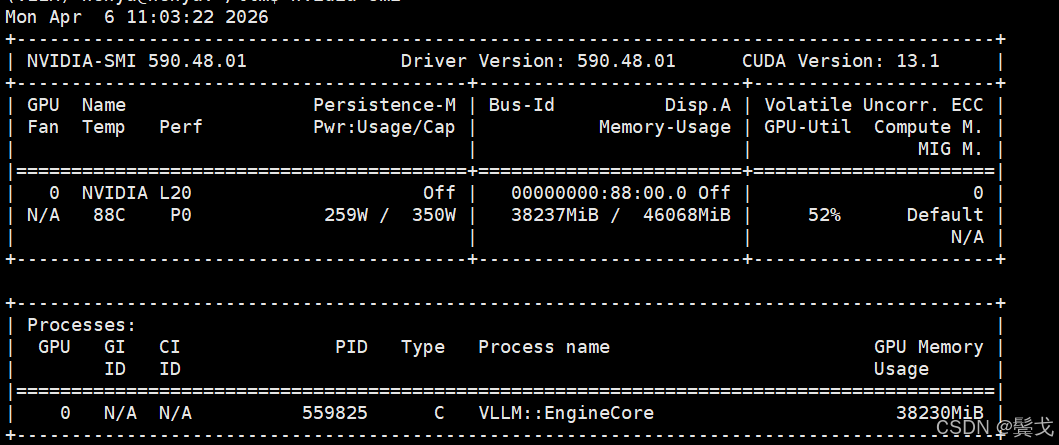
在后面尝试各种大模型时,vllm、transformers、tokenizers这3个关键库的版本,有时会出现版本不兼容,需要调整。
3. 大模型下载
虽然vllm可以直接指定模型名运行时去下载,但还是喜欢先下载到本地,然后直接指定本地模型路径来运行。
一般下载开源大模型流行的我知道的就2个:HuggingFace和modelscope,地址是:
https://huggingface.co/ 基本访问不成功。
https://github.com/huggingface
https://hf-mirror.com/ HuggingFace的镜像,基本是可以访问的,偶尔会失败。
https://modelscope.cn/my/overview 魔塔社区,网络没问题。
我基本上只要魔塔上有要的模型就会先去这里下载,写一个脚本跑后台:
$ cat download.sh
#!/usr/bin/bash

source /home/honya/llm/vLLM/bin/activate

rm -f ./nohup_download.out

nohup modelscope download \
	--model Qwen/Qwen3.5-27B-FP8 \
	--local_dir ./Qwen3.5-27B-FP8 \
	 >./nohup_download.out 2>&1 &
4. 模型运行
每个模型名去各家AI网页上查一下,会给具体运行命令参数的,如果你的GPU够好显存够大,就不用考虑那么多烦心事,不然如我这48G显存,很多今年发布的大模型,默认FP16都无法安装。
下面把我调测的大模型执行命令列一下:
#!/bin/bash


# 安装vLLM
# pip install vllm


stop_process()
{
	# 定义模型路径关键字
	MODEL_PATH="$1"

	# 1. 查找主进程PID
	MAIN_PID=$(ps -ef | grep "$MODEL_PATH" | grep -v grep | awk '{print $2}')

	if [ -z "$MAIN_PID" ]; then
		echo "未找到与模型路径 $MODEL_PATH 相关的进程"
		exit 1
	fi

	echo "找到主进程PID: $MAIN_PID"

	# 2. 查找所有子进程
	CHILD_PIDS=$(ps -o pid --ppid "$MAIN_PID" --no-headers | awk '{printf "%s ", $0}' | sed 's/ $//')

	if [ -z "$CHILD_PIDS" ]; then
		echo "主进程 $MAIN_PID 没有子进程"
		kill -9 $MAIN_PID
	else
		echo "子进程PID: $CHILD_PIDS"
		kill -9 $CHILD_PIDS $MAIN_PID
	fi
}


start_qwen35_9b_sft()
{
	rm -f ./nohup_vllm_qwen35_9b_sft.out
	echo "begin to start model qwen3.5-9b-sft ......"
	nohup python -m vllm.entrypoints.openai.api_server \
	  --model /home/honya/llm/LlamaFactory/saves/my_model/qwen3.5-9b-sft \
	  --served-model-name my-qwen3.5-9b-sft \
	  --tensor-parallel-size 1 \
	  --trust-remote-code \
	  --max-model-len 65536 \
	  --enable-auto-tool-choice \
	  --tool-call-parser qwen3_xml \
	  --port 38080 \
	  --host 0.0.0.0 >./nohup_vllm_qwen35_9b_sft.out 2>&1 &
	echo "end to start."
}

stop_qwen35_9b_sft()
{
	echo "begin to stop model qwen3.5-9b-sft ......"
	stop_process "/home/honya/llm/LlamaFactory/saves/my_model/qwen3.5-9b-sft"
	echo "end to stop."
}

start_qwen3_coder_next()
{
	echo "begin to start model qwen3-coder-next ......"
	export CUDA_VISIBLE_DEVICES=0

	rm -f ./nohup_vllm_qwen3_coder_next.out

	nohup vllm serve /home/honya/modelscope_models/Qwen3-Coder-30B-A3B-Instruct \
		--host 0.0.0.0 \
		--port 38081 \
		--dtype bfloat16 \
		--kv-cache-dtype fp8 \
		--tensor-parallel-size 1 \
		--gpu-memory-utilization 0.7 \
		--max-model-len 16384 \
		--api-key b7f5b00cd851463392aeacef6eaf1d0e \
		--enable-prefix-caching \
		--enable-auto-tool-choice \
		--tool-call-parser qwen3_coder \
		--max-num-seqs 8 \
		--trust-remote-code >./nohup_vllm_qwen3_coder_next.out 2>&1 &

	echo "end to start."
}

stop_qwen3_coder_next()
{
	echo "begin to stop model qwen3_coder_next ......"
	stop_process "/home/honya/modelscope_models/Qwen3-Coder-30B-A3B-Instruct"
	echo "end to stop."
}

# start Qwen3.5-27B-FP8
start_qwen35_27b()
{
	echo "begin to start model Qwen3.5-27B-FP8......"
	export PYTORCH_ALLOC_CONF=expandable_segments:True

	nohup python -m vllm.entrypoints.openai.api_server \
	  	--model /home/honya/modelscope_models/Qwen3.5-27B-FP8 \
		--served-model-name my-coder-llm \
		--api-key b7f5b00cd851463392aeacef6eaf1d0e \
		--host 0.0.0.0 \
		--port 38081 \
		--tensor-parallel-size 1 \
		--kv-cache-dtype fp8_e4m3 \
		--gpu-memory-utilization 0.85 \
		--max-model-len 32768 \
		--enable-auto-tool-choice \
		--tool-call-parser qwen3_coder \
		--reasoning-parser qwen3 \
		--max-num-seqs 8 \
		--trust-remote-code \
		>>./qwen35_27b_fp8.out 2>&1 &

	echo "end to start."
}

stop_qwen35_27b()
{
	stop_process "/home/honya/modelscope_models/Qwen3.5-27B"
}

# start Qwen3.5-27B-Claude-4.6-Opus-Reasoning-Distilled-v2
start_qwen35_27b_claude_46_opus_reasoning_distilled_v2()
{
	echo "begin to start model Qwen3.5-27B-Claude-4.6-Opus-Reasoning-Distilled-v2 ......"
	export CUDA_VISIBLE_DEVICES=0
	export VLLM_ALLOW_LONG_MAX_MODEL_LEN=1

	# 模型内部使用的 FLA 加速算子与当前 vLLM 版本或 PyTorch 环境不兼容,导致输入张量的维度格式解析错误。
	# 禁用 FLA(Flash Linear Attention)
	# export VLLM_USE_FLA=OFF

	# 强制限制最大并发请求数,减少预热时的显存压力。
	# --max-num-seqs 3 \

	# vLLM 默认会尝试使用 CUDA Graphs 来加速。如果你不需要极致的推理性能,或者为了避开这个特定的算子 Bug,可以先禁用它。
	# 使用 --enforce-eager 会牺牲约 10%-20% 的推理吞吐量(Token 生成速度变慢)。
	# 如果上述命令能成功启动,你可以尝试去掉 --enforce-eager,并保持较低的 --max-num-seqs,看是否能正常启动。
	# --enforce-eager \

	nohup python -m vllm.entrypoints.openai.api_server \
	  	--model /home/honya/modelscope_models/Qwen3.5-27B-Claude-4.6-Opus-Reasoning-Distilled-v2 \
		--served-model-name my-coder-llm \
		--api-key b7f5b00cd851463392aeacef6eaf1d0e \
		--host 0.0.0.0 \
		--port 38081 \
		--dtype auto \
		--load-format auto \
		--tensor-parallel-size 1 \
		--gpu-memory-utilization 0.90 \
		--max-model-len 16384 \
		--kv-cache-dtype auto \
		--reasoning-parser qwen3 \
		--tool-call-parser qwen3_coder \
		--tokenizer-mode slow \
		--max-num-seqs 8 \
		--trust-remote-code >>./qwen35_27b_claude46_opus.out 2>&1 &

	echo "end to start."
}

stop_qwen35_27b_claude_46_opus_reasoning_distilled_v2()
{
	stop_process "/home/honya/modelscope_models/Qwen3.5-27B-Claude-4.6-Opus-Reasoning-Distilled-v2"
}

# start Qwen3.5-35B-A3B-FP8
start_qwen35_35b_a3b_fp8()
{
	echo "begin to start model Qwen3.5-35B-A3B-FP8 ......"
	echo "need vllm == 0.18.0 and transformers == 4.57.6, please: pip install vllm==0.18.0 transformers==4.57.6"

	export CUDA_VISIBLE_DEVICES=0
	export VLLM_ALLOW_LONG_MAX_MODEL_LEN=1

	# 模型内部使用的 FLA 加速算子与当前 vLLM 版本或 PyTorch 环境不兼容,导致输入张量的维度格式解析错误。
	# 禁用 FLA(Flash Linear Attention)
	export VLLM_USE_FLA=OFF

	# 强制限制最大并发请求数,减少预热时的显存压力。
	# --max-num-seqs 3 \

	# vLLM 默认会尝试使用 CUDA Graphs 来加速。如果你不需要极致的推理性能,或者为了避开这个特定的算子 Bug,可以先禁用它。
	# 使用 --enforce-eager 会牺牲约 10%-20% 的推理吞吐量(Token 生成速度变慢)。
	# 如果上述命令能成功启动,你可以尝试去掉 --enforce-eager,并保持较低的 --max-num-seqs,看是否能正常启动。
	# --enforce-eager \

	nohup python -m vllm.entrypoints.openai.api_server \
	  	--model /home/honya/modelscope_models/Qwen3.5-35B-A3B-FP8 \
		--served-model-name my-coder-llm \
		--api-key b7f5b00cd851463392aeacef6eaf1d0e \
		--host 0.0.0.0 \
		--port 38081 \
		--tensor-parallel-size 1 \
		--max-model-len 262144 \
		--reasoning-parser qwen3 \
		--gpu-memory-utilization 0.90 \
		--enable-auto-tool-choice \
		--trust-remote-code \
		--max-num-seqs 3 \
		--tool-call-parser qwen3_coder >>./qwen35_35b_a3b_fp8.out 2>&1 &

	echo "end to start."
}

stop_qwen35_35b_a3b_fp8()
{
	stop_process "/home/honya/modelscope_models/Qwen3.5-35B-A3B-FP8"
}

# start Qwen2.5-14B-Instruct-AWQ
start_qwen25_14b_instruct_awq()
{
	echo "begin to start model Qwen2.5-14B-Instruct-AWQ ......"
	export CUDA_VISIBLE_DEVICES=0
	export VLLM_ALLOW_LONG_MAX_MODEL_LEN=1

	# rm -f ./nohup_vllm_qwen25_14b_instruct_awq.out

	# nohup vllm serve /home/honya/modelscope_models/Qwen2.5-14B-Instruct-AWQ \

	nohup python -m vllm.entrypoints.openai.api_server \
	  	--model /home/honya/modelscope_models/Qwen2.5-14B-Instruct-AWQ \
		--served-model-name my-coder-llm \
		--api-key b7f5b00cd851463392aeacef6eaf1d0e \
		--host 0.0.0.0 \
		--port 38081 \
		--tensor-parallel-size 1 \
		--dtype auto \
		--max-model-len 131072 \
		--gpu-memory-utilization 0.90 \
		--quantization awq \
		--enable-auto-tool-choice \
		--guided-decoding-backend lm-format-enforcer \
		--trust-remote-code \
		--tool-call-parser hermes >>./nohup_vllm_qwen25_14b_instruct_awq.out 2>&1 &

	echo "end to start."
}

stop_qwen25_14b_instruct_awq()
{
	stop_process "/home/honya/modelscope_models/Qwen2.5-14B-Instruct-AWQ"
}

# ZhipuAI/GLM-4.7-Flash
# cyankiwi/GLM-4.7-Flash-AWQ-4bit
start_glm47_flash()
{
	echo "begin to start model cyankiwi/GLM-4.7-Flash-AWQ-4bit ......"
	export CUDA_VISIBLE_DEVICES=0
	export VLLM_ALLOW_LONG_MAX_MODEL_LEN=1
	export PYTORCH_ALLOC_CONF=expandable_segments:True

	nohup python -m vllm.entrypoints.openai.api_server \
	  	--model /home/honya/modelscope_models/GLM-4.7-Flash-AWQ-4bit \
		--served-model-name my-coder-llm \
		--api-key b7f5b00cd851463392aeacef6eaf1d0e \
		--host 0.0.0.0 \
		--port 38081 \
		--trust-remote-code \
		--max-model-len 200000 \
		--gpu-memory-utilization 0.85 \
		--enable-auto-tool-choice \
		--tool-call-parser glm47 \
		--speculative-config.method mtp \
		--speculative-config.num_speculative_tokens 1 \
		 >>./glm47_flash.out 2>&1 &

	echo "end to start."
}

stop_glm47_flash()
{
	stop_process "/home/honya/modelscope_models/GLM-4.7-Flash-AWQ-4bit"
}

# start Qwen2.5-Coder-7B-Instruct
start_qwen25_coder_7b_instruct()
{
	echo "begin to start model Qwen2.5-Coder-7B-Instruct ......"
	export CUDA_VISIBLE_DEVICES=0

	rm -f ./nohup_vllm_qwen25_coder_7b_instruct.out

	nohup vllm serve /home/honya/modelscope_models/Qwen2.5-Coder-7B-Instruct \
		--served-model-name my-qwen2.5-coder-7b-instruct \
		--host 0.0.0.0 \
		--port 38081 \
		--dtype bfloat16 \
		--gpu-memory-utilization 0.85 \
		--max-model-len 32768 \
		--api-key b7f5b00cd851463392aeacef6eaf1d0e \
		--enable-auto-tool-choice \
		--tool-call-parser hermes \
		--max-num-seqs 8 \
		--trust-remote-code >./nohup_vllm_qwen25_coder_7b_instruct.out 2>&1 &

	echo "end to start."
}

stop_qwen25_coder_7b_instruct()
{
	echo "begin to stop model Qwen2.5-Coder-7B-Instruct ......"
	stop_process "/home/honya/modelscope_models/Qwen2.5-Coder-7B-Instruct"
	echo "end to stop."
}

start_deepseek_coder_67b_instruct()
{
	echo "begin to start model deepseek-ai/deepseek-coder-6.7b-instruct ......"
	export CUDA_VISIBLE_DEVICES=0
	export VLLM_ALLOW_LONG_MAX_MODEL_LEN=1

	python -m vllm.entrypoints.openai.api_server \
	  	--model /home/honya/modelscope_models/deepseek-coder-6.7b-instruct \
		--served-model-name my-coder-llm \
		--api-key b7f5b00cd851463392aeacef6eaf1d0e \
		--host 0.0.0.0 \
		--port 38081 \
		--tensor-parallel-size 1 \
		--gpu-memory-utilization 0.9 \
		--max-model-len 32768 \
		--dtype bfloat16 \
		--enable-prefix-caching \
		--enable-auto-tool-choice \
		--tool-call-parser pythonic \
		--trust-remote-code \
		--max-num-seqs 256 \
		--max-num-batched-tokens 8192 \
		--max-num-seqs 8 \
		>./deepseek_coder_67b_instruct.out 2>&1 &

	echo "end to start."
}

stop_deepseek_coder_67b_instruct()
{
	stop_process "/home/honya/modelscope_models/deepseek-coder-6.7b-instruct"
}

list_status()
{
	ps -ef | grep honya | grep -v grep | egrep -e "vllm|vLLM|VLLM"
}

usage()
{
	echo "usage: ./run_vllm.sh [start | stop | status] [qwen35_9b_sft]"
	echo "usage: ./run_vllm.sh [start | stop | status] [qwen35_35b_a3b_fp8]"
	echo "usage: ./run_vllm.sh [start | stop | status] [glm47_flash]"
	echo "usage: ./run_vllm.sh [start | stop | status] [deepseek_coder_67b_instruct]"
	echo "usage: ./run_vllm.sh [start | stop | status] [qwen25_14b_instruct_awq]"
	echo "usage: ./run_vllm.sh [start | stop | status] [qwen25_coder_7b_instruct]"
	echo "usage: ./run_vllm.sh [start | stop | status] [qwen3_coder_next]"
	echo "usage: ./run_vllm.sh [start | stop | status] [qwen35_27b_claude46_opus]"
	echo "usage: ./run_vllm.sh [start | stop | status] [qwen35_27b]"
}


if [ "$#" -lt "1" ]; then
	usage
elif [ "$1" = "start" -a "$2" = "qwen35_27b" ]; then
	start_qwen35_27b
elif [ "$1" = "stop" -a "$2" = "qwen35_27b" ]; then
	stop_qwen35_27b
elif [ "$1" = "start" -a "$2" = "qwen35_27b_claude46_opus" ]; then
	start_qwen35_27b_claude_46_opus_reasoning_distilled_v2
elif [ "$1" = "stop" -a "$2" = "qwen35_27b_claude46_opus" ]; then
	stop_qwen35_27b_claude_46_opus_reasoning_distilled_v2
elif [ "$1" = "start" -a "$2" = "qwen35_9b_sft" ]; then
	start_qwen35_9b_sft
elif [ "$1" = "start" -a "$2" = "qwen35_35b_a3b_fp8" ]; then
	start_qwen35_35b_a3b_fp8
elif [ "$1" = "stop" -a "$2" = "qwen35_35b_a3b_fp8" ]; then
	stop_qwen35_35b_a3b_fp8
elif [ "$1" = "start" -a "$2" = "glm47_flash" ]; then
	start_glm47_flash
elif [ "$1" = "start" -a "$2" = "deepseek_coder_67b_instruct" ]; then
	start_deepseek_coder_67b_instruct
elif [ "$1" = "start" -a "$2" = "qwen25_14b_instruct_awq" ]; then
	start_qwen25_14b_instruct_awq
elif [ "$1" = "start" -a "$2" = "qwen3_coder_next" ]; then
	start_qwen3_coder_next
elif [ "$1" = "start" -a "$2" = "qwen25_coder_7b_instruct" ]; then
	start_qwen25_coder_7b_instruct
elif [ "$1" = "stop" -a "$2" = "qwen35_9b_sft" ]; then
	stop_qwen35_9b_sft
elif [ "$1" = "stop" -a "$2" = "qwen3_coder_next" ]; then
	stop_qwen3_coder_next
elif [ "$1" = "stop" -a "$2" = "qwen25_coder_7b_instruct" ]; then
	stop_qwen25_coder_7b_instruct
elif [ "$1" = "status" ]; then
	list_status
else
	usage
fi
4.1 Qwen3-Coder-30B-A3B-Instruct
失败,显存不足,没去折腾,放弃。
(EngineCore_DP0 pid=15622) torch.OutOfMemoryError: CUDA out of memory. Tried to allocate 768.00 MiB. GPU 0 has a total capacity of 44.39 GiB of whic h 389.25 MiB is free. Including non-PyTorch memory, this process has 44.01 GiB memory in use. Of the allocated memory 43.63 GiB is allocated by PyTo rch, and 33.49 MiB is reserved by PyTorch but unallocated. If reserved but unallocated memory is large try setting PYTORCH_ALLOC_CONF=expandable_seg ments:True to avoid fragmentation. See documentation for Memory Management (https://pytorch.org/docs/stable/notes/cuda.html#environment-variables)
181 [rank0]:[W326 16:14:21.090413420 ProcessGroupNCCL.cpp:1553] Warning: WARNING: destroy_process_group() was not called before program exit, which can leak resources. For more info, please see https://pytorch.org/docs/stable/distributed.html#shutdown (function operator())
4.2 Qwen2.5-Coder-7B-Instruct
失败,放弃。
(EngineCore_DP0 pid=24176) ValueError: Free memory on device cuda:0 (34.49/44.39 GiB) on startup is less than desired GPU memory utilization (0.85, 37.73 GiB). Decrease GPU memory utilization or reduce GPU memory used by other processes.
87 [rank0]:[W327 14:47:34.674962665 ProcessGroupNCCL.cpp:1553] Warning: WARNING: destroy_process_group() was not called before program exit, which can leak resources. For more info, please see https://pytorch.org/docs/stable/distributed.html#shutdown (function operator())
4.3 deepseek-coder-6.7b-instruct
成功。
4.4 Qwen2.5-14B-Instruct-AWQ
成功。
4.5 qwen3.5-9b-sft
成功,参数太小,基本不用。
4.6 cyankiwi/GLM-4.7-Flash-AWQ-4bit
失败,没细查失败原因,放弃。
(EngineCore_DP0 pid=121118) File "/data/llm/vLLM/lib/python3.12/site-packages/vllm/model_executor/layers/quantization/compressed_tensors/utils.py ", line 126, in find_matched_target
1459 (EngineCore_DP0 pid=121118) raise ValueError(
1460 (EngineCore_DP0 pid=121118) ValueError: Unable to find matching target for model.layers.1.self_attn.fused_qkv_a_proj in the compressed-tensors conf ig.
1461 [rank0]:[W329 12:18:45.529142484 ProcessGroupNCCL.cpp:1553] Warning: WARNING: destroy_process_group() was not called before program exit, which can leak resources. For more info, please see https://pytorch.org/docs/stable/distributed.html#shutdown (function operator())
4.7 Qwen3.5-35B-A3B-FP8
成功,其中--max-num-seqs参数会极大影响缓存,默认是256,很多AI网页版都没讲到点子上,千问提示正确解决。
4.8 Qwen3.5-27B-Claude-4.6-Opus-Reasoning-Distilled-v2
失败,最头痛这个版本,Tokenizers总是不行,vllm、transformers、tokenizers库不停换版本,最后也没解决。
(APIServer pid=524191) File "/data/llm/vLLM2/lib/python3.12/site-packages/vllm/tokenizers/hf.py", line 85, in from_pretrained
247 (APIServer pid=524191) tokenizer = AutoTokenizer.from_pretrained(
248 (APIServer pid=524191) ^^^^^^^^^^^^^^^^^^^^^^^^^^^^^^
249 (APIServer pid=524191) File "/data/llm/vLLM2/lib/python3.12/site-packages/transformers/models/auto/tokenization_auto.py", line 1153, in from_pretr ained
250 (APIServer pid=524191) raise ValueError(
251 (APIServer pid=524191) ValueError: Tokenizer class TokenizersBackend does not exist or is not currently imported.
4.9 Qwen3.5-27B-FP8
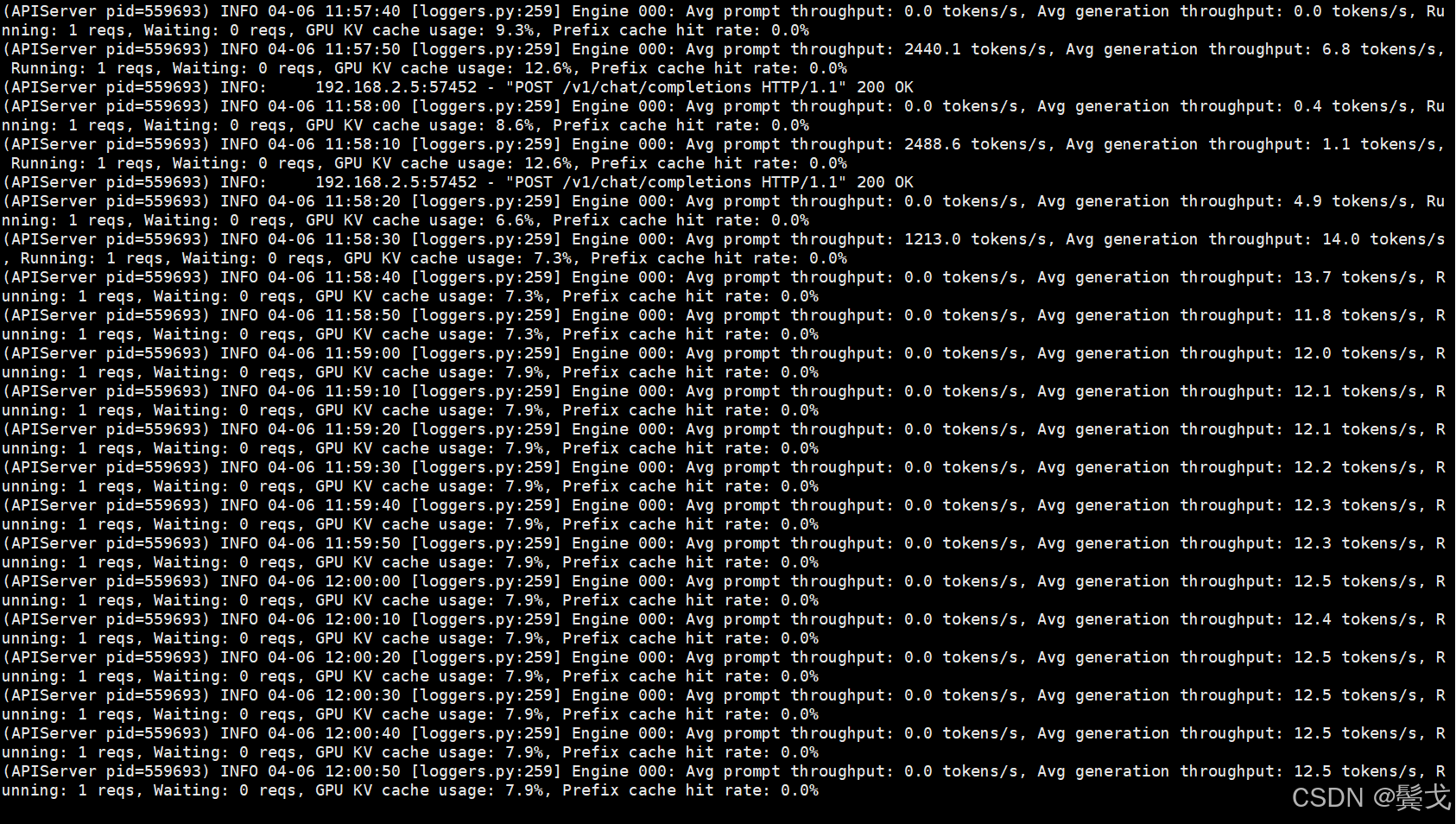
成功,目前用它来做AI coding,编程时执行速度很慢,一个大型一点的重构,跑上2个小时以上,tokens生成数很低。
5. 结束语
刚接触LLM才2周多,太多概念不熟悉,太多细节不清楚,也没时间去调研学习,客户现在被小龙虾风暴搞得激情起来,主动提出要一个大模型项目,怎么在业务流程中使用LangChain还没明白,先把开源模型选项和vLLM部署搞一下,抛砖引玉,希望有经验者来指点和讨论。

昇腾计算产业是基于昇腾系列(HUAWEI Ascend)处理器和基础软件构建的全栈 AI计算基础设施、行业应用及服务,https://devpress.csdn.net/organization/setting/general/146749包括昇腾系列处理器、系列硬件、CANN、AI计算框架、应用使能、开发工具链、管理运维工具、行业应用及服务等全产业链
更多推荐

 9
9 0
0- 0


 已为社区贡献1条内容

所有评论(0)