基础入门 Flutter for OpenHarmony:flutter_contacts 通讯录管理详解
欢迎加入开源鸿蒙跨平台社区:https://openharmonycrossplatform.csdn.net
🎯 欢迎来到 Flutter for OpenHarmony 社区!本文将深入讲解 Flutter 中 flutter_contacts 通讯录管理插件的使用方法,带你全面掌握在应用中读取、写入、更新和删除联系人信息的完整流程。
一、flutter_contacts 组件概述
通讯录是移动设备中最基础也是最重要的数据之一,几乎每个应用都需要访问用户的联系人信息。在 Flutter for OpenHarmony 应用开发中,flutter_contacts 是一个功能强大的通讯录管理插件,提供了完整的联系人增删改查功能,支持联系人详细信息的管理,包括姓名、电话、邮箱、地址、组织等。
📋 flutter_contacts 组件特点
| 特点 | 说明 |
|---|---|
| 功能完整 | 支持联系人的增删改查全部操作 |
| 信息丰富 | 支持姓名、电话、邮箱、地址、组织等多种信息 |
| 权限管理 | 内置权限请求功能 |
| 批量操作 | 支持批量获取和删除联系人 |
| 分组管理 | 支持联系人分组功能 |
| 外部应用集成 | 支持打开系统通讯录应用 |
| 数据监听 | 支持监听通讯录数据变化 |
| 鸿蒙适配 | 专门为 OpenHarmony 平台进行了适配 |
联系人数据结构
flutter_contacts 使用面向对象的方式管理联系人数据,主要的数据模型包括:
| 模型 | 说明 |
|---|---|
| Contact | 联系人主模型 |
| Name | 结构化姓名 |
| Phone | 电话号码 |
| 电子邮件 | |
| Address | 邮政地址 |
| Organization | 组织/公司信息 |
| Website | 网站 |
| SocialMedia | 社交媒体账号 |
| Event | 事件/生日 |
| Note | 备注 |
| Group | 联系人分组 |
| Account | 原始账户信息 |
💡 使用场景:通讯录应用、社交应用、CRM 系统、电话拨号器、名片管理等。
二、OpenHarmony 平台适配说明
2.1 兼容性信息
本项目基于 flutter_contacts@1.1.7+1 开发,适配 Flutter 3.7.12-ohos-1.0.6。OpenHarmony 平台的通讯录功能基于系统联系人数据库实现。
2.2 权限等级说明
在 OpenHarmony 系统中,权限分为三个等级:
| 等级 | 说明 |
|---|---|
| normal | 普通权限,普通应用可直接申请 |
| system_basic | 系统基础权限,需要系统签名或特殊配置 |
| system_core | 系统核心权限,仅系统应用可使用 |
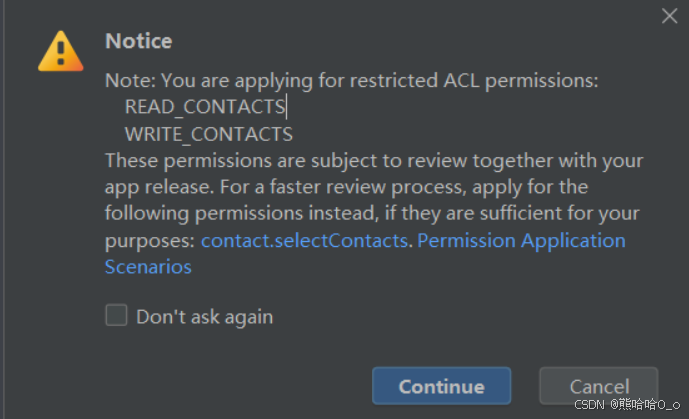
重要提示:通讯录权限(READ_CONTACTS、WRITE_CONTACTS)属于 system_basic 级别权限,默认的应用权限等级是 normal,只能使用 normal 等级的权限。如果直接安装包含 system_basic 权限的应用,会报错 9568289。
2.3 如何使用 system_basic 权限
要使用通讯录权限,需要修改应用的权限等级。请参考华为官方文档:安装 HAP 时提示 code 9568289
步骤 1:修改 Debug 签名模板
找到 SDK 目录下的签名模板文件:
{SDK路径}/openharmony/toolchains/lib/UnsgnedDebugProfileTemplate.json
例如:d:\huawei\DevEco Studio\sdk\default\openharmony\toolchains\lib\UnsgnedDebugProfileTemplate.json
打开文件,修改以下内容:
1. 将 APL 等级从 normal 改为 system_basic:
"bundle-info": {
    ...
    "apl": "system_basic",
    ...
}
2. 在 acls 中添加允许的权限:
"acls": {
    "allowed-acls": [
        "ohos.permission.READ_CONTACTS",
        "ohos.permission.WRITE_CONTACTS"
    ]
}
3. 在 permissions 中添加受限权限:
"permissions": {
    "restricted-permissions": [
        "ohos.permission.READ_CONTACTS",
        "ohos.permission.WRITE_CONTACTS"
    ]
}
完整的修改后的文件示例:
{
    "version-name": "2.0.0",
    "version-code": 2,
    "uuid": "fe686e1b-3770-4824-a938-961b140a7c98",
    "validity": {
        "not-before": 1610519532,
        "not-after": 1705127532
    },
    "type": "debug",
    "bundle-info": {
        "developer-id": "OpenHarmony",
        "development-certificate": "...",
        "bundle-name": "com.OpenHarmony.app.test",
        "apl": "system_basic",
        "app-feature": "hos_normal_app"
    },
    "acls": {
        "allowed-acls": [
            "ohos.permission.READ_CONTACTS",
            "ohos.permission.WRITE_CONTACTS"
        ]
    },
    "permissions": {
        "restricted-permissions": [
            "ohos.permission.READ_CONTACTS",
            "ohos.permission.WRITE_CONTACTS"
        ]
    },
    "debug-info": {
        "device-ids": [...],
        "device-id-type": "udid"
    },
    "issuer": "pki_internal"
}
步骤 2:修改 Release 签名模板(可选)
如果需要发布应用,同样修改 UnsgnedReleasedProfileTemplate.json 文件。
步骤 3:在 DevEco Studio 中重新签名
- 打开 DevEco Studio
- 点击 File > Project Structure > Project > Signing Configs
- 取消勾选 “Automatically generate signature”
- 重新勾选 “Automatically generate signature”
- 等待自动签名完成
- 点击 OK
步骤 4:重新运行应用
签名完成后,重新运行应用即可正常安装。
⚠️ 注意:修改签名模板后必须重新签名才能生效。如果仍然报错,请尝试清理项目后重新构建。
三、项目配置与安装
3.1 添加依赖配置
首先,需要在你的 Flutter 项目的 pubspec.yaml 文件中添加 flutter_contacts 依赖。
打开项目根目录下的 pubspec.yaml 文件,找到 dependencies 部分,添加以下配置:
dependencies:
  flutter:
    sdk: flutter

  # 添加 flutter_contacts 依赖(OpenHarmony 适配版本)
  flutter_contacts:
    git:
      url: https://atomgit.com/openharmony-sig/flutter_contacts
配置说明:
- 使用 git 方式引用开源鸿蒙适配的 flutter_contacts 仓库
url:指定 AtomGit 托管的仓库地址- 本项目基于
flutter_contacts@1.1.7+1开发
3.2 下载依赖
配置完成后,需要在项目根目录执行以下命令下载依赖:
flutter pub get
执行成功后,你会看到类似以下的输出:
Running "flutter pub get" in my_cross_platform_app...
Resolving dependencies...
Got dependencies!
3.3 权限配置
通讯录访问需要读写权限,在 OpenHarmony 平台上需要配置:
ohos/entry/src/main/module.json5:
{
  "module": {
    "requestPermissions": [
      {
        "name": "ohos.permission.INTERNET",
        "reason": "$string:network_reason",
        "usedScene": {
          "abilities": ["EntryAbility"],
          "when": "inuse"
        }
      },
      {
        "name": "ohos.permission.READ_CONTACTS",
        "reason": "$string:contacts_reason",
        "usedScene": {
          "abilities": ["EntryAbility"],
          "when": "inuse"
        }
      },
      {
        "name": "ohos.permission.WRITE_CONTACTS",
        "reason": "$string:contacts_reason",
        "usedScene": {
          "abilities": ["EntryAbility"],
          "when": "inuse"
        }
      }
    ]
  }
}
配置字段说明:
- name:权限名称
ohos.permission.READ_CONTACTS:读取联系人权限ohos.permission.WRITE_CONTACTS:写入联系人权限
- reason:权限说明,引用字符串资源
- usedScene:使用场景配置
ohos/entry/src/main/resources/base/element/string.json:
{
  "string": [
    {
      "name": "network_reason",
      "value": "使用网络"
    },
    {
      "name": "contacts_reason",
      "value": "读取和写入联系人信息"
    }
  ]
}
⚠️ 重要提示:由于通讯录权限是
system_basic级别,你需要按照官方文档修改应用的权限等级,否则安装时会报错。
四、flutter_contacts 基础用法
4.1 导入库
在使用 flutter_contacts 之前,需要先导入库:
import 'package:flutter_contacts/flutter_contacts.dart';
导入后,你就可以使用 flutter_contacts 提供的所有类和方法了。
4.2 请求权限
在访问通讯录之前,必须先请求用户授权。flutter_contacts 提供了内置的权限请求方法:
Future<bool> requestContactsPermission() async {
  bool granted = await FlutterContacts.requestPermission(readonly: false);
  return granted;
}
参数说明:
- readonly:是否只读模式
true:只请求读取权限false:请求读写权限
4.3 获取联系人列表
获取所有联系人的基本信息:
Future<List<Contact>> getContacts() async {
  final contacts = await FlutterContacts.getContacts(
    withProperties: true,    // 包含电话、邮箱等属性
    withThumbnail: true,     // 包含缩略图
    withPhoto: false,        // 不包含高清照片
    sorted: true,            // 按名称排序
  );
  return contacts;
}
参数说明:
| 参数 | 默认值 | 说明 |
|---|---|---|
| withProperties | false | 是否包含电话、邮箱等属性 |
| withThumbnail | false | 是否包含缩略图 |
| withPhoto | false | 是否包含高清照片 |
| withGroups | false | 是否包含分组信息 |
| withAccounts | false | 是否包含账户信息 |
| sorted | true | 是否按名称排序 |
| deduplicateProperties | true | 是否去重属性 |
4.4 获取单个联系人详情
根据 ID 获取联系人的完整信息:
Future<Contact?> getContactById(String id) async {
  final contact = await FlutterContacts.getContact(
    id,
    withProperties: true,
    withThumbnail: true,
    withPhoto: true,
  );
  return contact;
}
五、联系人 CRUD 操作
5.1 创建联系人
创建新联系人并保存到通讯录:
Future<Contact> createContact({
  required String firstName,
  required String lastName,
  String? phone,
  String? email,
}) async {
  final newContact = Contact(
    name: Name(
      first: firstName,
      last: lastName,
    ),
    phones: phone != null
        ? [Phone(phone, label: PhoneLabel.mobile)]
        : [],
    emails: email != null
        ? [Email(email, label: EmailLabel.work)]
        : [],
  );

  final savedContact = await FlutterContacts.insertContact(newContact);
  return savedContact;
}
5.2 更新联系人
更新现有联系人的信息:
Future<Contact> updateContactPhone(Contact contact, String newPhone) async {
  contact.phones.add(Phone(newPhone, label: PhoneLabel.mobile));
  final updatedContact = await FlutterContacts.updateContact(contact);
  return updatedContact;
}
5.3 删除联系人
删除单个联系人:
Future<void> deleteContactById(Contact contact) async {
  await FlutterContacts.deleteContact(contact);
}
批量删除联系人:
Future<void> deleteMultipleContacts(List<Contact> contacts) async {
  await FlutterContacts.deleteContacts(contacts);
}
六、实际应用场景
6.1 通讯录管理示例
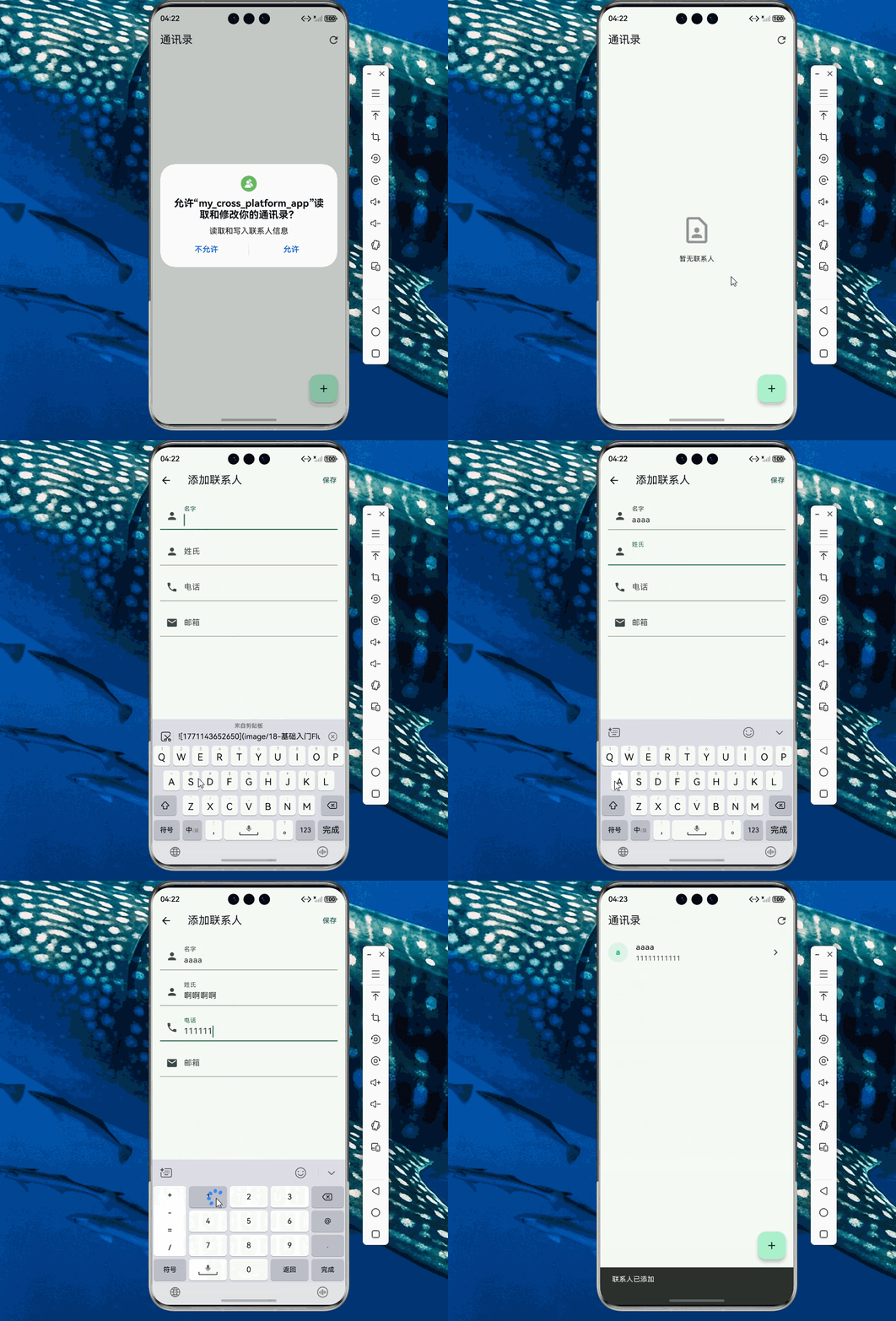
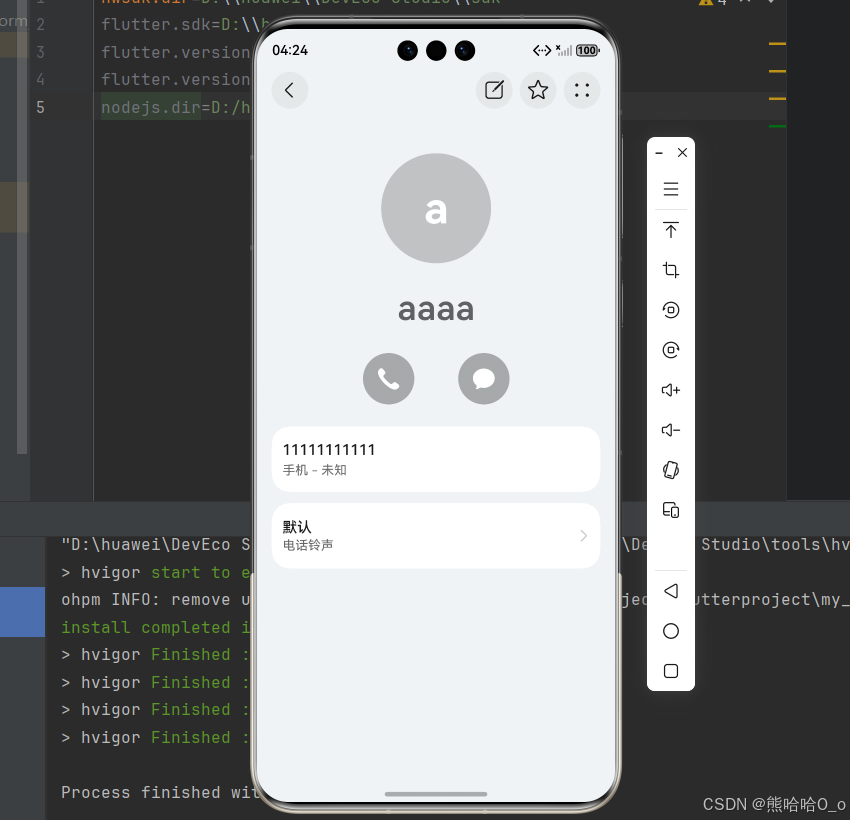
下面是一个功能完整的通讯录管理示例,包含联系人列表、详情查看、添加联系人等功能:
import 'package:flutter/material.dart';
import 'package:flutter_contacts/flutter_contacts.dart';
void main() => runApp(const MyApp());
class MyApp extends StatelessWidget {
const MyApp({super.key});
Widget build(BuildContext context) {
return MaterialApp(
title: '通讯录示例',
debugShowCheckedModeBanner: false,
theme: ThemeData(
colorScheme: ColorScheme.fromSeed(seedColor: const Color(0xFF10B981)),
useMaterial3: true,
),
home: const ContactsListPage(),
);
}
}
class ContactsListPage extends StatefulWidget {
const ContactsListPage({super.key});
State<ContactsListPage> createState() => _ContactsListPageState();
}
class _ContactsListPageState extends State<ContactsListPage> {
List<Contact>? _contacts;
bool _permissionDenied = false;
bool _isLoading = true;
void initState() {
super.initState();
_fetchContacts();
}
Future<void> _fetchContacts() async {
setState(() {
_isLoading = true;
_permissionDenied = false;
});
bool granted = await FlutterContacts.requestPermission(readonly: false);
if (!granted) {
setState(() {
_permissionDenied = true;
_isLoading = false;
});
return;
}
try {
final contacts = await FlutterContacts.getContacts(
withProperties: true,
withThumbnail: true,
sorted: true,
);
setState(() {
_contacts = contacts;
_isLoading = false;
});
} catch (e) {
setState(() {
_isLoading = false;
});
if (mounted) {
ScaffoldMessenger.of(context).showSnackBar(
SnackBar(content: Text('获取联系人失败: $e')),
);
}
}
}
Widget build(BuildContext context) {
return Scaffold(
appBar: AppBar(
title: const Text('通讯录'),
actions: [
IconButton(
icon: const Icon(Icons.refresh),
onPressed: _fetchContacts,
),
],
),
body: _buildBody(),
floatingActionButton: FloatingActionButton(
onPressed: () => _navigateToAddContact(),
child: const Icon(Icons.add),
),
);
}
Widget _buildBody() {
if (_isLoading) {
return const Center(child: CircularProgressIndicator());
}
if (_permissionDenied) {
return Center(
child: Column(
mainAxisAlignment: MainAxisAlignment.center,
children: [
const Icon(Icons.perm_contact_cal, size: 64, color: Colors.grey),
const SizedBox(height: 16),
const Text('需要通讯录权限'),
const SizedBox(height: 16),
ElevatedButton(
onPressed: _fetchContacts,
child: const Text('重新请求权限'),
),
],
),
);
}
if (_contacts == null || _contacts!.isEmpty) {
return const Center(
child: Column(
mainAxisAlignment: MainAxisAlignment.center,
children: [
Icon(Icons.contact_page_outlined, size: 64, color: Colors.grey),
SizedBox(height: 16),
Text('暂无联系人'),
],
),
);
}
return ListView.builder(
itemCount: _contacts!.length,
itemBuilder: (context, index) {
final contact = _contacts![index];
return _buildContactTile(contact);
},
);
}
Widget _buildContactTile(Contact contact) {
String subtitle = '';
if (contact.phones.isNotEmpty) {
subtitle = contact.phones.first.number;
} else if (contact.emails.isNotEmpty) {
subtitle = contact.emails.first.address;
}
return ListTile(
leading: CircleAvatar(
backgroundColor: const Color(0xFF10B981).withOpacity(0.1),
child: Text(
contact.displayName.isNotEmpty ? contact.displayName[0] : '?',
style: const TextStyle(
color: Color(0xFF10B981),
fontWeight: FontWeight.bold,
),
),
),
title: Text(
contact.displayName.isNotEmpty ? contact.displayName : '未知联系人',
style: const TextStyle(fontWeight: FontWeight.w500),
),
subtitle: subtitle.isNotEmpty ? Text(subtitle) : null,
trailing: const Icon(Icons.chevron_right),
onTap: () => _navigateToContactDetail(contact),
);
}
Future<void> _navigateToAddContact() async {
final result = await Navigator.push<bool>(
context,
MaterialPageRoute(builder: (_) => const AddContactPage()),
);
if (result == true) {
_fetchContacts();
}
}
Future<void> _navigateToContactDetail(Contact contact) async {
final fullContact = await FlutterContacts.getContact(
contact.id,
withProperties: true,
withThumbnail: true,
);
if (fullContact != null && mounted) {
Navigator.push(
context,
MaterialPageRoute(builder: (_) => ContactDetailPage(fullContact)),
);
}
}
}
class ContactDetailPage extends StatelessWidget {
final Contact contact;
const ContactDetailPage(this.contact, {super.key});
Widget build(BuildContext context) {
return Scaffold(
appBar: AppBar(
title: Text(contact.displayName),
actions: [
IconButton(
icon: const Icon(Icons.edit),
onPressed: () {},
),
IconButton(
icon: const Icon(Icons.delete),
onPressed: () => _deleteContact(context),
),
],
),
body: SingleChildScrollView(
padding: const EdgeInsets.all(16),
child: Column(
crossAxisAlignment: CrossAxisAlignment.start,
children: [
_buildHeader(),
const SizedBox(height: 24),
_buildSection('电话', _buildPhones()),
const SizedBox(height: 16),
_buildSection('邮箱', _buildEmails()),
const SizedBox(height: 16),
_buildSection('地址', _buildAddresses()),
const SizedBox(height: 16),
_buildSection('组织', _buildOrganization()),
],
),
),
);
}
Widget _buildHeader() {
return Center(
child: Column(
children: [
CircleAvatar(
radius: 48,
backgroundColor: const Color(0xFF10B981).withOpacity(0.1),
child: Text(
contact.displayName.isNotEmpty ? contact.displayName[0] : '?',
style: const TextStyle(
fontSize: 32,
color: Color(0xFF10B981),
fontWeight: FontWeight.bold,
),
),
),
const SizedBox(height: 16),
Text(
contact.displayName,
style: const TextStyle(
fontSize: 24,
fontWeight: FontWeight.bold,
),
),
if (contact.name.first.isNotEmpty || contact.name.last.isNotEmpty)
Text(
'${contact.name.first} ${contact.name.last}',
style: TextStyle(
fontSize: 14,
color: Colors.grey[600],
),
),
],
),
);
}
Widget _buildSection(String title, Widget content) {
return Column(
crossAxisAlignment: CrossAxisAlignment.start,
children: [
Text(
title,
style: const TextStyle(
fontSize: 14,
fontWeight: FontWeight.bold,
color: Color(0xFF10B981),
),
),
const SizedBox(height: 8),
content,
],
);
}
Widget _buildPhones() {
if (contact.phones.isEmpty) {
return const Text('暂无电话', style: TextStyle(color: Colors.grey));
}
return Column(
children: contact.phones.map((phone) {
return ListTile(
contentPadding: EdgeInsets.zero,
leading: const Icon(Icons.phone),
title: Text(phone.number),
subtitle: Text(_getPhoneLabel(phone.label)),
);
}).toList(),
);
}
Widget _buildEmails() {
if (contact.emails.isEmpty) {
return const Text('暂无邮箱', style: TextStyle(color: Colors.grey));
}
return Column(
children: contact.emails.map((email) {
return ListTile(
contentPadding: EdgeInsets.zero,
leading: const Icon(Icons.email),
title: Text(email.address),
subtitle: Text(_getEmailLabel(email.label)),
);
}).toList(),
);
}
Widget _buildAddresses() {
if (contact.addresses.isEmpty) {
return const Text('暂无地址', style: TextStyle(color: Colors.grey));
}
return Column(
children: contact.addresses.map((address) {
return ListTile(
contentPadding: EdgeInsets.zero,
leading: const Icon(Icons.location_on),
title: Text(address.address),
subtitle: Text(_getAddressLabel(address.label)),
);
}).toList(),
);
}
Widget _buildOrganization() {
if (contact.organizations.isEmpty) {
return const Text('暂无组织信息', style: TextStyle(color: Colors.grey));
}
return Column(
children: contact.organizations.map((org) {
return ListTile(
contentPadding: EdgeInsets.zero,
leading: const Icon(Icons.business),
title: Text(org.company),
subtitle: Text(org.title),
);
}).toList(),
);
}
String _getPhoneLabel(PhoneLabel label) {
const labels = {
PhoneLabel.mobile: '手机',
PhoneLabel.home: '家庭',
PhoneLabel.work: '工作',
PhoneLabel.other: '其他',
};
return labels[label] ?? '其他';
}
String _getEmailLabel(EmailLabel label) {
const labels = {
EmailLabel.home: '家庭',
EmailLabel.work: '工作',
EmailLabel.mobile: '手机',
EmailLabel.other: '其他',
};
return labels[label] ?? '其他';
}
String _getAddressLabel(AddressLabel label) {
const labels = {
AddressLabel.home: '家庭',
AddressLabel.work: '工作',
AddressLabel.other: '其他',
};
return labels[label] ?? '其他';
}
Future<void> _deleteContact(BuildContext context) async {
final confirmed = await showDialog<bool>(
context: context,
builder: (context) => AlertDialog(
title: const Text('确认删除'),
content: Text('确定要删除联系人 ${contact.displayName} 吗?'),
actions: [
TextButton(
onPressed: () => Navigator.pop(context, false),
child: const Text('取消'),
),
TextButton(
onPressed: () => Navigator.pop(context, true),
style: TextButton.styleFrom(foregroundColor: Colors.red),
child: const Text('删除'),
),
],
),
);
if (confirmed == true) {
await FlutterContacts.deleteContact(contact);
if (context.mounted) {
Navigator.pop(context);
ScaffoldMessenger.of(context).showSnackBar(
const SnackBar(content: Text('联系人已删除')),
);
}
}
}
}
class AddContactPage extends StatefulWidget {
const AddContactPage({super.key});
State<AddContactPage> createState() => _AddContactPageState();
}
class _AddContactPageState extends State<AddContactPage> {
final _formKey = GlobalKey<FormState>();
final _firstNameController = TextEditingController();
final _lastNameController = TextEditingController();
final _phoneController = TextEditingController();
final _emailController = TextEditingController();
bool _isSaving = false;
void dispose() {
_firstNameController.dispose();
_lastNameController.dispose();
_phoneController.dispose();
_emailController.dispose();
super.dispose();
}
Widget build(BuildContext context) {
return Scaffold(
appBar: AppBar(
title: const Text('添加联系人'),
actions: [
TextButton(
onPressed: _isSaving ? null : _saveContact,
child: const Text('保存'),
),
],
),
body: Form(
key: _formKey,
child: ListView(
padding: const EdgeInsets.all(16),
children: [
TextFormField(
controller: _firstNameController,
decoration: const InputDecoration(
labelText: '名字',
prefixIcon: Icon(Icons.person),
),
validator: (value) {
if (value == null || value.isEmpty) {
return '请输入名字';
}
return null;
},
),
const SizedBox(height: 16),
TextFormField(
controller: _lastNameController,
decoration: const InputDecoration(
labelText: '姓氏',
prefixIcon: Icon(Icons.person),
),
),
const SizedBox(height: 16),
TextFormField(
controller: _phoneController,
decoration: const InputDecoration(
labelText: '电话',
prefixIcon: Icon(Icons.phone),
),
keyboardType: TextInputType.phone,
),
const SizedBox(height: 16),
TextFormField(
controller: _emailController,
decoration: const InputDecoration(
labelText: '邮箱',
prefixIcon: Icon(Icons.email),
),
keyboardType: TextInputType.emailAddress,
),
],
),
),
);
}
Future<void> _saveContact() async {
if (!_formKey.currentState!.validate()) return;
setState(() => _isSaving = true);
try {
final newContact = Contact(
name: Name(
first: _firstNameController.text,
last: _lastNameController.text,
),
phones: _phoneController.text.isNotEmpty
? [Phone(_phoneController.text, label: PhoneLabel.mobile)]
: [],
emails: _emailController.text.isNotEmpty
? [Email(_emailController.text, label: EmailLabel.work)]
: [],
);
await FlutterContacts.insertContact(newContact);
if (mounted) {
Navigator.pop(context, true);
ScaffoldMessenger.of(context).showSnackBar(
const SnackBar(content: Text('联系人已添加')),
);
}
} catch (e) {
if (mounted) {
ScaffoldMessenger.of(context).showSnackBar(
SnackBar(content: Text('添加失败: $e')),
);
}
} finally {
setState(() => _isSaving = false);
}
}
}
七、API 参考
7.1 主要方法
| 方法 | 返回值 | 说明 |
|---|---|---|
| requestPermission({bool readonly = false}) | Future<bool> |
请求通讯录权限 |
| getContacts({…}) | Future<List<Contact>> |
获取所有联系人 |
| getContact(String id, {…}) | Future<Contact?> | 获取单个联系人详情 |
| insertContact(Contact contact) | Future<Contact> |
插入新联系人 |
| updateContact(Contact contact) | Future<Contact> |
更新联系人 |
| deleteContact(Contact contact) | Future<void> |
删除单个联系人 |
deleteContacts(List<Contact> contacts) |
Future<void> |
批量删除联系人 |
| getGroups() | Future<List<Group>> |
获取所有分组 |
| openExternalPick() | Future<Contact?> | 打开系统联系人选择器 |
| openExternalView(String id) | Future<void> |
打开系统联系人详情 |
7.2 Contact 模型属性
| 属性 | 类型 | 说明 |
|---|---|---|
| id | String | 唯一标识符 |
| displayName | String | 显示名称 |
| thumbnail | Uint8List? | 缩略图 |
| photo | Uint8List? | 高清照片 |
| name | Name | 结构化姓名 |
| phones | List<Phone> |
电话列表 |
| emails | List<Email> |
邮箱列表 |
| addresses | List<Address> |
地址列表 |
| organizations | List<Organization> |
组织列表 |
| websites | List<Website> |
网站列表 |
| socialMedias | List<SocialMedia> |
社交媒体列表 |
| events | List<Event> |
事件列表 |
| notes | List<Note> |
备注列表 |
| groups | List<Group> |
分组列表 |
| accounts | List<Account> |
账户列表 |
八、常见问题与解决方案
8.1 安装报错 9568289
问题描述:安装应用时报错 “install failed due to grant request permissions failed”。
原因:通讯录权限是 system_basic 级别,普通应用默认只有 normal 级别权限。
解决方案:按照华为官方文档修改应用的权限等级为 system_basic。
8.2 权限被拒绝
问题描述:请求权限时用户拒绝授权。
解决方案:
final granted = await FlutterContacts.requestPermission();
if (!granted) {
  // 用户拒绝了权限,引导用户去设置页面开启
  await openAppSettings();
}
8.3 获取联系人为空
问题描述:调用 getContacts() 返回空列表。
可能原因:
- 权限未授予
- 设备通讯录确实为空
- 权限等级不正确
解决方案:
- 确保已获取权限
- 检查设备通讯录是否有数据
- 确认应用权限等级配置正确
九、最佳实践
9.1 权限管理
在访问通讯录前先检查权限状态:
Future<void> checkAndRequestPermission() async {
  final status = await Permission.contacts.status;
  if (status.isGranted) {
    // 已有权限,直接访问通讯录
  } else if (status.isPermanentlyDenied) {
    // 用户永久拒绝,引导去设置页面
    await openAppSettings();
  } else {
    // 请求权限
    final result = await Permission.contacts.request();
  }
}
9.2 性能优化
获取联系人时按需加载属性:
// 只获取基本信息,提高性能
final contacts = await FlutterContacts.getContacts(
  withProperties: false,
  withThumbnail: false,
);

// 需要详情时再获取
final fullContact = await FlutterContacts.getContact(
  contact.id,
  withProperties: true,
);
9.3 错误处理
始终添加错误处理:
try {
  final contacts = await FlutterContacts.getContacts();
  // 处理数据
} catch (e) {
  // 处理错误
  print('获取联系人失败: $e');
}
十、总结
本文详细介绍了 Flutter for OpenHarmony 中 flutter_contacts 通讯录管理插件的使用方法,包括:
- 基础概念:flutter_contacts 的特点、数据结构
- 平台适配:权限等级说明、system_basic 权限配置
- 项目配置:依赖添加、权限配置
- 核心 API:权限请求、联系人 CRUD 操作
- 实际应用:完整的通讯录管理示例
- 最佳实践:权限管理、性能优化、错误处理
flutter_contacts 是一个功能完整的通讯录管理插件,适合需要访问和管理联系人信息的应用。需要注意的是,由于通讯录权限属于 system_basic 级别,需要正确配置应用权限等级才能正常使用。
十一、参考资料
📌 提示:本文基于 Flutter 3.7.12-ohos-1.0.6 和 flutter_contacts@1.1.7+1 编写,不同版本可能略有差异。

昇腾计算产业是基于昇腾系列(HUAWEI Ascend)处理器和基础软件构建的全栈 AI计算基础设施、行业应用及服务,https://devpress.csdn.net/organization/setting/general/146749包括昇腾系列处理器、系列硬件、CANN、AI计算框架、应用使能、开发工具链、管理运维工具、行业应用及服务等全产业链
更多推荐

 14
14 0
0- 0


 已为社区贡献30条内容

所有评论(0)