【学习日志】202402w3\跑通时序预测code+配置pytorchgpu环境
10:40 目标:跑通时序预测codeClass Student(object):# 关键字 类名(大写字母)(object)(继承类 默认object类)… defbart = Student(‘zhang’, 99) # bart是Student()的实例。
2024/2/16
10:40 目标:跑通时序预测code
*有空学习sublime(教程收藏在标签‘工作’中)
- python中的class什么意思?
–面对对象中的类class和实例instance。
–类是指抽象出的模板(学生)。实例则是根据类创建出来的具体的“对象”(具体的学生A或者B),每个对象都拥有从类中继承的相同的方法,但各自的数据可能不同。比如:
Class Student(object): # 关键字 类名(大写字母)(object)(继承类 默认object类)
… def init(self, name, score):
… self.name = name
… self.score = score
…
… def print_score(self):
… print(“%s: %s” % (self.name, self.score))
bart = Student(‘zhang’, 99) # bart是Student()的实例
bart.print_score()
…
Result:zhang: 99
2024/2/17
- debug出现pytorch版本与cuda版本不匹配问题,
The error message ImportError: cannot import name ‘dtensor’ suggests that there’s an issue with importing the dtensor module from tensorflow.compat.v2.experimental.
It’s possible that the dtensor module is not available in your TensorFlow installation, or it might have been moved or deprecated in the version you’re using.
-
需要更新TensorFlow
-
更新tensorflow时 显示python版本不支持
现更新python 下载python3.9.11 链接: 参考
*注意:将下载地址C:\Program Files\Python39\和C:\Program Files\Python39\Scripts添加到系统变量、用户变量,且将用户变量中C:\Users…\AppData\Local\Microsoft\WindowsApps下移 可解决在cmd中输入python并运行后弹出了win10的应用商店的问题
一. 虚拟环境配置链接:
pytorch
-
打开anaconda prompt:
-
conda info 查看虚拟环境安装位置
*不建议装在C盘,修改虚拟环境默路径conda config --add envs_dirs D:\anaconda\envs 参考 -
conda create -n pytorchgpu python=3.9新建虚拟环境
-
activate pytorchgpu 激活环境
-
conda install pytorch torchvision torchaudio pytorch-cuda=12.1 -c pytorch -c nvidia 打开pytorch.org选择对应安装命令:
报错CondaSSLError: OpenSSL appears to be unavailable on this machine. OpenSSL is required to downl
*解决:1.到你的anaconda的安装目录位置:比如 D:\ProgramData\Anaconda3\Library\bin,找到如下两个DLL的文件(libcrypto-1_1-x64.dll 、libssl-1_1-x64.dll)复制到D:\ProgramData\Anaconda3\DLLs。若无,则从https://www.dll-files.com/中下载
*下载OpenSSL: 参考
- python
import torch
torch.cuda.is_available()
true
torch.cuda.current_device()
0
torch.cuda.device(0)
<torch.cuda.device object at 0x0000016A889AEBA0>
torch.cuda.device_count()
torch.cuda.get_device_name(0)
‘NVIDIA GeForce RTX 3060 Laptop GPU’
tensorflow
- 打开anaconda prompt:
- 输入
conda activate tensorflow
- 查对应的tensorflow-gpu版本
pip install tensorflow-gpu==2.10.0 -i https://pypi.mirrors.ustc.edu.cn/simple
- 验证:输入python,顺利进入python,输入
import tensorflow as tf
报错内容如下:
2024-03-01 23:29:54.499172: W tensorflow/stream_executor/platform/default/dso_loader.cc:64] Could not load dynamic library ‘cudart64_110.dll’; dlerror: cudart64_110.dll not found
2024-03-01 23:29:54.499427: I tensorflow/stream_executor/cuda/cudart_stub.cc:29] Ignore above cudart dlerror if you do not have a GPU set up on your machine.
解决方法:
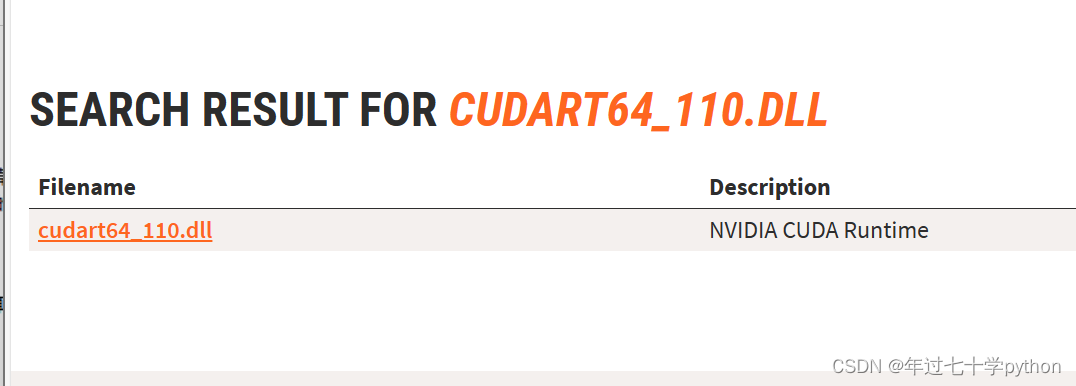
- 进入网页,输入cudart64_110.dll,查找后
- 点击下载,网页跳转后需要等待几秒自动下载:
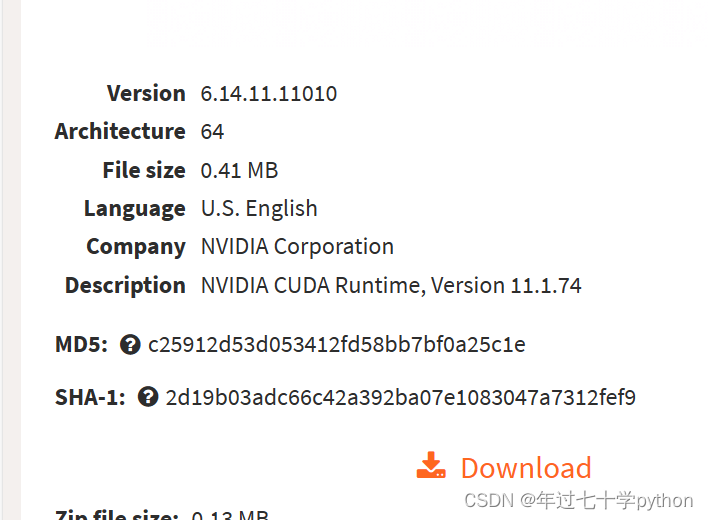
- 将下载好的压缩包解压,里面的cudart64_110.dll文件复制,粘贴在C:\Windows\System32里。
- 再输入
-
import tensorflow as tf
-正常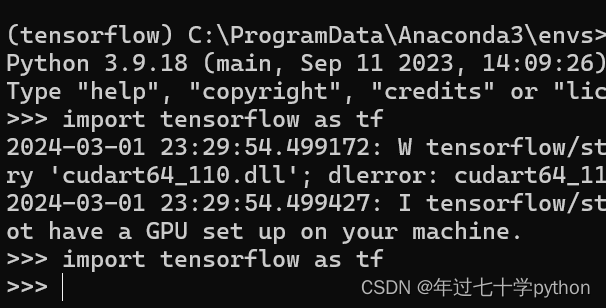

昇腾计算产业是基于昇腾系列(HUAWEI Ascend)处理器和基础软件构建的全栈 AI计算基础设施、行业应用及服务,https://devpress.csdn.net/organization/setting/general/146749包括昇腾系列处理器、系列硬件、CANN、AI计算框架、应用使能、开发工具链、管理运维工具、行业应用及服务等全产业链
更多推荐



 24
24 0
0- 0


 已为社区贡献1条内容

所有评论(0)